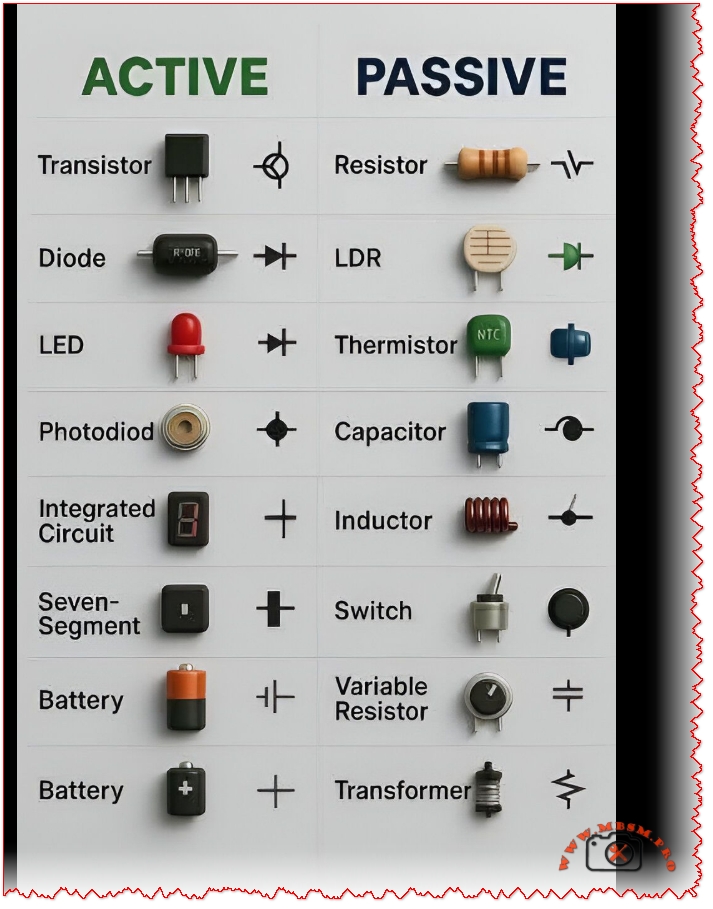
Understanding Active and Passive Electronic Components
Electronic circuits are built from two main families of components: active components that can amplify or control signals, and passive components that only store, dissipate, or filter energy. Recognizing which parts are active or passive is essential for troubleshooting PCBs, designing power supplies, and analyzing why a control board fails in HVAC or refrigeration equipment.
What makes a component active or passive?
Active components require an external power source and can introduce energy into the circuit, typically by amplifying, switching, or processing signals. Passive components do not generate power; instead, they resist, store, or transfer energy, which makes them simpler and generally more reliable over long operating hours.
Key criteria
Criterion
Active components
Passive components
Power requirement
Need external bias or supply to operate correctly
Operate without dedicated supply; work from the circuit itself
Signal behavior
Can amplify, modulate, or switch signals
Cannot amplify; only attenuate, store, or filter
Typical role
Processing, logic, regulation, high‑level control
Biasing, timing, filtering, matching, energy storage
Active devices are the “intelligent” part of a board: they decide when current flows, how much gain is applied, and how digital data is processed. In low‑voltage control boards for compressors or fan motors, these parts are usually the first suspects when there is no response or unstable regulation.
Common active components
Active component
Function in a circuit
Typical HVAC / industrial example
Transistor (BJT, MOSFET)
Amplifies or switches current; acts as electronic valve
Driving a relay coil, controlling DC fan speed
Diode
Allows current in one direction only; used for rectification and protection
Bridge rectifier in SMPS, free‑wheel diode on solenoid
LED (light emitting diode)
Indicates status by emitting light when forward‑biased
Power, alarm, or compressor‑run indicators
Photodiode
Converts light into current; used in sensors and receivers
Infrared receiver in remote control boards
Integrated circuit (IC)
Combines many transistors/diodes into one package for logic, control, or power conversion
Microcontroller, driver IC, or op‑amp in control module
Seven‑segment display (LED)
Numeric indicator built from multiple LEDs driven by an IC
Temperature or error‑code display on controllers
Rechargeable/non‑rechargeable battery
Provides DC supply for memory backup or standalone devices; considered active in many classifications because it delivers energy into the circuit
RTC backup battery or wireless sensor power source
Compared with simple mechanical switches, active devices react faster, allow precise analog control, and integrate protection features such as soft‑start or current limiting.
List of passive components and their behavior
Passive components shape voltage and current waveforms, store energy, and protect sensitive active devices from surges and noise. Without properly sized passive parts, even the best microcontroller will fail due to ripple, spikes, or thermal stress.
DC bus smoothing, EMI filtering, start/run capacitors
Inductor
Stores energy in magnetic field; filters current or forms resonant circuits
Output choke in DC‑DC converter, EMI filter
Switch (mechanical)
Opens or closes circuit path manually or by actuator
On/off pushbuttons, limit switches
Variable resistor / potentiometer
Adjustable resistance for calibration or user settings
Set‑point knob on thermostat or speed control
Transformer
Transfers energy between windings; adapts voltage and provides isolation
Mains step‑down transformer, control transformer
Passive parts rarely fail catastrophically; instead, their values drift with heat, age, or overload, which can slowly push a regulation loop out of tolerance.
Active vs passive: practical comparisons
A good way to understand the difference is to compare how active and passive components behave in typical low‑voltage control circuits. This is especially relevant when diagnosing PCB faults in refrigeration controllers or inverter drives.
Energy and control capabilities
Aspect
Active component example
Passive component example
Signal amplification
Transistor boosting sensor signal before ADC
No amplification; resistor network only scales sensor voltage
Switching function
MOSFET turning compressor relay on/off using low‑power logic signal
Toggle switch manually interrupts line but cannot be gated electronically
Power gain
Audio or gate driver IC increases output power vs. input
Transformer changes voltage and current but does not create power gain
Dependence on supply
Stops functioning without bias or Vcc
Still presents resistance, capacitance, or inductance characteristics without dedicated supply
In digital control boards, active devices act as the brain, while passive parts form the skeleton and blood vessels that route and condition energy so the brain can work reliably.
Component symbols and schematic reading
Every component is represented by a standardized symbol on schematics, which allows engineers and technicians to understand complex boards quickly. Learning these symbols is critical for decoding service manuals, drawing custom circuits, or reverse‑engineering a defective PCB.
Representative symbols
Component
Typical symbol characteristics
Transistor
Three‑terminal symbol (emitter, base, collector or source, gate, drain) with arrow indicating current direction
Diode / LED / photodiode
Triangle‑to‑bar symbol; LED adds outward arrows; photodiode adds inward arrows
Resistor / variable resistor
Zig‑zag or rectangular symbol; arrow or extra terminal for variable types
Capacitor
Two parallel lines (or one curved for polarized electrolytic)
Inductor
Series of loops or rectangles; transformer shows two inductors with coupling bars or core symbol
LDR / thermistor
Resistor symbol with diagonal arrows or small temperature mark to indicate dependency
Knowing the symbol set reduces troubleshooting time because it becomes easy to identify where signals are amplified, rectified, filtered, or limited on any board.
Why both active and passive parts are essential in modern electronics
Real‑world products, from inverter air conditioners to smart thermostats, rely on the interplay between active controllers and passive networks. Active components process information and drive loads, while passive components ensure clean power, stable references, and EMC compliance.
In a typical microcontroller‑based board:
The microcontroller, transistors, and driver ICs handle logic, timing, and switching.
Resistors, capacitors, and inductors form power filters, RC timing networks, and snubbers to protect the active silicon.
Sensors such as thermistors and LDRs translate physical variables into electrical signals that the active devices can interpret.
📄 mbsmpro.com-Active and Passive Electronic ComponentsFull Screen