
Carrier Pro-Dialog+
Carrier Pro-Dialog+ Tripout shutdown: how the controller protects HVAC equipment
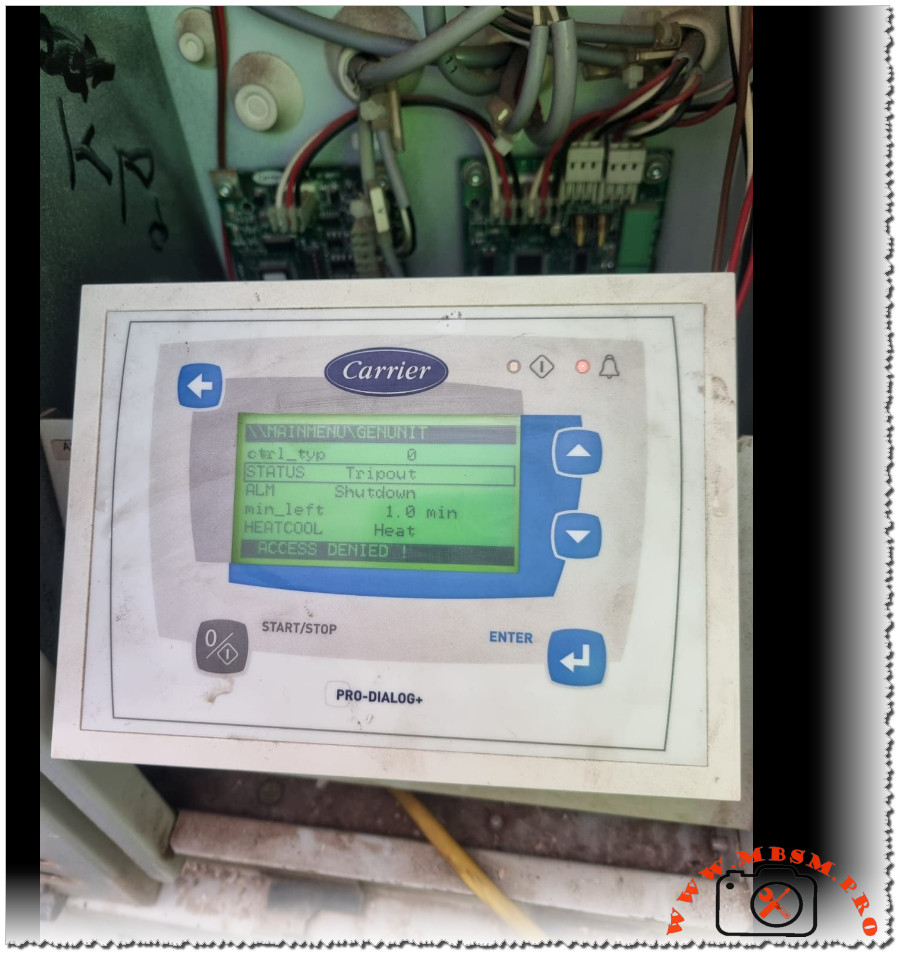
Modern Carrier Pro-Dialog+ controllers are designed to stop a chiller or rooftop unit whenever operating limits are exceeded, displaying a Tripout status and Shutdown alarm to prevent serious damage. This behaviour can seem abrupt to building owners, but for technicians it is a valuable diagnostic signal that the safety chain has done its job.
Main controller messages
The Pro-Dialog+ interface provides a structured view of the unit’s operating state and alarms.
- STATUS = Tripout means the unit has reached a fault shutdown condition and is fully locked out until the fault is cleared and the controller is reset.
- ALM = Shutdown indicates that the controller has issued a complete stop order because one or more safety inputs have changed state.
Other fields, such as min_left (minimum time left before restart) and HEAT/COOL mode, indicate how long the unit must remain stopped and which operating mode was requested when the alarm occurred.
If the user tries to enter restricted menus without the proper password, the display shows ACCESS DENIED, confirming that configuration-level parameters are protected.
Typical causes of Tripout
Tripout and Shutdown are linked to a well‑defined list of protective functions in Carrier’s documentation.
- Common triggers include high‑pressure cut‑out, low‑pressure or loss of refrigerant, water or air flow loss, pump failure, motor overloads, or anti‑freeze protection on the evaporator.
- The controller monitors digital inputs and analogue sensors; if a safety contact opens while the unit is commanded to run, it records an alarm, stops the circuit, and may require a manual reset.
For example, if the evaporator pump feedback contact opens after a start command, the Pro-Dialog logic raises a pump failure alarm and blocks any new start until a technician has verified the hydraulic circuit.
This strict logic reduces the risk of running a compressor with no flow, a situation that can quickly lead to overheating and mechanical failure.
Access levels and password protection
Carrier’s manuals emphasise that configuration changes are reserved for authorised personnel using password‑protected menus.
- Users can navigate status, inputs, outputs, and alarm history, but changes to setpoints, safety delays, or configuration tables require entering a correct password.
- If a password is entered when the unit is not fully stopped, the message ACCES dEniEd appears, preventing unsafe modifications while the machine is running.
This hierarchy of access levels protects the integrity of safety parameters and ensures that only trained technicians adjust critical values such as start‑up delays or capacity control settings.
For service companies like Mbsmgroup, documenting passwords and authorised changes forms a key part of professional maintenance records and quality assurance.
Troubleshooting workflow for technicians
A structured workflow helps technicians move from the Tripout message to a reliable repair.
- First, review the ALARMS and ALARMS HISTORY menus to identify which safety triggered the fault shutdown and whether it is recurrent.
- Next, inspect the relevant circuit: verify water or air flow, check pump or fan operation, inspect fuses and overloads, and measure system pressures and temperatures against manual values.
Once the root cause is identified and corrected—for example, resetting a tripped overload, cleaning a clogged filter, or restoring proper flow—the technician can reset the alarm at the controller and observe a full operating cycle.
Experienced teams often cross‑check field readings with Carrier’s troubleshooting charts to confirm that operating conditions remain within the recommended envelope after restart.
Reference data table for Pro-Dialog+ Tripout
The following table summarises key concepts technicians use when analysing a Tripout situation on Carrier Pro-Dialog and Pro-Dialog+ controlled units.