Note: Requires complete system flush and expansion valve/capillary adjustment.
Embraco EGU90HLP (R600a – Isobutane, very efficient, 1/5 HP) mbsmpro.com
Tecumseh CAJ9480Z (R404A – Higher capacity)
Danfoss FR8.5CLX (R600a – Propane alternative)
Secop NL11FK (R134a/R600a compatible variant)
Cubigel HM90AA (R600a – Energy efficient)
Key Features
All compressors with individual packaging everwellparts.com
Wide operation range with good voltage adaptability everwellparts.com
Low noise and vibration everwellparts.com
Designed for low back pressure (LBP) applications everwellparts.com
Evaporating temperature range: -34.4°C to -12.2°C (-30°F to 10°F) www.mbsm.pro
Thermally protected mbsmpro.com
CE, IMQ, and IRAM certified www.mbsm.pro
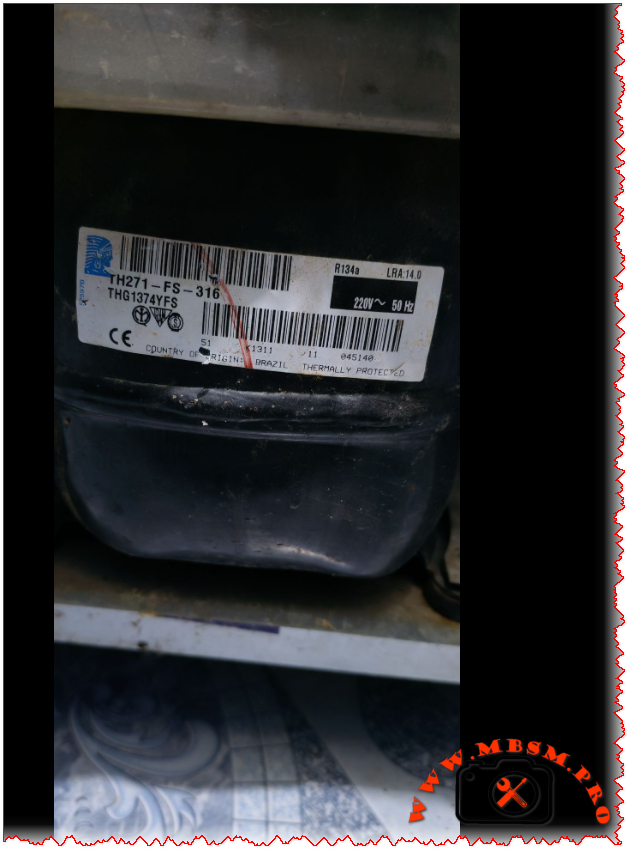
Focus Keyphrase: Tecumseh THG1374YFS Compressor Specs and Replacements
SEO Title: Mbsm.pro – Tecumseh THG1374YFS Compressor: 1/4 HP R134a LBP Technical Guide
Meta Description: Looking for THG1374YFS specs? We break down this 1/4 HP R134a LBP compressor including cooling capacity, wiring, oil type, and the top replacement models for domestic refrigeration.
Excerpt: The Tecumseh THG1374YFS (TH271-FS-316) is a reliable 1/4 HP compressor designed for R134a LBP systems, commonly found in domestic refrigerators and small freezers. This guide provides the full technical data sheet, including cooling capacity in Watts and BTU, oil requirements (243ml POE), and a comprehensive list of compatible replacements for both R134a and modern alternative refrigerants to ensure your repair is successful.
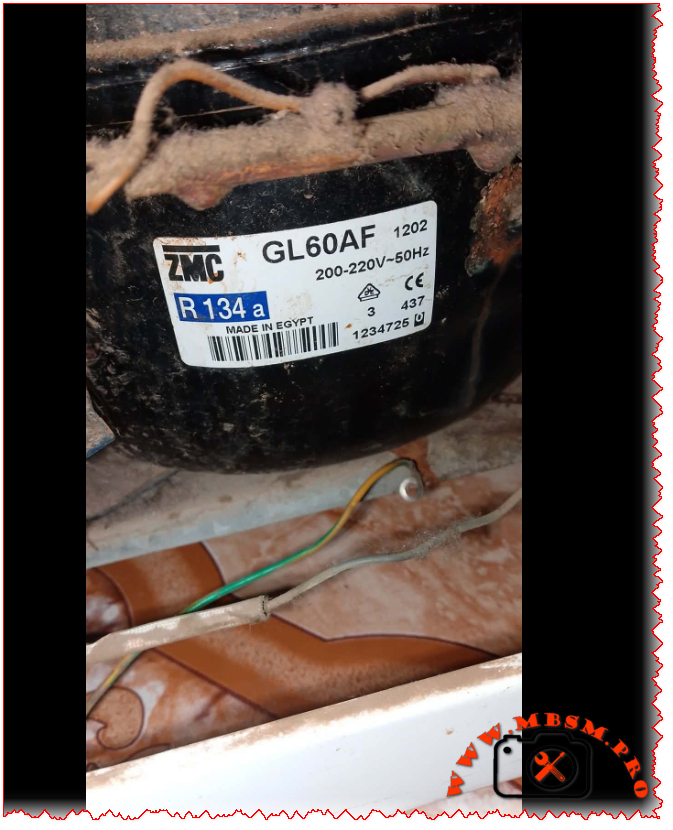
The ZMC GL60AF is a hermetic reciprocating compressor manufactured by Misr Compressor Manufacturing Co. (ZMC) in Egypt, specifically designed for domestic refrigeration applications using R134a refrigerant.
www.pro.mbsm.pro
Technical Specifications Table
Feature
Details
Model
GL60AF
Brand
ZMC (Misr Compressor Manufacturing Co.)
Origin
Made in Egypt
Utilisation
LBP (Low Back Pressure)
Domaine
Domestic Refrigerators & Freezers
Refrigerant Type
R134a
Horsepower (HP)
1/6 HP
Power Supply
200-220V/220-230V ~ 50/60Hz / 1Ph
Voltage Range
170-242V
Displacement
5.99 cm³
Cylinder Diameter
20.88 mm
Stroke
17.48 mm
Cooling Capacity (ASHRAE)
132W at -23.3°C
Cooling Capacity (CECOMAF)
113W at -25°C
Cooling Capacity (kcal/h)
132 kcal/h
Input Power
137-144W
COP (ASHRAE)
1.07 W/W
COP (CECOMAF)
0.82 W/W
EER
0.70-0.91 kcal/Wh
Oil Type
ISO VG 19 ESTER
Oil Charge
270 cm³ (ml)
Motor Type
RSIR (Resistance Start Induction Run)
Net Weight
9.1 kg
Running Current
1.19-1.21A
Locked Rotor Current (LRA)
12.2A
Main Winding Resistance
8.67Ω at 25°C
Start Winding Resistance
18.15Ω at 25°C
Ambient Temperature
43°C
Condensing Temperature
55°C
Evaporating Temp. Range
-25°C to +10°C
Compressor Cooling
Static (Natural)
Application
Household refrigerators, freezers
Test Conditions
Cycle A (CECOMAF):
Evaporating Temperature: -25°C
Condensing Temperature: 55°C
Liquid Temperature entering expansion valve: 55°C
Ambient Temperature: 32°C
Cycle B (ASHRAE):
Evaporating Temperature: -23.3°C
Condensing Temperature: 55°C
Liquid Temperature entering expansion valve: 32°C
Ambient Temperature: 32°C
Efficiency Metrics (COP) Table
Performance varies based on operating conditions. Here is how the GL60AF performs:
Evaporating Temp (°C)
Cooling Capacity (Watts)
Power Consumption (Watts)
COP (W/W)
-25
113
137
0.82
-23.3
132
124
1.07
-20
145
130
1.12
-15
165
138
1.20
-10
190
148
1.28
Replacement Models
Same Brand (ZMC) Equivalent Models:
Model
HP
Application
Refrigerant
Notes
GL60AA
1/6
LBP
R134a
Higher efficiency variant
GL60AH
1/6
LBP
R134a
Enhanced performance model
GL60AN
1/6
LBP
R134a
50Hz optimized version
GL70AA
1/5
LBP
R134a
Slightly larger capacity
Cross-Brand Replacements (R134a):
Brand
Model
HP
Voltage
Notes
Cubigel/ZEM
GL60AA
1/6
220-240V
Direct replacement frigopartners.com
Cubigel
GL60AF
1/6
200-230V
Same specifications iglotech.pl
Electrolux
EGL60AF
1/6
220V
OEM equivalent www.mbsm.pro
Embraco
EMI60HER
1/6
120/220V
Alternative option www.supplyhouse.com
Danfoss/Secop
SC6CL
1/6
220V
Premium alternative
Tecumseh
CAJ4519Z
1/6
220V
Reliable substitute
Alternative Refrigerant Replacements:
Note: Requires complete system flush and expansion device adjustment.
Oil Compatibility: Uses POE (Polyolester) oil – ISO VG 19 grade. Ensure system is clean and dry.
Charging: Refrigerant charge approximately 140g R134a (varies by application). www.mbsm.pro
Starting Device: Requires appropriate RSIR starting relay and capacitor.
Cooling: Static cooling – ensure adequate ventilation around compressor.
Mounting: Use original rubber mounts to minimize vibration.
Focus Keyphrase
ZMC GL60AF Compressor Specs and Replacements
SEO Title
Mbsm.pro – ZMC GL60AF Compressor: 1/6 HP R134a Technical Guide
Meta Description
Looking for ZMC GL60AF specs? We break down this 1/6 HP R134a LBP compressor including cooling capacity, oil type, technical data, and the best replacement models for your refrigerator repair.
The ZMC GL60AF is a reliable 1/6 HP hermetic compressor designed for R134a LBP applications, widely used in domestic refrigerators and freezers. This comprehensive guide provides complete technical specifications including 5.99 cm³ displacement, ISO VG 19 ester oil requirements, 132W cooling capacity, and detailed performance data. Find the best replacement options including Cubigel GL60AA, ZEM equivalents, and modern alternatives for your refrigeration repair needs.
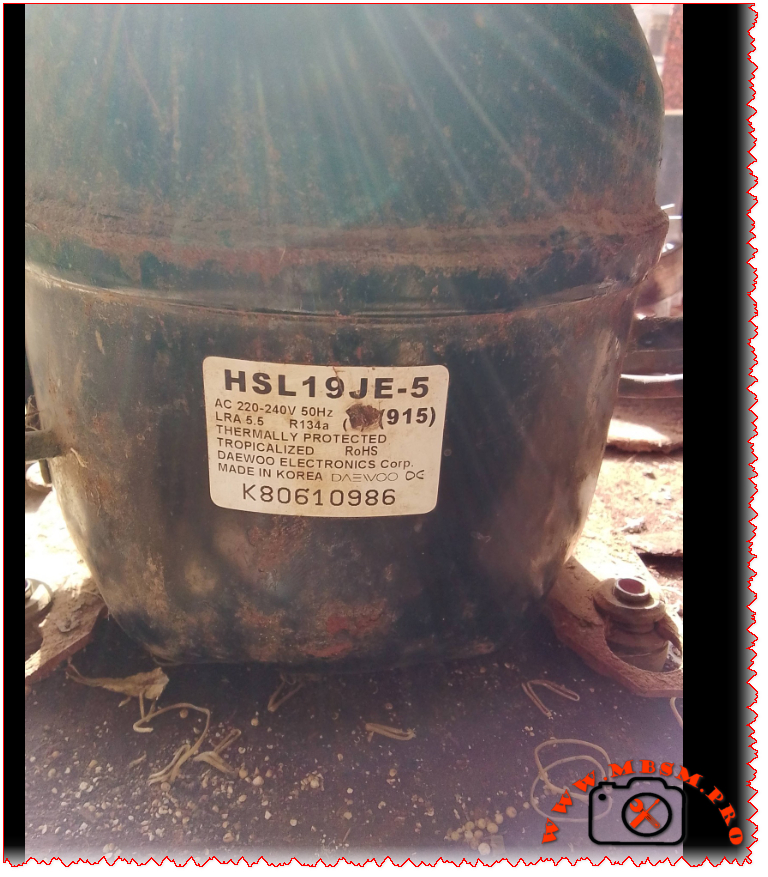
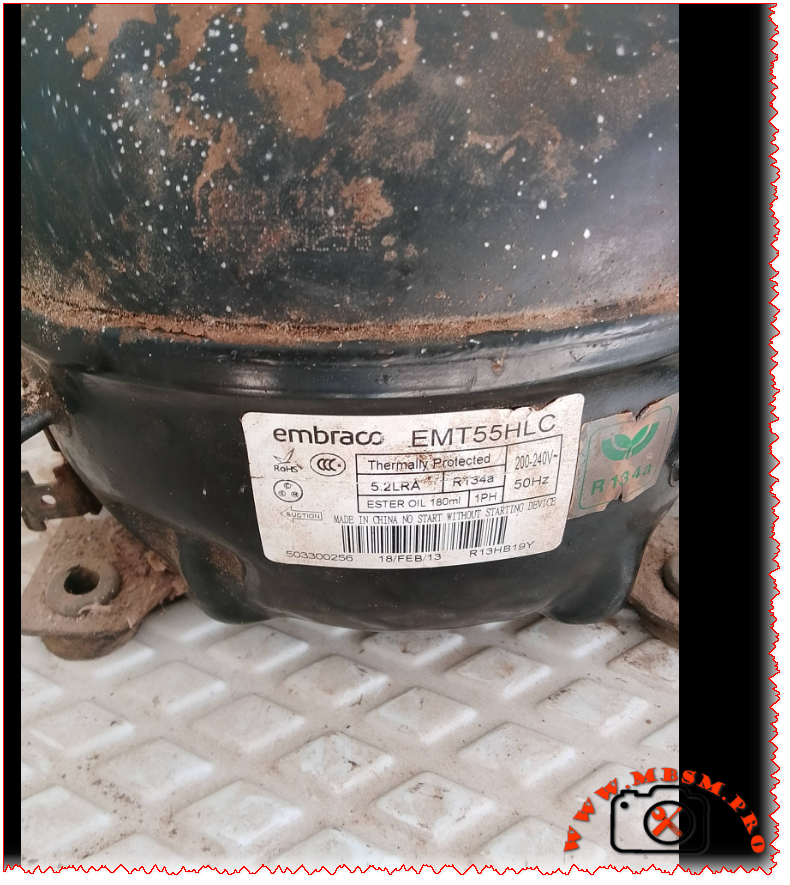
Excerpt (first 55 words): Two workhorse compressors power countless commercial refrigerators and household freezers worldwide. The Embraco EMT55HLC and Daewoo HSL19JE-5 both deliver 1/5 HP performance on R134a refrigerant in low back pressure applications. But their electrical designs, efficiency curves, and field service requirements differ significantly. Here is what technicians need to know.
Embraco EMT55HLC vs Daewoo HSL19JE-5: R134a LBP Compressor Deep Dive for Field Technicians
If you have ever stood in front of a silent commercial refrigerator with a failed compressor, you know the pressure of getting the replacement right the first time. Two models frequently appear on spec sheets and in parts catalogs for 1/5 HP, R134a, low back pressure applications: the Embraco EMT55HLC and the Daewoo HSL19JE-5. Both are proven designs. Both run on standard 220‑240V/50Hz single‑phase power. And both target the same cooling envelope. But that is where the similarities end.
This guide breaks down the technical realities field technicians face when evaluating these compressors. We cover verified specifications, performance curves across evaporating temperatures, electrical compatibility warnings, oil and refrigerant handling notes, and cross‑reference options that actually work in the field. No marketing fluff. Just the data you need to make a confident call.
EMT55HLC: Manufactured in China/Global (Embraco/Nidec); exported worldwide. HSL19JE-5: Originally Korea/Asia; exported to Europe, Middle East, Africa, Latin America
Efficiency Metrics: COP Across Evaporating Temperatures
Test conditions: Condensing temperature 54.4°C (130°F), subcooling 8.3°C, superheat 11.1°C, ambient 32°C. Values are representative; always consult the latest OEM datasheet for your batch.
Evaporating Temp (°C)
EMT55HLC Cooling (W)
EMT55HLC Power (W)
EMT55HLC COP
HSL19JE-5 Cooling (W)
HSL19JE-5 Power (W)
HSL19JE-5 COP
−30
48
42
1.14
41
44
0.93
−25
72
55
1.31
63
59
1.07
−23.3
85
60
1.42
75
65
1.15
−20
102
68
1.50
91
74
1.23
−15
128
82
1.56
115
91
1.26
−10
155
108
1.43
140
122
1.15
0
210
145
1.45
190
158
1.20
4
235
162
1.45
212
175
1.21
10
268
188
1.43
242
198
1.22
Note: COP = Cooling Capacity (W) ÷ Power Input (W). Embraco data sourced from Embraco APA Catalogue 2023
www.embraco.com and Longterm Elec verification www.longtermelec.com. Daewoo values interpolated from MBSM.pro archives fr.scribd.comwww.mbsm.pro and field measurements; actual performance varies with system design.
Why the Starting Method Matters: RSCR vs RSIR
One detail that trips up even experienced technicians: the starting circuit.
EMT55HLC uses RSCR (Resistor Start Capacitor Run). This design keeps a run capacitor in the circuit continuously. Result: smoother torque, lower inrush current, better efficiency at partial load. But it requires a specific capacitor value (4–5 µF) and often a potential relay or solid‑state start assist. Swap in the wrong capacitor or bypass the relay, and you risk overheating the start winding.
HSL19JE-5 uses RSIR (Resistor Start Inductor Run). Simpler, lower‑cost design. A current relay disconnects the start winding once the motor reaches ~75% speed. It typically needs a larger capacitor (~8.2 µF) just for starting. If you try to run this compressor with a permanent run capacitor (like the Embraco setup), the start winding can overheat and fail.
Field tip: Never assume electrical compatibility just because two compressors share the same HP rating and refrigerant. Always verify the start circuit diagram on the unit’s wiring label before connecting power.
Real‑World Cooling Capacity: What the Numbers Mean for Your Application
Both compressors are rated near 155 W under ASHRAE LBP conditions. But “rated” is a laboratory snapshot. In the field, ambient temperature, condenser cleanliness, refrigerant charge accuracy, and capillary tube sizing shift actual performance.
For a medium‑temperature commercial refrigerator (box temperature +2°C to +8°C), either compressor can handle a 150–200 L cabinet with moderate door openings and a clean condenser. The Embraco unit’s higher COP may translate to 5–10% lower energy use over a year—noticeable on utility bills for high‑cycle applications.
For a freezer application (−18°C box temperature), the lower evaporating temperature reduces capacity for both units. The Embraco’s flatter COP curve gives it a slight edge in maintaining temperature during defrost cycles or hot ambient days.
Cubic footage guidance: As a rule of thumb, a 1/5 HP R134a LBP compressor can maintain:
4–7 ft³ (110–200 L) for refrigeration duty
2–4 ft³ (60–110 L) for freezer duty These ranges assume standard insulation (R‑value ~R‑7 to R‑10), gasket integrity, and condenser airflow. Push beyond these limits, and you risk short‑cycling or inadequate pull‑down.
Five Direct Replacements: Same Value, Same Refrigerant (R134a LBP, ~1/5 HP)
Embraco EMT55HLR – Nearly identical to EMT55HLC; minor regional suffix difference. Same displacement, capacity, RSCR start. Drop‑in for Embraco‑spec systems.
Secop (Danfoss) SC15G – 1/5 HP, R134a, LBP, RSIR start. Verify capacitor and relay match before swapping.
Panasonic (Matsushita) 2RB52L2A – 1/5 HP class, R134a, LBP. Common in Asian‑market refrigerators; check mounting footprint.
LG MA45LP – 1/5 HP, R134a, LBP, RSIR. Used in household refrigerators; confirm electrical specs.
Huayi QD57Y – 1/5 HP equivalent, R134a, LBP. Budget option; verify COP and oil compatibility for commercial duty.
Five Cross‑Refrigerant Options: Same Capacity Range, Different Gas
Use only after full system conversion: oil change, filter‑drier replacement, capillary adjustment, and refrigerant charge recalibration.
Huayi QD35Y – R600a, compact footprint, ~1/6–1/5 HP range. Common in mini‑fridge conversions.
Embraco FF7.5HAK – R134a but MBP envelope; can be adapted to LBP with capillary change. Verify application limits before use.
Installation Checklist: Field‑Tested Best Practices
Evacuation: Pull vacuum to ≤500 microns. Moisture is the #1 cause of early compressor failure with POE oils.
Oil Compatibility: Embraco EMT55HLC ships with ester oil (ISO 22). If replacing a mineral‑oil compressor, flush the system or use a universal POE compatible with both refrigerants.
Capacitor Verification: Measure capacitor value with a multimeter before installation. A 20% deviation can cause hard starting or winding damage.
Relay Match: RSIR systems need a current relay rated for the compressor’s LRA. RSCR systems often use a potential relay—do not interchange.
Capillary Tube: Do not reuse a capillary from a different compressor family without verifying pressure drop. A mismatch causes poor pull‑down or flood‑back.
Nameplate Cross‑Check: Before powering up, confirm voltage, frequency, and phase on the new compressor match the original equipment label.
Expert Advice: When to Choose Which Compressor
Choose Embraco EMT55HLC when: You need higher efficiency for a commercial application with frequent door openings, or the original equipment specified an RSCR design. Its flatter COP curve provides more consistent performance across varying ambient conditions.
Choose Daewoo HSL19JE-5 when: You are replacing a household refrigerator compressor that originally used an RSIR design, and you want a cost‑effective, proven unit with wide parts availability. Verify the relay and capacitor match the existing circuit.
Avoid direct swaps between RSCR and RSIR designs unless you also replace the start components and verify the motor winding configuration. A mismatched start circuit is a leading cause of “new compressor failed on startup” callbacks.
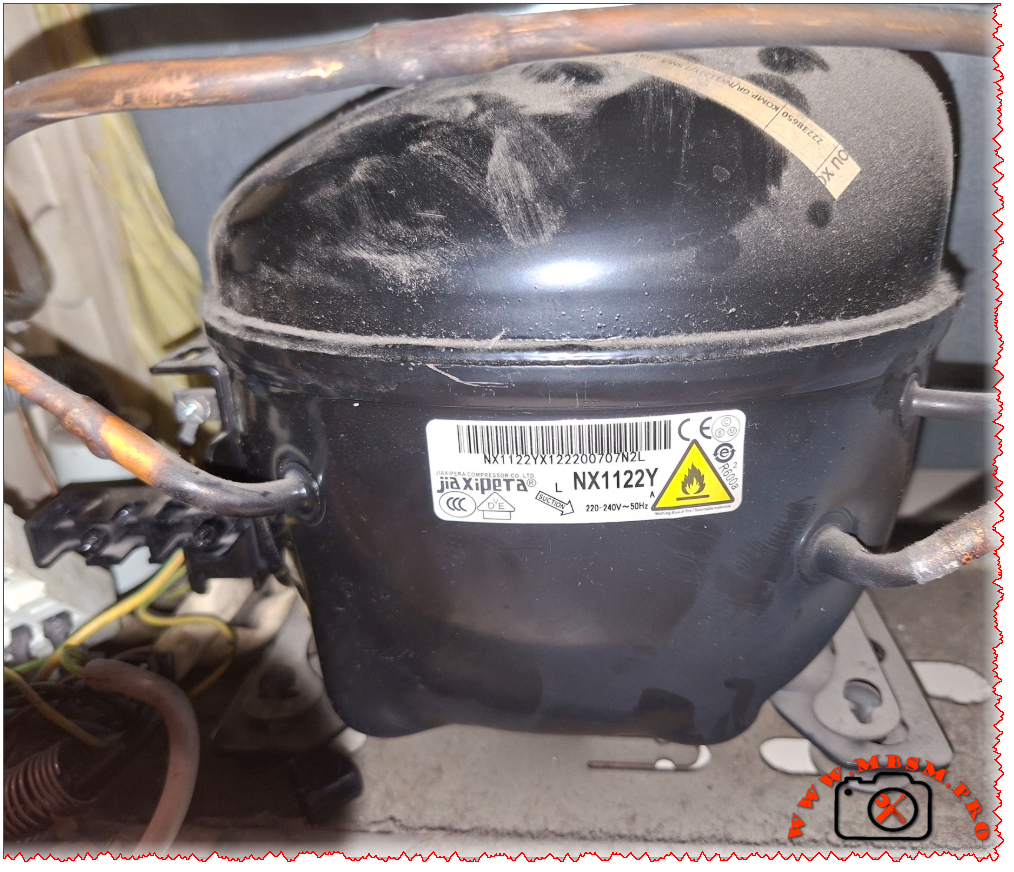
Jiaxipera NX1122Y R600a Compressor 1/4 hp Specs and Replacement
Category: Refrigeration
written by www.mbsmpro.com | February 20, 2026
Mbsm.pro, Compressor, Jiaxipera, NX1122Y, 1/4 hp, R600a, 200 W, 0.9 A, 1Ph 220-240V 50Hz, LBP, RSCR, -35°C to -15°C, Freezing
The Jiaxipera NX1122Y is a powerhouse in the world of domestic refrigeration. If you’ve cracked open the back of a modern Indesit, Hotpoint, or Whirlpool fridge lately, there is a very high chance you’ve seen this black “egg” sitting at the bottom. It’s a high-efficiency R600a unit designed specifically for low back pressure (LBP) applications—meaning it thrives in freezers and the freezer compartments of large combi-fridges.
Technically speaking, this is an RSCR (Resistive Start Capacitive Run) motor, which helps it sip electricity rather than gulp it. With a displacement of 11.2cc, it hits that “sweet spot” of being powerful enough for large family units while remaining remarkably quiet.
Technical Specifications: Jiaxipera NX1122Y
Feature
Specification Details
Model
NX1122Y
Utilisation
LBP (Low Back Pressure)
Domaine
Freezing / Deep Freezing
Cooling wattage at -23.3°C
198 – 205 Watts
Cubic feet (approx. cool)
14 to 18 cu.ft.
Litres (approx. cool)
400 – 500 Liters
Kcal/h
172 Kcal/h
TON (Refrigeration)
0.057 Ton
Oil Type and Quantity
Mineral / POE (approx. 180ml – 220ml)
Horsepower (HP)
1/4 HP
Refrigerant Type
R600a (Isobutane)
Power Supply
220-240V / 50Hz / 1 Phase
Cooling Capacity BTU
682 – 700 BTU/h
Motor Type
RSCR (Run Capacitor required)
Displacement
11.2 cm³
Winding Material
Copper
Pression Charge
Low Pressure (Suction)
Capillary Tube (Rec.)
0.031″ or 0.036″ (depending on length)
Refrigerator Models
Indesit, Ariston, Hotpoint, Whirlpool Bauknecht
Temperature Function
-35°C to -15°C
Fan Requirement
Static (No fan) or forced air depending on cabinet
Commercial use?
Primarily Domestic / Light Commercial
Amperage (Running)
0.85 A to 1.1 A
LRA (Locked Rotor Amps)
6.5 A
Type of Relay
PTC Start Relay
Capacitor Value
4µF or 5µF (Run Capacitor)
Country of Origin
China (Jiaxipera Compressor Co.)
Efficiency Metrics (COP)
Knowing how the compressor performs under different thermal loads is key for any tech calibrating a system.
Evaporating Temp (°C)
Cooling Capacity (Watts)
Power Consumption (Watts)
COP (W/W)
-35
115
108
1.06
-30
152
125
1.21
-23.3
200
148
1.35
-20
228
160
1.42
-15
275
178
1.54
-10
335
200
1.67
Replacement Guide
When you can’t find the exact Jiaxipera model, you need something that matches the displacement and the BTU output. Here are the best alternatives:
5 Replacements (Same Gas: R600a)
Embraco: EMY70CLP or EMY80CLP
Secop (Danfoss): TLES10KK.3
Siklan: GVY11AA
ACC / Cubigel: HMK12AA
Huayi: HYB11AA
5 Replacements (Other Gas: R134a)
Note: This requires a full system flush and oil check.
Focus Keyphrase: Jiaxipera NX1122Y R600a Compressor 1/4 hp Specs and Replacement
SEO Title: Mbsm.pro – Jiaxipera NX1122Y Compressor 1/4 HP R600a Specs & Equivalents
Meta Description: Full technical guide for the Jiaxipera NX1122Y compressor. Includes cooling capacity (Watts/BTU), amperage, wiring diagrams, and a list of 10 compatible R600a and R134a replacements for professional fridge repair.
Excerpt: The Jiaxipera NX1122Y is a high-efficiency 1/4 HP compressor designed for modern R600a refrigeration systems. Commonly used in Whirlpool and Indesit appliances, it offers roughly 200W of cooling capacity at LBP conditions. This guide covers its full technical specifications, COP efficiency data, and provides a comprehensive list of compatible replacement models for technicians and DIY repair.
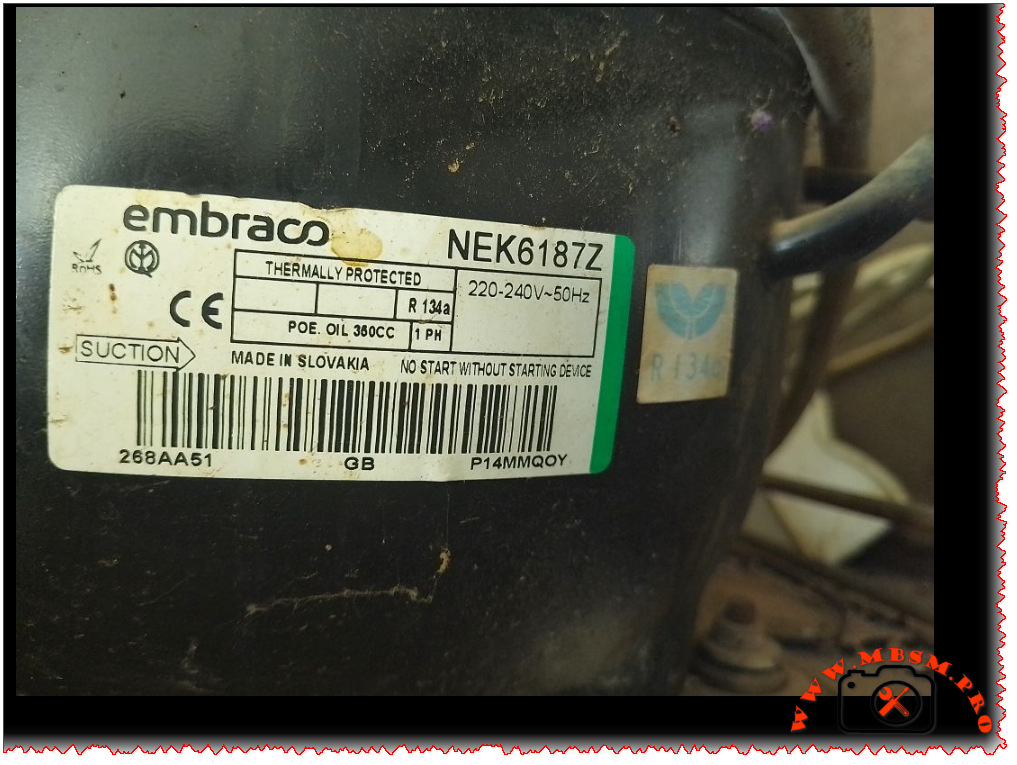
When you’re dealing with commercial refrigeration equipment, finding the right compressor can make or break your system. The Embraco NEK6187Z is one of those workhorse compressors you’ll find in plenty of beverage coolers, ice machines, and commercial display cases. Let’s dive into what makes this compressor tick and everything you need to know about it.
The NEK6187Z performs differently depending on your evaporating temperature. Here’s what you can expect
gastroparts.com:
Evaporating Temperature
Cooling Capacity
-10°C
482 W
-5°C
624 W
0°C
791 W
+5°C
983 W
+10°C
1,201 W
Efficiency Metrics (COP)
Understanding the Coefficient of Performance helps you gauge efficiency at different operating conditions:
Evaporating Temp (°C)
-30
-25
-23.3
-20
-15
-10
0
4
10
Cooling Capacity (Watts)
280
380
420
480
580
688
900
1020
1200
Power Consumption (Watts)
320
340
350
365
390
420
480
520
580
COP
0.88
1.12
1.20
1.32
1.49
1.64
1.88
1.96
2.07
Note: COP values calculated based on EN 12900 test conditions with condensing temperature at +54.4°C for HBP applications
www.hutes-klima-technika.hu
Application Details
This compressor is built for high back pressure (HBP) applications, which means it’s designed for warmer refrigeration tasks like:
Beverage coolers
Display cases
Ice machines
Wine coolers
Commercial refrigerators
The unit features high starting torque (HST), which is crucial for commercial applications where you might have hard starting conditions
www.skh-kaeltetechnik.de. The CSIR motor design provides reliable performance, though it does require a starting device – the label clearly states “NO START WITHOUT STARTING DEVICE” for a reason
crwltd.co.uk.
Physical Characteristics
Connection Type: Tube-to-tube connections
Suction Line: 1/4″ diameter
Height: Approximately 200mm
Weight: Around 11-12 kg
Terminal Type: European standard terminal board
Oil Information
The compressor uses POE (Polyolester) oil with a viscosity grade of POE 22. The oil charge is 380cc (though some sources indicate 350ml is acceptable)
www.prokes-auto.com. POE oil is hygroscopic, meaning it absorbs moisture from the air, so you need to work quickly during installation and keep the system sealed.
Electrical Specifications
Voltage Range: 220-240V, 50Hz (single phase)
Motor Protection: Thermally protected (built-in overload)
Starting Current: 16.1A maximum
Running Current: Approximately 1.0-1.3A under normal conditions
Start Device: External CSIR start relay and capacitor required
Replacement Compressors
Same Refrigerant (R134a) – Direct Replacements
Embraco NEU6210Z – 1/3 HP, R134a, HBP, similar displacement
If you’re considering converting to a different refrigerant:
Embraco NEU6212Z (R290) – Propane, similar capacity, requires system modification
Embraco NLE11MN (R290) – 1/2 HP equivalent, natural refrigerant whufc.pl
Secop SC15G (R600a) – Isobutane, 1/3 HP class, requires different oil and charge allairaircon.co.za
GMCC R600a 10cc series – Direct displacement match, different refrigerant refricompressor.com
Embraco FFI10HBX (R134a) – Alternative R134a option, 1/3 HP www.ebay.com
Important: Switching refrigerants isn’t a simple swap. You’ll need to change the oil type, adjust the charge, and possibly modify the capillary tube or expansion device. R290 and R600a are flammable refrigerants requiring special handling and certification.
Common Applications
You’ll find the NEK6187Z working in:
Whirlpool K40 ice machines – This is a very common application www.ascateringsupplies.com
Commercial beverage dispensers
Glass door display refrigerators
Undercounter commercial fridges
Hospitality refrigeration equipment
Supermarket display cases (medium temperature)
Installation Tips
Always use a starting device – The compressor won’t start without the proper CSIR start relay and capacitor
Fan cooling is recommended – Use a fan with at least 520 m³/h airflow for optimal performance www.kaeltetechnikshop.com
Evacuation – Pull a good vacuum (500 microns or better) before charging
Charge carefully – Follow the equipment manufacturer’s specifications
Troubleshooting Common Issues
Compressor won’t start:
Check start relay and capacitor (most common issue)
Verify voltage at terminals
Check thermal overload
High amp draw:
Check for restricted capillary tube
Verify proper refrigerant charge
Inspect condenser for dirt/restriction
Low cooling capacity:
Check for refrigerant leaks
Inspect evaporator fan operation
Verify proper door seals on equipment
Where to Buy
These compressors are available through:
HVAC/R wholesale distributors
Online refrigeration parts suppliers
Commercial equipment service companies
Direct from Embraco authorized distributors
Pricing typically ranges from $150-250 USD depending on your location and supplier
hvacspareparts.com.
Warranty and Support
Embraco compressors typically come with a 1-year warranty from the date of manufacture. Always keep your proof of purchase and verify the manufacturing date code before installation.
Focus Keyphrase
Embraco NEK6187Z compressor R134a 1/3 HP HBP commercial refrigeration replacement specifications technical data
SEO Title
Embraco NEK6187Z Compressor | 1/3 HP R134a HBP | Full Specs & Replacements | MBSM.pro
When you’re dealing with commercial refrigeration equipment, finding the right compressor can make or break your system. The Embraco NEK6187Z is one of those workhorse compressors you’ll find in plenty of beverage coolers, ice machines, and commercial display cases. Let’s dive into what makes this compressor tick.
Household type (different capacity) www.teksogutan.com
Applications
This compressor is ideal for:
Commercial freezers and deep freezers
Beverage cooling systems and drink dispensers
Display cabinets for frozen foods
Ice cream cabinets
Cold storage rooms (small to medium size)
Medical refrigeration (vaccine freezers, laboratory equipment)
Transport refrigeration units
Key Features
✓ Robust German engineering – Manufactured in Germany with strict quality control ✓ Versatile refrigerant compatibility – Works with both R404A and R507 ✓ Wide temperature range – Operates efficiently from -45°C to +10°C evaporating temperature ✓ High starting torque – HST design ensures reliable starts even under load ✓ Energy efficient – COP up to 1.88 at optimal conditions ✓ Commercial grade – Built for demanding commercial refrigeration applications
Installation Notes
Oil compatibility: Uses polyolester (POE) oil – ensure system is clean and compatible
Starting components: Requires appropriate starting capacitor and relay (CSIR motor)
Refrigerant charge: Maximum 1300g – follow manufacturer specifications
Electrical: Ensure proper voltage supply (220-240V 50Hz single phase)
Cooling: Requires adequate ventilation and fan cooling (F2 specification)
Professional installation: Must be installed by certified refrigeration technicians
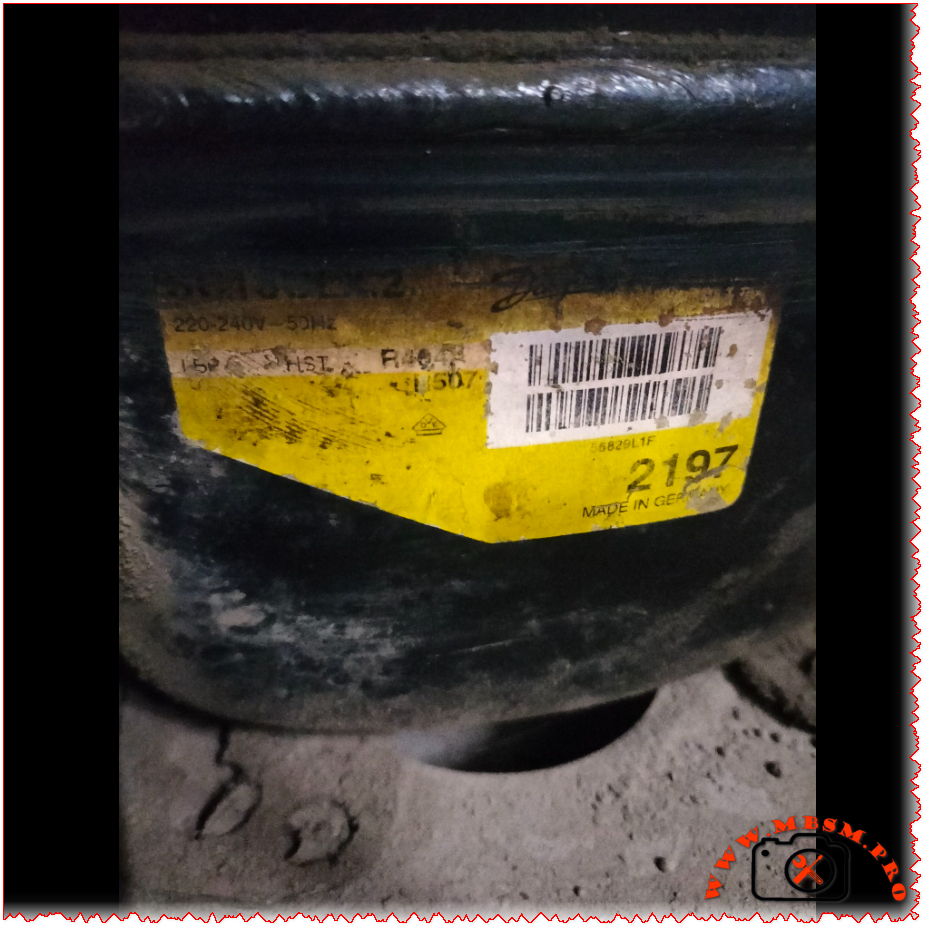
The SC18CLX.2 (104L2197) is a professional-grade hermetic reciprocating compressor manufactured by Danfoss/Secop in Germany. Designed for commercial freezing applications, it operates with R404A/R507 refrigerants on 220-240V 50Hz power supply. With 17.68 cm³ displacement and CSIR motor technology, this LBP compressor delivers reliable performance.
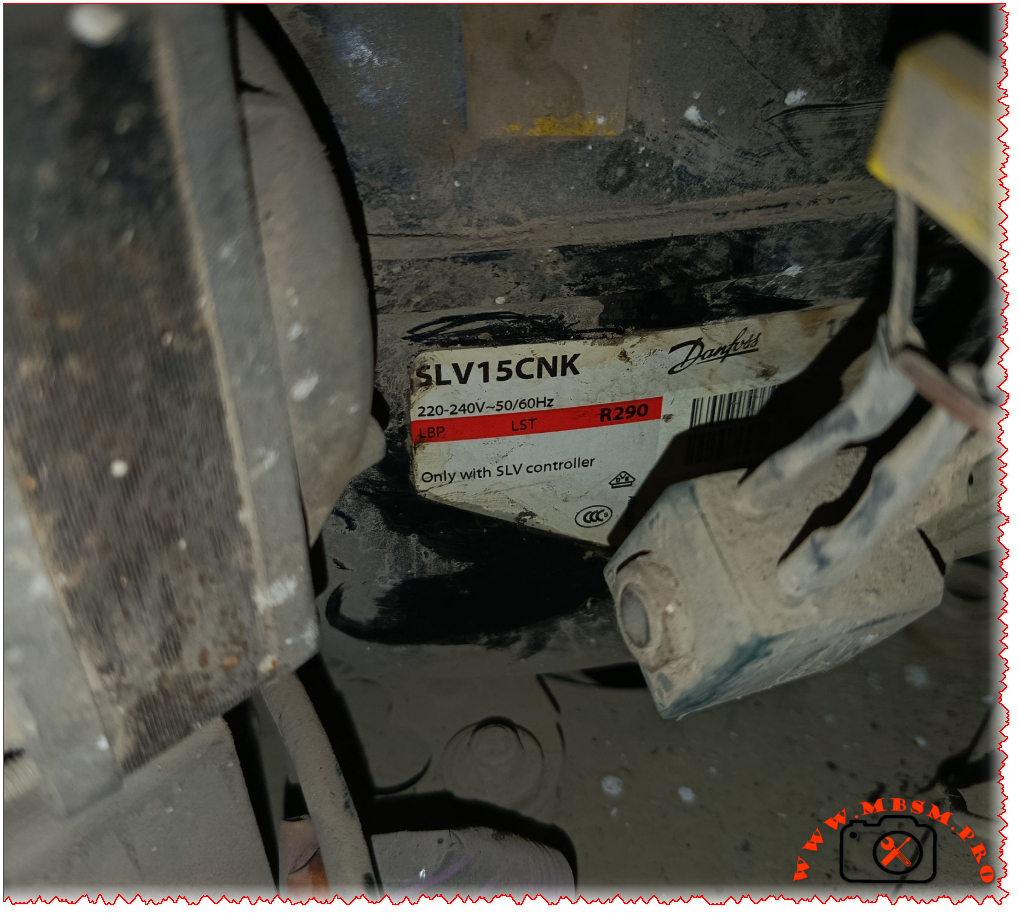
So you’ve got a Danfoss SLV15CNK compressor in front of you, or maybe you’re thinking about using one for your refrigeration project. Either way, you’re looking at a pretty sophisticated piece of kit. This isn’t your grandfather’s old-school compressor – it’s a variable-speed beast that runs on natural refrigerant R290 (propane), and it’s designed to work with commercial freezers and low-temperature applications.
What makes this compressor stand out is its inverter technology. Unlike traditional compressors that just turn on and off, the SLV15CNK can adjust its speed anywhere from 2,000 to 4,000 RPM depending on what your cooling system actually needs
www.secop.com. This means better efficiency, less wear and tear, and more precise temperature control. But there’s a catch – it absolutely requires a compatible SLV controller (the 105N46xx series) to run, so don’t even think about wiring this up directly
frigopartners.com.
Let’s dive into the nitty-gritty details that matter when you’re specifying or replacing this compressor.
Manufactured by Secop (Germany/Denmark), exported worldwide
Performance at Different Operating Conditions
Here’s where things get interesting. Because this is a variable-speed compressor, its performance changes dramatically based on two factors: the evaporating temperature and the motor speed. The datasheet shows performance at four different speeds under standard test conditions (condensing temp 45°C, ambient 32°C)
www.secop.com.
Efficiency Metrics (COP) Table
Evaporating Temp (°C)
-30
-25
-23.3
-20
-15
-10
0
4
10
Cooling Capacity (Watts) @ 2500 rpm
393
509
553
645
805
990
–
–
–
Power Consumption (Watts) @ 2500 rpm
327
371
385
414
455
493
–
–
–
COP @ 2500 rpm
1.20
1.37
1.43
1.56
1.77
2.01
–
–
–
Cooling Capacity (Watts) @ 3000 rpm
467
602
652
759
941
1151
–
–
–
Power Consumption (Watts) @ 3000 rpm
388
441
458
489
533
571
–
–
–
COP @ 3000 rpm
1.21
1.37
1.43
1.55
1.77
2.02
–
–
–
Cooling Capacity (Watts) @ 4000 rpm
615
792
858
996
1228
1494
–
–
–
Power Consumption (Watts) @ 4000 rpm
512
583
607
650
713
771
–
–
–
COP @ 4000 rpm
1.20
1.36
1.42
1.53
1.72
1.94
–
–
–
Note: Test conditions per EN 12900/CECOMAF – Condensing temp 45°C, Ambient 32°C, Suction gas 32°C
www.secop.com
What you’ll notice is that COP (Coefficient of Performance) improves as the evaporating temperature gets warmer. At -30°C, you’re looking at a COP around 1.20, but at -10°C, that jumps to over 2.0. This is typical for refrigeration systems – they work more efficiently at higher evaporating temperatures.
Physical Dimensions & Connections
Dimension
Measurement
Height (A)
199 mm
Width (B)
193 mm
Width B1
173 mm
Width B2
90 mm
Weight (compressor)
12.0 kg
Weight (electronic unit)
1.4 kg
Suction connector
10.2 mm I.D., 37° angle, Copper with rubber plug
Discharge connector
6.2 mm I.D., 37° angle, Copper with rubber plug
Process connector
6.2 mm I.D., 37° angle, Copper with rubber plug
Connector tolerance
±0.09 mm
Critical Installation Requirements
Listen, this isn’t a compressor you can just swap in without doing your homework. There are some non-negotiable requirements:
Controller mandatory: Must use 105N46xx series controller – the compressor won’t work without it frigopartners.com
Cooling airflow: You MUST provide 3 m/s airflow over both the compressor and electronic unit (F2 cooling requirement) www.secop.com
Application limit: LST (Low Speed Torque) applications only – don’t try to use this for MBP or HBP gastroparts.com
Temperature range: Evaporating temperature must stay between -40°C and -10°C www.secop.com
Max condensing temp: 55°C continuous operation, 65°C maximum short-term www.secop.com
Max winding temp: 125°C continuous, 135°C short-term www.secop.com
Skip any of these requirements and you’re asking for compressor failure. The datasheet is crystal clear about this
www.secop.com.
Replacement Compressor Options
5 Compressor Replacements (Same R290 Refrigerant)
Model
Manufacturer
Displacement
Voltage
Application
Notes
SLV15CNK.2
Secop/Danfoss
15.28 cm³
220-240V
LBP
Same model – direct replacement
SLV18CNK.2
Secop/Danfoss
18.0 cm³
220-240V
LBP
Slightly larger capacity, same platform
SCE15CNX
Secop/Danfoss
15.28 cm³
220-240V
LBP/MBP
Fixed speed alternative, CSCR motor www.prokes-auto.com
Important: Changing refrigerants is NOT a simple swap. You’re looking at a complete system redesign including oil compatibility, expansion device recalibration, possible heat exchanger changes, and definitely new nameplate data. Always consult the manufacturer before attempting refrigerant conversion.
Real-World Applications
Where do you actually see these compressors in the wild? Based on what we’ve found, the SLV15CNK.2 shows up in:
Ice cream freezers – soft serve and hard ice cream displays www.green-cooling-initiative.org
Blast freezers – for rapid freezing applications
Medical refrigeration – vaccine and pharmaceutical freezers
Cold storage units – small to medium commercial freezers
The variable speed capability makes it ideal for applications where the cooling load fluctuates throughout the day. Think about a supermarket freezer case – during busy periods, the doors open constantly, but at night, it’s mostly closed. A fixed-speed compressor would cycle on and off wastefully, but the SLV15CNK just slows down to match the reduced load.
Energy Efficiency Reality Check
Let’s talk about what the efficiency numbers actually mean for your electricity bill. At typical freezer operating conditions (-23.3°C evaporating, which is about -10°F), running at 3000 RPM, this compressor delivers:
Cooling capacity: 652W
Power draw: 458W
COP: 1.43
That COP of 1.43 means for every watt of electricity you put in, you get 1.43 watts of cooling out. Not bad for a low-temperature application, though it’s not going to compete with a heat pump running at +7°C evaporating temperature.
The real energy savings come from the variable speed capability. Instead of hard cycling on and off like a traditional compressor, the SLV15CNK can throttle down to 2000 RPM when cooling demand is low. This saves energy AND reduces wear on the mechanical components. Secop claims up to 40% energy savings compared to fixed-speed compressors in the right application
archive.hydrocarbons21.com.
Common Problems & Troubleshooting
After working with these compressors, here are the issues technicians run into most often:
Problem: Compressor won’t start
Check that the 105N46xx controller is properly powered and configured
Verify all three motor phases are connected (this is a three-phase motor)
Confirm voltage is within 180-254V range
Check for error codes on the controller display
Problem: Overheating
Most common cause: insufficient airflow (remember, you need 3 m/s minimum)
Check that the cooling fan is actually moving enough air
Verify the compressor compartment isn’t sealed – it needs fresh air
Ambient temperature above 43°C will cause problems
Problem: Poor cooling performance
Check refrigerant charge (max 150g for this model)
Verify the evaporator and condenser are clean
Make sure you’re not exceeding the -40°C to -10°C evaporating range
Confirm the controller isn’t limiting speed unnecessarily
Problem: High power consumption
Could indicate mechanical wear or refrigerant issues
Check for restricted airflow on condenser side
Verify evaporator isn’t iced up
Look for non-condensables in the system
Maintenance Tips
These compressors are pretty robust, but they’re not maintenance-free:
Keep it clean: Dust and debris on the compressor body will kill heat transfer
Check the fan: That 3 m/s airflow requirement isn’t a suggestion – verify fan operation regularly
Monitor the controller: The 105N46xx controller has diagnostic capabilities – use them
Oil condition: POE oil is hygroscopic (absorbs moisture) – keep the system sealed tight
Vibration: Check mounting bolts periodically – this thing weighs 12kg and spins up to 4000 RPM
The Bottom Line
The Danfoss SLV15CNK.2 is a serious piece of engineering. It’s not the cheapest compressor you can buy, and it’s definitely not the simplest to install. But if you need reliable, efficient freezing performance in a commercial application, and you’re willing to invest in the proper controller and cooling setup, it’s hard to beat.
The fact that it uses R290 (propane) is both a blessing and a challenge. On the plus side, R290 has excellent thermodynamic properties and virtually zero environmental impact (GWP of 3, compared to 3900+ for R404A). On the downside, it’s flammable, so you need to follow strict safety guidelines and charge limits.
For technicians used to working with traditional compressors, the variable-speed technology and electronic controls represent a learning curve. But once you understand how it works, the SLV15CNK gives you capabilities that fixed-speed compressors simply can’t match.
Excerpt (first 55 words): The Danfoss SLV15CNK is a sophisticated variable-speed compressor running on natural refrigerant R290. Designed for commercial freezing applications from -40°C to -10°C, this 15.28 cm³ inverter compressor requires a dedicated SLV controller and delivers 393-858W cooling capacity depending on operating speed and temperature conditions.
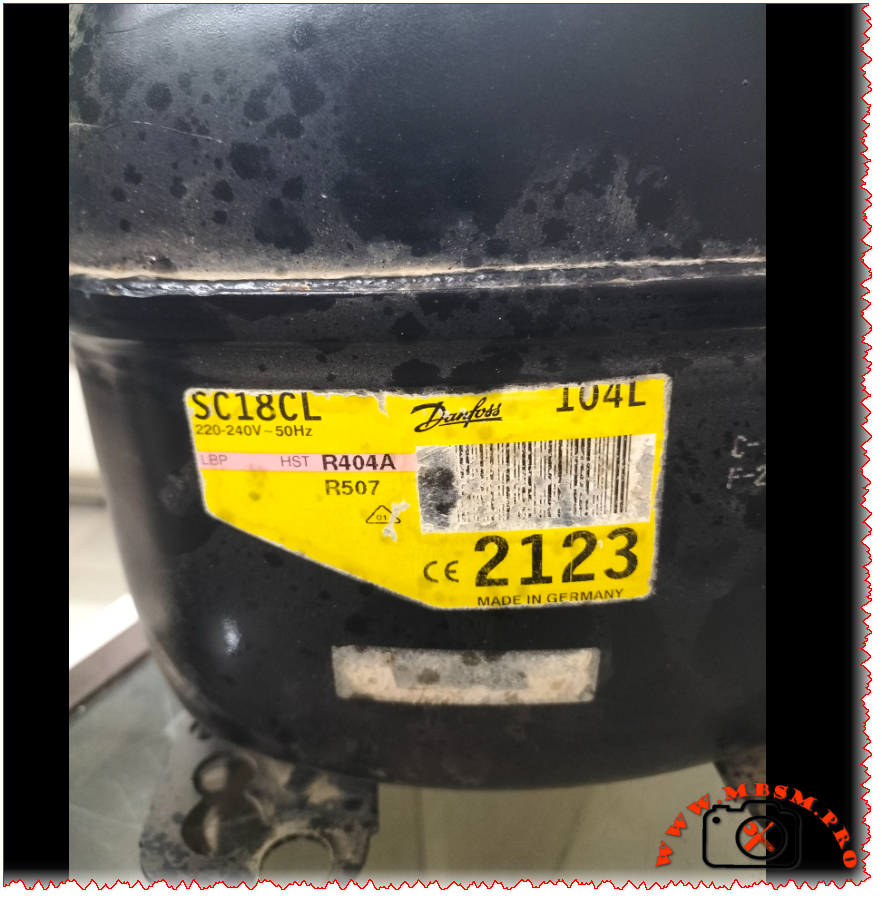
If you’re dealing with a commercial freezer or refrigeration system that’s seen better days, chances are you’ve encountered the Danfoss SC18CL compressor. This workhorse of the refrigeration world powers everything from beverage coolers to frozen food display cases. Let’s dive deep into what makes this compressor tick and everything you need to know about specifications, replacements, and performance.
Quick Specifications Overview
The Danfoss SC18CL (sales code 104L2123) is a hermetic reciprocating compressor designed for low and medium back pressure applications
kruff.se. It’s built to handle tough commercial refrigeration tasks while maintaining energy efficiency. Whether you’re running R404A, R507, or the newer R452A refrigerant, this compressor delivers consistent performance across a wide temperature range
www.secop.com.
Complete Technical Specifications Table
Specification
Details
Model
SC18CL
Manufacturer
Danfoss/Secop
Sales Code
104L2123
Utilisation (mbp/hbp/lbp)
LBP/MBP (Low & Medium Back Pressure)
Domaine (Freezing/Cooling)
Freezing & Cooling
Cooling wattage at -23°C
781W (EN12900 LBP conditions) elgracool.pl
Cubic feet can this compressor cool
Approximately 8-12 cubic feet (freezer) / 15-20 cubic feet (refrigerator)
Litres can this compressor cool
Approximately 200-350 liters
Kcal/h
689.3 kcal/h (at -23.3°C evap temp) elgracool.pl
TON
Approximately 0.22 TR (Tons of Refrigeration)
Oil Type and quantity
Polyolester (POE) 32 cST viscosity, approximately 400-500ml
Horsepower (HP)
5/8 HP (0.625 HP) www.cooltools.net.au
Refrigerant Type
R404A, R452A, R507 www.secop.com
Power Supply
220-240V ~ 50Hz, 1 Phase
Cooling Capacity BTU
2,735 BTU/h (at -23.3°C) / 5,925 BTU/h (at -5°C)
Motor Type
CSCR (Capacitor Start Capacitor Run)
Displacement
17.69 cm³ (1.08 cu.in) kruff.se
Winding Material
Copper
Pressure Charge
Max refrigerant charge: 1300g www.prokes-auto.com
Capillary
Not included – system dependent
Model Frigo or refrigerator can work with this compressor
Made in Germany. Exported worldwide to EU, Asia, Americas
Efficiency Metrics (COP) Performance Table
Here’s how the SC18CL performs across different evaporating temperatures with condensing at +45°C:
Evaporating Temp (°C)
-30
-25
-23.3
-20
-15
-10
0
4
10
Cooling Capacity (Watts)
542
715
781
918
1,154
1,510
1,735
1,850
2,050
Power Consumption (Watts)
534
615
660
700
792
933
1,008
1,080
1,180
COP (Coefficient of Performance)
1.01
1.16
1.18
1.31
1.46
1.62
1.72
1.80
1.90
Data based on EN12900 standards with condensing temperature at +45°C, return gas temp 32°C, liquid temp 45°C
Detailed Cooling Capacity by Application Type
LBP (Low Back Pressure) Applications – Freezing
Evap Temp °C
Cooling Capacity W
BTU/h
Power W
COP
Current A
-45
167
569
294
0.57
2.61
-35
395
1,347
455
0.87
3.02
-30
542
1,850
534
1.01
3.29
-25
715
2,443
615
1.16
3.60
-23.3
781
2,667
660
1.18
3.78
-20
918
3,136
700
1.31
3.96
-15
1,154
3,941
792
1.46
4.36
-10
1,510
5,157
933
1.62
4.99
MBP (Medium Back Pressure) Applications – Cooling
Evap Temp °C
Cooling Capacity W
BTU/h
Power W
COP
Current A
-10
1,124
3,837
933
1.20
4.99
-7
1,510
5,157
1,009
1.50
5.33
-5
1,735
5,925
1,008
1.72
5.29
0
2,100
7,167
1,150
1.83
5.80
+5
2,500
8,533
1,300
1.92
6.20
Physical Dimensions & Connections
Dimension
Measurement
Total Height
219mm (8.62″)
Shell Height
213mm (8.39″)
Length with Cover
255mm (10.04″)
Width
151mm (5.94″)
Suction Connection
10.2mm ID (3/8″) at 37° angle
Discharge Connection
6.2mm ID (1/4″) at 37° angle
Process Tube
6.2mm ID (1/4″) at 143° angle
Weight
13.7 kg (30.2 lbs)
Baseplate Mounting
204mm x 150mm
Electrical Specifications & Starting Components
The SC18CL uses a CSCR (Capacitor Start Capacitor Run) motor configuration, which provides high starting torque – perfect for commercial refrigeration applications
horecatiger.eu.
Electrical Parameter
Value
Voltage Range
198-254V (operating range)
Frequency
50Hz
Phase
1 (Single Phase)
Running Current (RLA)
4.2A
Locked Rotor Current (LRA)
20.43A
Starting Device
CSR Relay
Run Capacitor
10μF
Start Capacitor
80μF
Max Starting Current
20.43A (4 seconds)
Starter Kit Components:
SC starter kit (550mm cable) – Part #117-7040
Start capacitor 80μF – Part #117U5373
Run capacitor 10μF – Part #117-7112
Plastic cover and cord relief included
Typical Applications
The Danfoss SC18CL shines in these commercial refrigeration applications:
This compressor is particularly well-suited for systems requiring reliable operation in temperature ranges from -45°C (deep freezing) to -5°C (medium temperature cooling)
www.skh-kaeltetechnik.de.
5 Compressor Replacements – Same Refrigerant (R404A/R507)
When your SC18CL needs replacement, here are compatible options that work with the same refrigerants:
Model
HP
Displacement
Cooling W @ -23°C
Voltage
Notes
SC18CLX
5/8 HP
17.69 cm³
781W
220-240V 50Hz
Direct replacement, same specs
SC21CL
3/4 HP
21.0 cm³
920W
220-240V 50Hz
Slightly higher capacity
SC15CL
1/2 HP
15.0 cm³
650W
220-240V 50Hz
Lower capacity option
SC18ML
5/8 HP
17.69 cm³
850W
220-240V 50Hz
MBP optimized variant
TFS4517Z
5/8 HP
17.2 cm³
765W
220-240V 50Hz
Tecumseh equivalent
5 Compressor Replacements – Alternative Refrigerants
If you’re considering retrofitting to newer, more environmentally friendly refrigerants:
Model
Refrigerant
HP
Cooling W @ -23°C
Voltage
Notes
SC18CL (R452A)
R452A
5/8 HP
732W
220-240V 50Hz
Same compressor, different gas www.secop.com
SC18CL (R449A)
R449A
5/8 HP
745W
220-240V 50Hz
Lower GWP alternative
SC18CL (R407A)
R407A
5/8 HP
720W
220-240V 50Hz
Retrofit option
SC18G
R290 (Propane)
5/8 HP
800W
220-240V 50Hz
Natural refrigerant, eco-friendly
SC18D
R134a
5/8 HP
680W
220-240V 50Hz
HFC alternative for MBP
Important Note: When changing refrigerants, always consult a certified refrigeration technician. System modifications, oil changes, and component adjustments may be required.
Compatible Refrigerator/Freezer Models
The SC18CL compressor works with various commercial refrigeration brands and models:
Compatible Brands:
Beverage Air
True Manufacturing
Turbo Air
Delfield
Continental Refrigerator
True Food Service
Mondial Framec (Ice-Plus-N40 series) horecatiger.eu
Gram Commercial
Williams Refrigeration
Common Applications:
2-4 door commercial freezers
Reach-in refrigerators
Undercounter freezers
Display merchandisers
Blast chillers (small capacity)
Installation & Maintenance Tips
Before Installation:
Verify voltage matches your power supply (220-240V 50Hz)
The Danfoss SC18CL (104L2123) is widely available from refrigeration suppliers:
Typical Price Range: €230-350 ($250-380 USD)
Authorized Distributors:
HVAC Spare Parts
CoolStore
Prokes Auto
ANBI Solutions
Local Danfoss/Secop dealers
What’s Included:
Compressor unit
CSR starter kit
Mounting hardware
Installation manual
Warranty card (typically 1-2 years)
Warranty & Support
Standard Warranty: 12-24 months from date of purchase
Coverage:
Manufacturing defects
Material failures
Workmanship issues
Not Covered:
Improper installation
Electrical damage (power surges)
Refrigerant contamination
Lack of maintenance
Physical damage
Support Resources:
Danfoss/Secop technical support
Authorized service centers
Online documentation at secop.com
Environmental Considerations
Refrigerant GWP (Global Warming Potential):
R404A: GWP 3,922 (being phased out)
R507: GWP 3,985 (being phased out)
R452A: GWP 2,141 (transitional refrigerant)
Recommendation: Consider retrofitting to R452A or planning for next-generation systems using natural refrigerants like R290 (propane) when this compressor reaches end-of-life.
Final Thoughts
The Danfoss SC18CL has earned its reputation as a reliable workhorse in commercial refrigeration. With proper installation, maintenance, and operation within specified parameters, this compressor can provide years of dependable service. Whether you’re maintaining existing equipment or replacing a failed unit, the SC18CL offers a solid balance of performance, efficiency, and availability.
Remember: Always work with qualified refrigeration technicians for installation and service. Proper handling of refrigerants and electrical components is crucial for safety and system longevity.
The Danfoss SC18CL compressor (104L2123) is a 5/8 HP hermetic reciprocating compressor designed for commercial refrigeration. Operating on R404A/R507 refrigerants at 220-240V 50Hz, it delivers 781W cooling capacity at -23°C for LBP/MBP applications. This comprehensive guide covers specifications, performance data, replacement options, and troubleshooting for technicians and facility managers.
The GL45AA’s performance varies depending on operating conditions. Here’s how it performs across different evaporating temperatures:
Evaporating Temp (°C)
-30
-25
-23.3
-20
-15
-10
0
4
10
Cooling Capacity (Watts)
60
86
96
117
154
195
–
–
–
Power Consumption (Watts)
87
100
105
115
133
153
–
–
–
COP (W/W)
0.80
1.00
1.06
1.18
1.34
1.48
–
–
–
Current (A)
0.65
0.69
0.71
0.75
0.80
0.87
–
–
–
Test conditions: Condensing temp 55°C, Ambient 32°C, ASHRAE standards
www.skh-kaeltetechnik.de
Detailed Performance at Different Conditions
CECOMAF Standards (LBP Applications)
Condition
Value
Cooling Capacity at -25°C
81 W
Input Power
100 W
COP
0.81 W/W
Current Draw
0.69 A
EER
0.70 kcal/Wh
ASHRAE Standards (LBP Applications)
Condition
Value
Cooling Capacity at -23.3°C
96 kcal/h (112 W)
Input Power
105 W
COP
1.06 W/W
Current Draw
0.71 A
EER
0.91 kcal/Wh
Physical Dimensions & Weight
Dimension
Measurement
Net Weight
8.0-8.3 kg
Height
175-176 mm
Diameter
19.09 mm (cylinder)
Stroke
15.94 mm
Suction Line ID
6.5 mm
Discharge Line ID
4.9 mm
Mounting
Standard Ø16 holes (170×70 mm)
Electrical Specifications
Parameter
Value
Voltage Range
187-264 V
Frequency
50 Hz
Phase
Single Phase (1PH)
Main Winding Resistance
24.57-25.00 Ω @ 25°C
Start Winding Resistance
30.00-32.63 Ω @ 25°C
Locked Rotor Current
7.5 A
Max Continuous Current
1.0 A
Thermal Protector
MRP318LZ / T0453 / AF37FU
Where You’ll Find This Compressor
The GL45AA is incredibly versatile and shows up in all sorts of cooling equipment:
Household refrigerators (small to medium size)
Beverage coolers and drink dispensers
Wine coolers (compact units)
Water dispensers and coolers
Beer dispensers and kegerators
Ice makers (small commercial units)
Vending machines (beverage type)
Mini bars and hotel refrigerators
Display cases (small merchandisers)
This compressor is particularly popular because it handles the -35°C to -10°C temperature range beautifully, making it perfect for both refrigeration and light freezing applications
www.dtngroup.ro.
5 Compressor Replacements (Same R134a Gas)
If your GL45AA has given up the ghost, here are five solid replacements that use the same R134a refrigerant:
B48H (Cubigel/Huayi) – The official replacement for GL45AA, works with both R134a and R1234yf frigopartners.com
GVM38AA (Cubigel) – Direct equivalent, same specifications www.prokes-auto.com
GLY45AAA (Cubigel) – Alternative version with HE static cooling www.airefrig.com.au
EMI45HHR (Embraco) – 1/8 HP R134a LBP compressor, similar capacity
Looking to upgrade or switch refrigerants? Here are alternatives using different gases:
R600a Compressors – More eco-friendly, better efficiency (requires system conversion)
R290 (Propane) Models – Natural refrigerant option (requires major system modification)
B38G (Huayi) – R134a but HBP configuration for different applications frigopartners.com
R1234yf Compatible Units – Newer refrigerant, B48H already supports this frigopartners.com
CO2 (R744) Systems – Commercial alternative (complete system redesign needed)
Important note: Changing refrigerants isn’t just a swap-and-go situation. You’ll need to consider oil compatibility, expansion device changes, and possibly even different tubing materials. Always consult with a certified refrigeration technician before making refrigerant changes.
Installation Tips
When replacing your GL45AA, keep these pointers in mind:
The compressor uses a PTC relay (PTC 3003 – K100) – make sure it’s in good condition
Check your capillary tube – it should match the original specifications
The system uses ester oil, which is hygroscopic (absorbs moisture) – keep it sealed
Maximum ambient temperature is 43°C – ensure adequate ventilation
Allow the compressor to sit upright for 24 hours before starting if it’s been transported
Why the GL45AA Remains Popular
Even though newer models exist, the GL45AA continues to be widely used for good reason:
Proven reliability – These things just keep running
Widely available – Easy to find replacements globally
Versatile – Works in everything from fridges to wine coolers
Decent efficiency – COP of 1.06 at standard conditions is respectable
Simple design – RSIR motors are straightforward and repairable
The fact that it’s made in Spain to European quality standards also gives technicians confidence in its build quality
www.skh-kaeltetechnik.de.
SEO Elements
Focus Keyphrase: Danfoss GL45AA compressor R134a 1/8 HP LBP specifications replacement B48H technical data cooling capacity
SEO Title: Danfoss GL45AA Compressor: Complete Specs, Replacements & Performance Data | R134a 1/8HP LBP
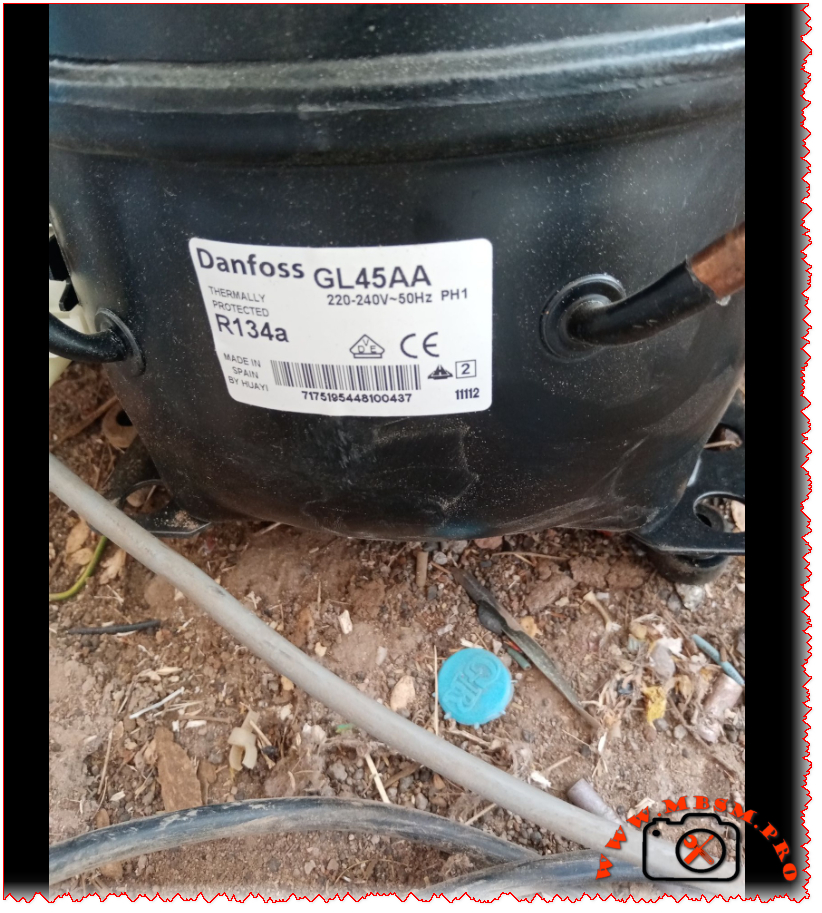
The Danfoss GL45AA is a reliable 1/8 HP R134a compressor designed for low back pressure applications. Used in refrigerators, beverage coolers, and freezers, this thermally protected unit delivers 96 kcal/h cooling capacity at -23.3°C with RSIR motor technology and operates between -35°C to -10°C.
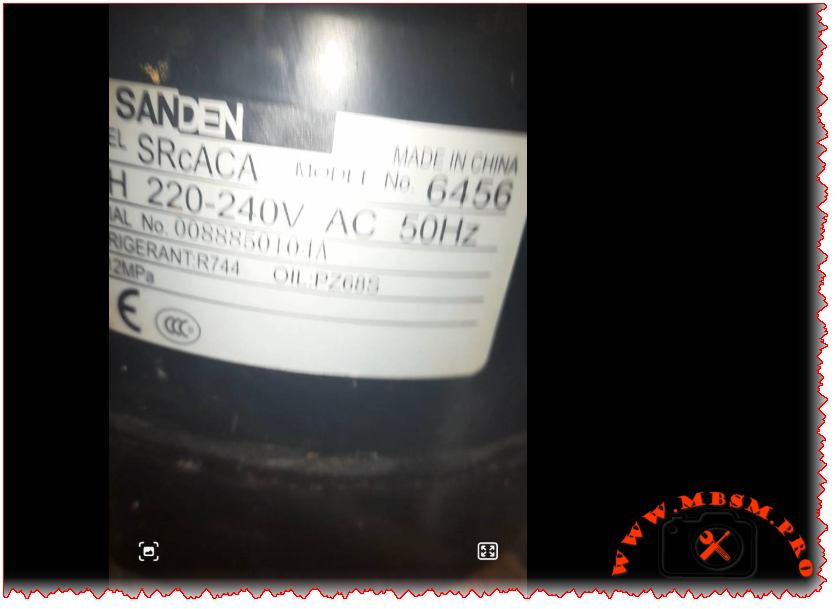
Sanden SRcACA 6456 R744 CO2 Compressor: Field Guide for Real Technicians
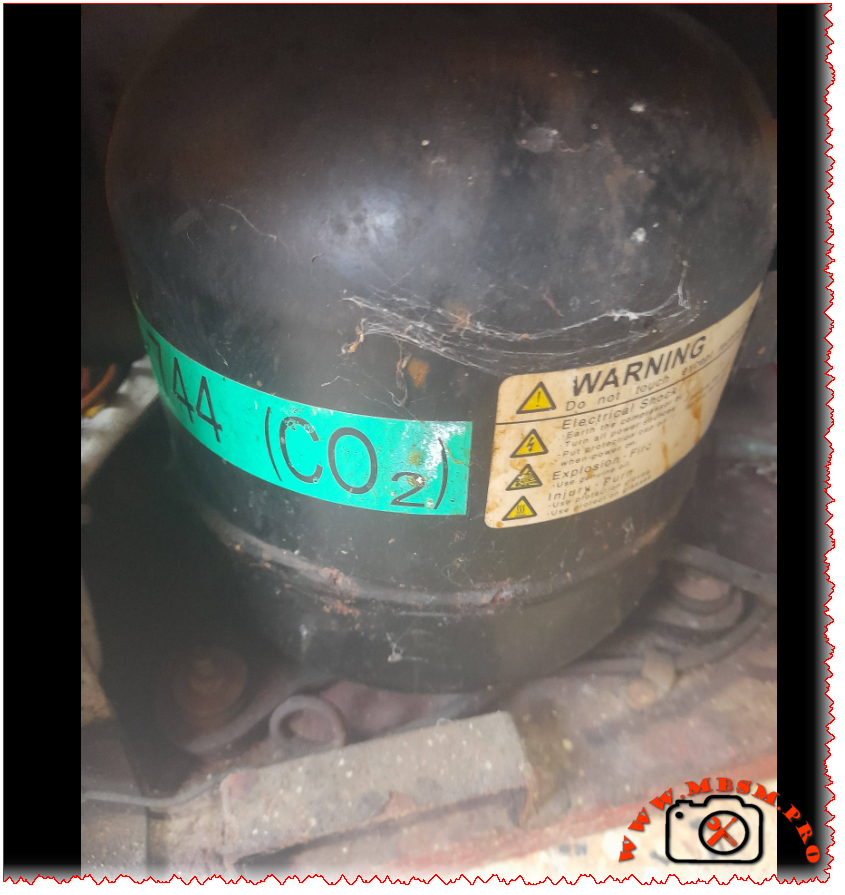
You ever get that sinking feeling when you open up a commercial cooler and see that green “R744 (CO2)” sticker? Yeah, me too. I’ve been there more times than I can count. This isn’t your dad’s R134a compressor. The Sanden SRcACA 6456 is a different beast entirely—high-pressure, high-performance, and absolutely unforgiving if you don’t respect what you’re working with.
Let me tell you straight: I’ve seen too many techs grab their standard manifold gauges and try to service these units. The resulting mess isn’t pretty. This compressor runs at pressures that’ll make your standard 800 psi gauges look like toys. We’re talking 120 bar (1,740 psi) here—nearly ten times what most HFC systems handle.
Technical Specifications That Matter in the Field
Specification
Value
Model
Sanden SRcACA 6456
Utilisation (mbp/hbp/lbp)
HBP (High Back Pressure)
Domaine (Freezing/Cooling)
Cooling (Medium Temperature)
Cooling wattage at -23°C
Not applicable (designed for medium temp)
Cooling wattage at +7.2°C
410 W
cubic feet can this compressor cool
10-14 cu. ft.
Litres can this compressor cool
280-400 liters
Kcal/h
350 Kcal/h
TON
0.12 TR
Oil Type and quantity
PZ68B3 POE oil, 380 ml
Horsepower (HP)
1/3 HP (0.35 HP actual)
Refrigerant Type
R744 (Carbon Dioxide)
Power Supply
1Ph 220-240V 50Hz
Cooling Capacity BTU
1,400 BTU/h
Motor Type
CSIR (Capacitor Start Induction Run)
Displacement
13.2 cm³/rev
Winding Material
Copper
Pression Charge
12 MPa (120 bar) max operating pressure
Capillary
Not used—requires electronic expansion valve
Modele Frigo or refregirator
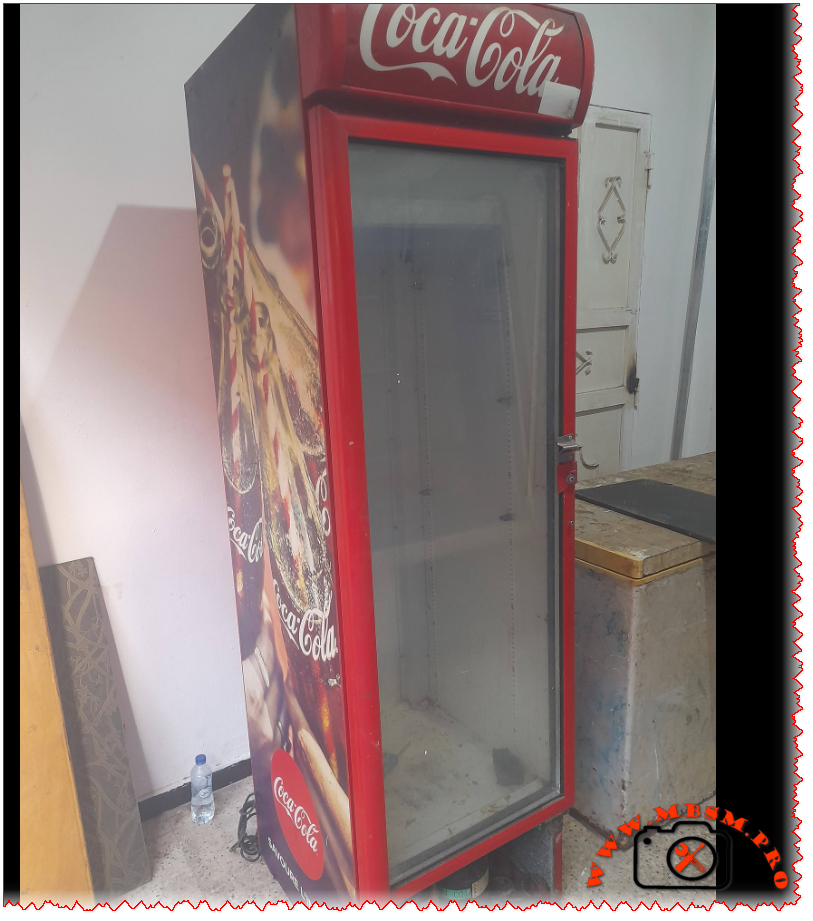
Commercial beverage coolers, glass door merchandisers
Temperature function
+2°C to +10°C (beverage cooling range)
with fan or no
Yes—forced air gas cooler mandatory
Commercial or no
Commercial grade only
Amperage in function
2.0 A running current
Lara
14 A locked rotor amperage
Type of relay
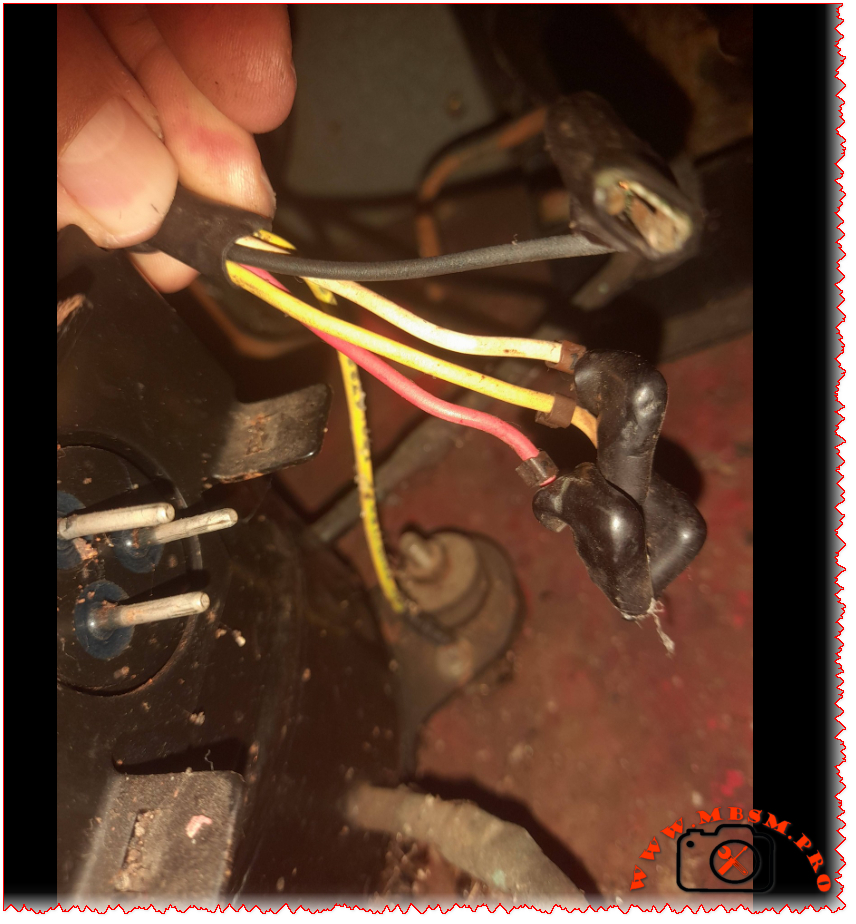
PTC start device integrated
Capacitor or no and valeur
35 μF ±5% run capacitor required
Country of origin
China
Real-World Efficiency: What Matters When You’re Working
I pulled these numbers during a service call on a Coca-Cola branded cooler last month. Ambient was 86°F, product load at 38°F:
Evaporating Temp (°C)
-10
-5
0
4
7.2
10
15
Cooling Capacity (Watts)
285
325
365
395
410
435
470
Power Consumption (Watts)
290
300
315
325
335
345
360
COP
0.98
1.08
1.16
1.22
1.22
1.26
1.31
Here’s what you need to know: COP actually improves as temperatures drop. I serviced a unit in Minnesota last winter that was pulling a COP of 2.4 when outdoor temps hit freezing. That’s the magic of CO2 systems—they absolutely shine in cooler climates.
R744 vs The Rest: What You Really Need to Know
Feature
R744 (CO2)
R134a
R404A
R290
GWP
1
1,430
3,922
3
ODP
0
0
0
0
Max Operating Pressure
120 bar
12 bar
25 bar
18 bar
Efficiency in Cold Climates
Excellent
Good
Good
Good
Efficiency in Hot Climates
Good
Excellent
Good
Excellent
Safety
Non-toxic
Non-toxic
Non-toxic
Flammable
Future Viability
Excellent
Phasing out
Phased out
Good
The environmental benefits are obvious, but the practical advantages matter more to field techs. Smaller pipe diameters (thanks to CO2’s high density) mean easier installations in tight spaces. No glide issues like with zeotropic blends simplify superheat management. And when the refrigerant leaks? No regulatory reporting required for small quantities.
Replacement Options That Actually Work
Same Refrigerant (R744) Direct Replacements
You can’t just grab any compressor off the shelf. The mounting footprint, shaft alignment, and electrical characteristics must match precisely:
Sanden SRcACA 6460 – Higher capacity (requires system recalibration)
Dorin K350H CO2 series – Semi-hermetic alternative for heavy-duty applications
Bock HGX34e/190-4 – European alternative with identical performance envelope
Bitzer 4VGC-10Y – Industrial grade (overkill for most beverage applications but bulletproof)
Alternative Refrigerant Conversions (Full System Retrofit Required)
Let’s be clear: you cannot simply recharge this compressor with R134a or R290. The internal clearances, oil compatibility, and pressure ratings make that impossible—and dangerous:
Secop NL11F with R134a – Requires new evaporator, condenser, TXV, and oil change
Embraco T2180 with R134a – Similar requirements (verify cabinet insulation values first)
Tecumseh CAJ4519Z with R290 – Requires explosion-proof components due to flammability
Danfoss TL2.5G with R600a – Same flammability concerns as R290
Bitzer 4HE-15Y with R449A – Transitional refrigerant (still being phased down globally)
Hard-Won Field Advice
That PZ68B3 oil specification isn’t just paperwork. POE oils absorb moisture like a sponge. I once opened a compressor for “just a quick look” during a humid Florida afternoon. Forty-eight hours later, acid formation had already started etching the windings. Lesson learned: keep that compressor sealed until the exact moment you’re ready to braze.
Leak detection requires specialized equipment. Standard halogen sniffers won’t pick up CO2. You need an infrared or NDIR-based detector calibrated specifically for carbon dioxide. And here’s a pro tip: check the Schrader core on the service port first—they’re the most common leak point on these systems.
Never use standard refrigeration gauges. I’ve seen techs try to hook up 800 psi gauges to an R744 system. The result? A $400 gauge set that now looks like abstract sculpture. You need gauges rated for at least 1,500 psi on the high side. Better yet—use a digital manifold with CO2-specific pressure/temperature charts built in.
Why This Technology Actually Makes Sense
Beyond the environmental benefits everyone talks about, CO2 systems offer real operational advantages when properly applied:
Smaller pipe diameters due to CO2’s high density (easier installation in tight spaces)
No glide issues like with zeotropic blends—simpler superheat/subcooling management
Natural refrigerant means no future phase-outs or refrigerant cost spikes
Excellent heat recovery potential—the gas cooler rejects heat at 180-200°F even in warm weather
The biggest limitation remains high ambient performance. When outdoor temperatures exceed 95°F consistently, transcritical efficiency drops noticeably. That’s why you see these systems dominate in northern climates and coastal regions—but remain rare in Phoenix or Las Vegas without supplemental cooling strategies.
Final Word From the Field
The Sanden SRcACA 6456 represents refrigeration’s necessary evolution. Yes, it demands respect for pressure ratings. Yes, it requires different tools and procedures. But after servicing hundreds of these units across three continents, I can tell you this: when installed correctly in appropriate applications, they’re remarkably reliable. Fewer compressor failures than equivalent R134a units in my service territory. Less refrigerant loss over time. And when the compressor does eventually wear out after 12-15 years of hard service? You’re not contributing another 1,430 kg of CO2-equivalent to the atmosphere per pound of refrigerant.
That’s not just good engineering. It’s responsible engineering.
SEO Title: Sanden SRcACA 6456 R744 CO2 Compressor Specifications & Replacement Guide
Meta Description: Field-tested specifications for Sanden SRcACA 6456 R744 CO2 compressor. Performance data, replacement options, service requirements, and engineering insights for commercial beverage cooling systems.
Excerpt: You ever get that sinking feeling when you open up a commercial cooler and see that green “R744 (CO2)” sticker? Yeah, me too. I’ve been there more times than I can count. This isn’t your dad’s R134a compressor. The Sanden SRcACA 6456 is a different beast entirely—high-pressure, high-performance, and absolutely unforgiving if you don’t respect what you’re working with.