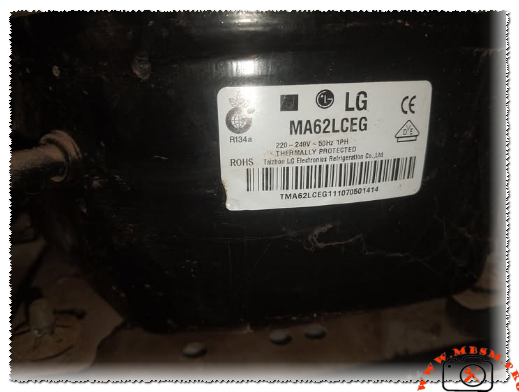
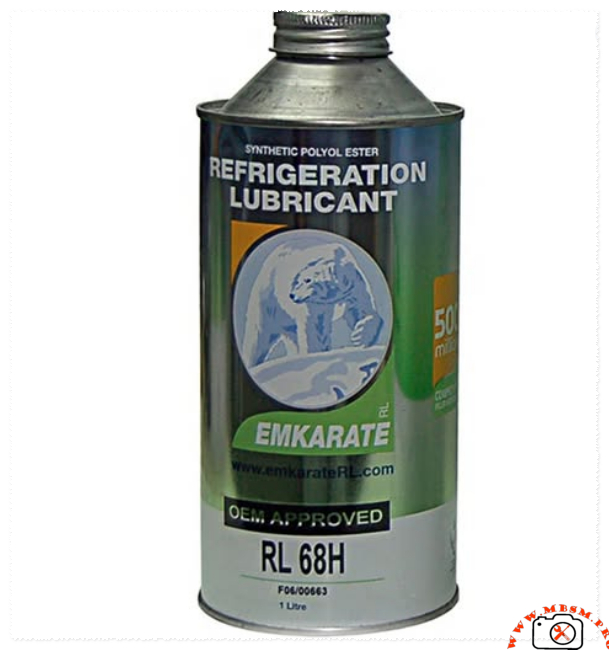
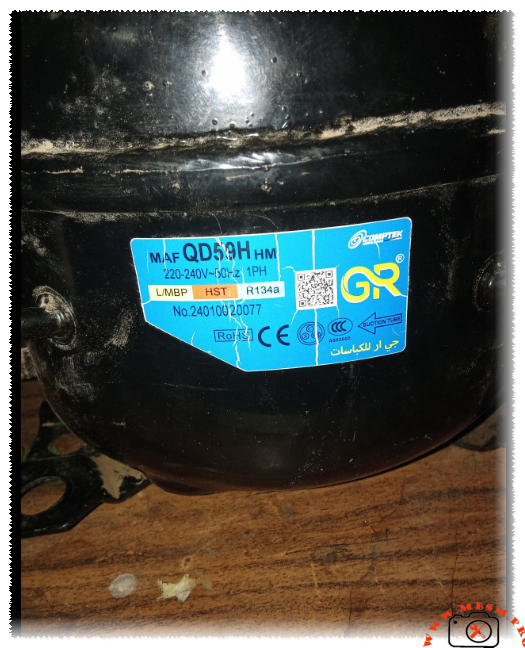
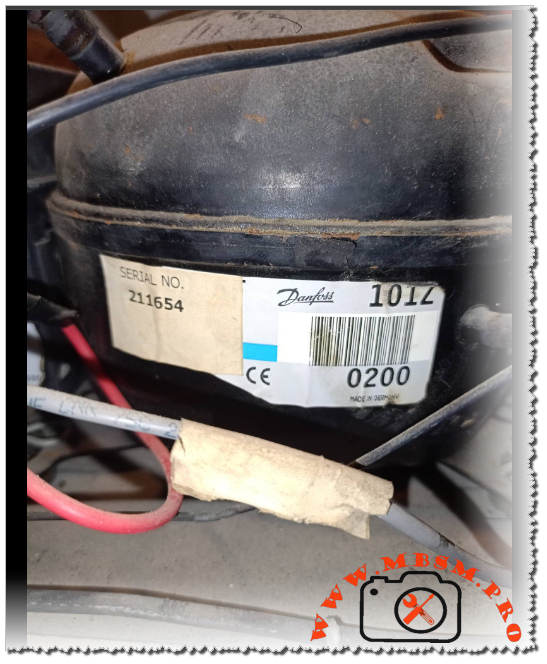
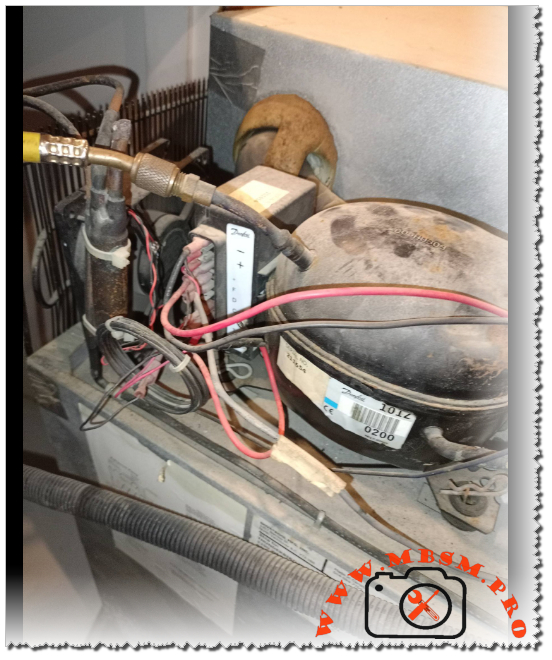
Compressor MAF QD59H HM for Ideal 8-foot Refrigerator

Mbsmgroup-files-2026-01-16_203856 mbsmpro

Focus Keyphrase: Compressor MAF QD59H HM for Ideal 8-foot Refrigerator Technical Specifications and Compatibility Guide

SEO Title: Mbsm.pro, Compressor, MAF QD59H HM, 1/6 HP, Comptek, Cooling, R134a, 220-240V 50Hz, L/MBP, HST, Ideal 8ft Refrigerator

Meta Description: Discover if the MAF QD59H HM Comptek compressor is the right fit for your Ideal 8-foot refrigerator. Comprehensive technical specs, 1/6 HP performance, and engineering tips.

Slug: compressor-maf-qd59h-hm-1-6-hp-r134a-ideal-fridge

Add Tags: Mbsmgroup, Mbsm.pro, mbsmpro.com, mbsm, Comptek Compressor, MAF QD59H HM, Ideal Refrigerator Repair, R134a Cooling, 1/6 HP Compressor, LBP Refrigeration

Excerpt: Choosing the correct compressor for a classic Ideal 8-foot refrigerator requires technical precision. The MAF QD59H HM, a robust 1/6 HP unit by Comptek, is a frequent candidate for these repairs. This article explores the mechanical compatibility, electrical requirements, and performance values necessary to ensure a long-lasting and efficient cooling system restoration.


The Engineering Guide to Compressor MAF QD59H HM: Performance and Compatibility for Ideal 8-Foot Refrigerators

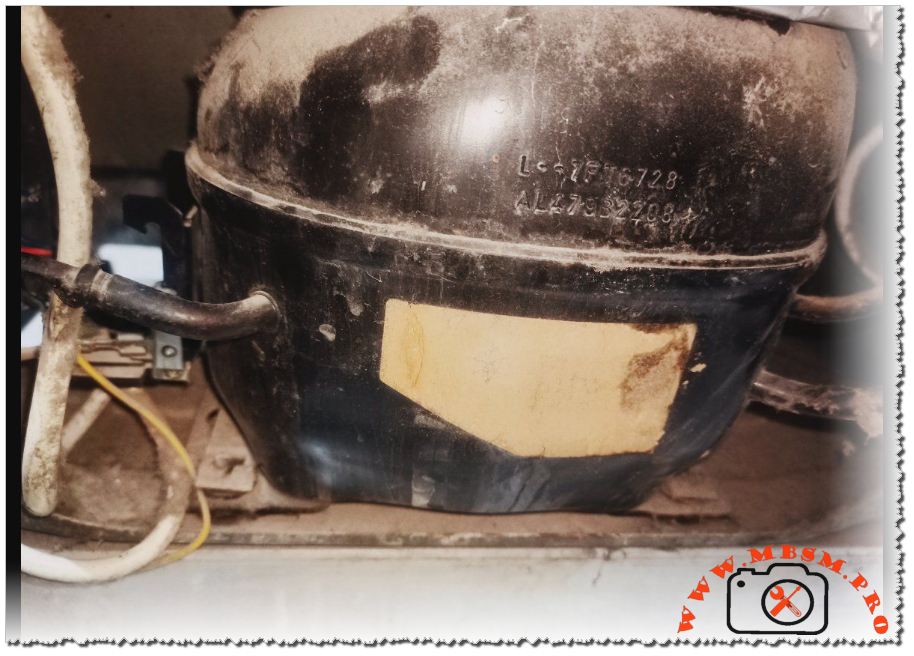
In the world of domestic refrigeration maintenance, the Ideal 8-foot refrigerator remains a legendary appliance known for its sturdy build. However, when the heart of the system—the compressor—fails, selecting a modern replacement requires an understanding of displacement, cooling capacity, and motor torque. The MAF QD59H HM, manufactured by Comptek, is a specialized L/MBP (Low/Medium Back Pressure) unit designed for R134a systems.

Technical Breakdown: MAF QD59H HM Characteristics

The MAF QD59H HM is engineered for efficiency. As a 1/6 HP class compressor, it provides the necessary thermal displacement to handle the internal volume of an 8-cubic-foot unit without overstressing the condenser coils.

Table 1: Technical Specifications

Feature Specification
Model MAF QD59H HM
Brand Comptek / GR
Horsepower (HP) 1/6 HP
Refrigerant R134a
Voltage/Frequency 220-240V ~ 50Hz
Phase 1 PH (Single Phase)
Application Range L/MBP (Low/Medium Back Pressure)
Motor Type RSIR / CSIR (Depending on Starter Kit)
Starting Torque HST (High Starting Torque)
Cooling Capacity ~150W – 165W (at -23.3°C LBP)

Is it Compatible with an Ideal 8-Foot Refrigerator?

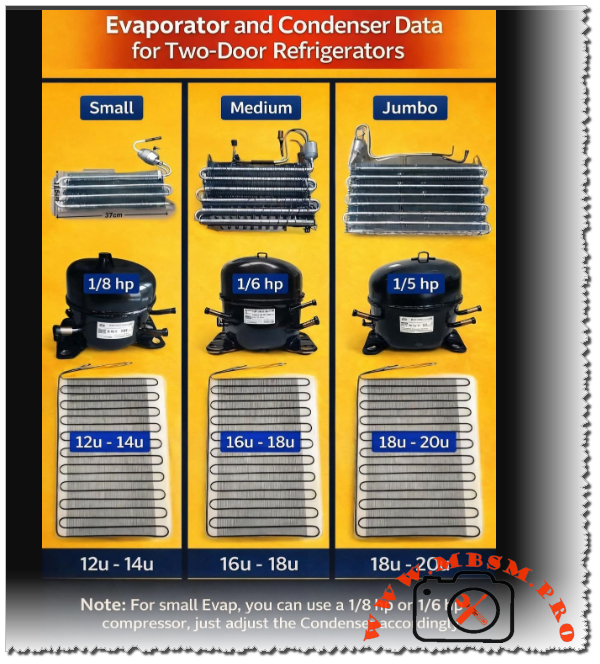
The short answer is yes. An 8-foot refrigerator typically requires between 1/8 HP and 1/6 HP. Using the MAF QD59H HM ensures that the system reaches the desired temperature quickly, even in high-ambient-temperature environments.

The HST (High Starting Torque) designation is particularly beneficial. In many regions where voltage can fluctuate or where the refrigerator is opened frequently, an HST motor ensures the compressor starts reliably against the pressure of the refrigerant without tripping the thermal overload protector.

Comparative Analysis: Displacement vs. Cooling Efficiency

When comparing the MAF QD59H HM to other common industry standards like the Danfoss or Embraco equivalents, we see a focus on balancing energy consumption with cooling speed.

Table 2: Comparison with Equivalent Models

Compressor Model Displacement (cc) Cooling Capacity (W) Efficiency (COP)
Comptek MAF QD59H 5.9 158 1.25
Embraco EMT56CLP 5.6 145 1.22
Danfoss TL5G 5.0 135 1.18
ZMC GM70AZ 6.5 170 1.28

Engineering Insights: Wiring and Installation

For the field technician, the electrical configuration is standard but requires precision. Below is the typical schematic logic for the MAF series.

Electrical Connection Schematic:

  1. Common (C): Connected to the Internal/External Overload Protector.
  2. Main/Run (R): Connected to the Neutral line.
  3. Start (S): Connected via the PTC (Positive Temperature Coefficient) or Start Capacitor.

Notice: Always ensure the suction tube is identified correctly (marked by an arrow on the label) to prevent oil slugging into the manifold during the first start-up.

Professional Advice for Maximum Longevity

  • System Flushing: Before installing the MAF QD59H HM, always flush the evaporator and condenser with R141b to remove old mineral oil or carbon deposits.
  • Capillary Tube Check: For an 8-foot Ideal fridge, ensure the capillary tube is not restricted. A restricted tube will cause the HST motor to overheat.
  • Vacuuming: Achieve a vacuum of at least 500 microns to ensure the R134a/POE oil environment remains moisture-free.
  • Filter Drier: Always replace the filter drier with a high-quality 20g or 30g XH-9 molecular sieve drier.

Benefits of Using the MAF QD59H HM

  • Thermal Stability: Excellent heat dissipation during long run cycles.
  • Quiet Operation: Low vibration levels compared to older reciprocating models.
  • Versatility: Suitable for both freezers and standard refrigerators due to its L/MBP range.

Expert Notice: While the MAF QD59H HM is a robust replacement, always verify the original nameplate of the refrigerator. If the original compressor was significantly larger (e.g., 1/4 HP), a QD59H may lead to extended run times. However, for the standard Ideal 8ft model, this unit remains a top-tier engineering choice.

Mbsmgroup-files-2026-01-16_203856 mbsmpro


mbsmgroup2026-01-16_121136-mbsmpro mbsmpro

Mbsmpro.com, Gree Multi VRF, Error Codes List, Troubleshooting Guide, E1 E2 E3 E4 E5 E6 E9 F1 F2 F3 F4 F5 F6 F7 F8 F9 FA Fb Fc Fd EH, HVAC Diagnostics, Variable Refrigerant Flow Systems


Mastering the Diagnostics of Gree Multi VRF Systems: An Engineering Perspective

In the demanding world of commercial climate control, Multi VRF (Variable Refrigerant Flow) systems represent the pinnacle of efficiency and complexity. As a field engineer who has spent countless hours on rooftops and in mechanical rooms, I understand that an error code is not just a letter and a number; it is a vital communication from the machine’s brain. When a Gree Multi VRF unit halts operation, the diagnostic display becomes your most powerful tool.

Understanding the Logic of Protection and Sensor Errors

Modern HVAC systems are built with a philosophy of “self-preservation.” The error codes displayed on the digital control panel allow technicians to pinpoint whether a fault is mechanical, electrical, or related to the refrigerant cycle. These codes are divided into primary protection triggers (the “E” series) and sensor malfunctions (the “F” series).

Table 1: Primary Protection and Communication Codes

Error Code Description Potential Root Cause Engineer’s Field Action
E1 High-Pressure Protection Blocked condenser, overcharge, or fan failure. Check high-pressure switch and coil cleanliness.
E2 Prevention against low temperature Low airflow or evaporator icing. Inspect filters and indoor blower motor.
E3 Low-pressure protection Refrigerant leak or clogged expansion valve. Leak test and check suction pressure levels.
E4 Exhaust overtemperature Shortage of refrigerant or compressor strain. Verify discharge line temperature and charge.
E5 Overcurrent Protector Voltage instability or compressor seizure. Check supply voltage and compressor windings.
E6 Communication error Wiring fault between indoor and outdoor units. Verify signal wire continuity and shielding.
E9 Water-Full protection Drain pump failure or blocked condensate line. Clean the drain pan and test the float switch.

The Role of Thermistors in System Performance

The “F” series codes are dedicated to the nervous system of the VRF—the sensors. In a Multi VRF environment, accuracy is everything. A deviation of even 2 degrees in a tube-inlet sensor can lead to inefficient cooling or unnecessary system shutdowns.

Table 2: Sensor Diagnostic Logic (Indoor and Outdoor)

Error Code Sensor Location Specific Component Circuit Check
F Indoor Ambient Temperature Check 10k/15k Ohm resistance.
F1 Indoor Tube-inlet Sensor Inspect thermistor contact with piping.
F2 Indoor Tube-middle Sensor Check for moisture ingress in sensor head.
F3 Indoor Tube-exit Sensor Ensure secure connection to the PCB.
F4 Outdoor Ambient Temperature Verify no direct sunlight on the sensor.
F5 Outdoor Tube-inlet Sensor Resistance check vs. temperature chart.
F6 Outdoor Tube-middle Sensor Check for corrosion on the terminal.
F7 Outdoor Tube-exit Sensor Ensure insulation is intact.
F8 / F9 Exhaust Temp Sensor 1 (Fixed) / 2 (Digital) Essential for discharge gas monitoring.
FA / Fb Oil Temp Sensor 1 (Fixed) / 2 (Digital) Critical for compressor lubrication health.

Advanced Valving and Relay Errors

When you encounter codes like Fc or Fd, the system is indicating a mechanical-electronic mismatch. High and Low-pressure valve errors usually point to a failure in the solenoid coil or a stuck valve body. Meanwhile, EH (Thermal Relay Error) is a critical warning that the internal heat protection of a component has been tripped, often due to excessive ambient heat or mechanical friction.

Comparative Analysis: VRF vs. Standard Split Systems

To truly appreciate the diagnostic depth of a Gree Multi VRF, one must compare it to standard residential split systems.

  • Diagnostic Granularity: While a standard split might give a generic “System Fault” blink, the VRF distinguishes between tube-inletmiddle, and exit temperatures. This allows the engineer to calculate the exact superheat and subcooling at different stages of the evaporator.
  • Operational Protection: Conventional systems often run until a mechanical failure occurs. The VRF uses E1 through E4 logic to shut down before the compressor is permanently damaged, saving thousands in repair costs.

Professional Engineering Schema: Communication (E6) Troubleshooting

For electrical diagnostics, specifically for the E6 Communication Error, follow this logic flow:

  1. Isolate Power: Turn off the breaker for both indoor and outdoor units.
  2. Verify Shielding: Ensure the communication cable (usually 2-core or 3-core) is shielded and grounded only at the outdoor unit to prevent EMI (Electromagnetic Interference).
  3. Voltage Check: With power on, measure the DC voltage across the communication terminals. A fluctuating signal (typically between 12V and 24V DC) indicates active data transmission.
  4. Resistor Check: In some daisy-chain configurations, verify if a terminal resistor is required at the end of the line.

Expert Advice and Maintenance Benefits

  • Notice: Never bypass a pressure switch (E1/E3) to “test” the system. These protections are the only thing preventing a catastrophic compressor explosion.
  • Engineering Tip: Most sensor errors (F series) are caused by poor contact or moisture. Before replacing a sensor, clean the terminal with an electronic contact cleaner and ensure the thermistor is tightly clipped to the copper pipe with thermal paste.
  • Benefit: Understanding these codes reduces “part-swapping” syndrome. A technician who knows that E9 is simply a clogged drain can fix the issue in 10 minutes, rather than misdiagnosing a faulty PCB.

Focus Keyphrase: Gree Multi VRF Error Codes Troubleshooting Guide

SEO Title: Gree Multi VRF Error Codes: Expert Troubleshooting Guide (E1-EH)

Meta Description: Decode Gree Multi VRF error codes like E1, E6, and F1. Our engineering guide provides expert solutions for pressure protection, sensor errors, and system diagnostics.

Slug: gree-multi-vrf-error-codes-diagnostics-guide

Tags: Mbsmgroup, Mbsm.pro, mbsmpro.com, mbsm, Gree HVAC, VRF Troubleshooting, Air Conditioning Repair, HVAC Engineering, Error Code E1, Error Code E6, Sensor Calibration, Refrigerant Cycle.

Excerpt: Mastering Gree Multi VRF systems requires a deep understanding of their diagnostic language. From high-pressure protection (E1) to complex sensor logic (F1-F9), this comprehensive guide offers field-proven engineering insights to help technicians identify root causes, perform precise electrical checks, and ensure optimal system performance in commercial environments.


mbsmgroup2026-01-16_121136-mbsmpro mbsmpro
air conditioning repair, Error Code E1, Error Code E6, Gree HVAC, HVAC Engineering, mbsm, mbsm.pro, mbsmgroup, mbsmpro.com, Sensor Calibration, VRF Troubleshooting


Danfoss Secop BD35F 101Z0200 DC compressor technical specifications and 12V 24V, 1/8 hp

Danfoss Secop BD35F 101Z0200 DC compressor technical specifications and 12V 24V, 1/8 hp mbsmpro


Focus Keyphrase:
 Danfoss Secop BD35F 101Z0200 DC compressor technical specifications and 12V 24V wiring guide for mobile refrigeration Mbsmpro

SEO Title: Mbsmpro.com, Compressor, BD35F, 1/8 hp, Secop Danfoss, R134a, 12V 24V DC, Mobile Refrigeration, 101Z0200, Technical Datasheet

Meta Description: Professional guide to the Danfoss Secop BD35F 101Z0200 compressor. Includes 12/24V DC electrical schemas, HP ratings, R134a cooling capacities, and technical data for marine and solar cooling.

Slug: compressor-bd35f-101z0200-secop-danfoss-r134a-12-24v-dc-guide

Tags: BD35F, 101Z0200, Secop, Danfoss, R134a, 12V DC Compressor, 24V DC Compressor, Mobile Cooling, Solar Fridge, Mbsmgroup, Mbsm.pro, mbsmpro.com, mbsm

Excerpt: The Danfoss Secop BD35F 101Z0200 is the industry standard for DC mobile refrigeration. Engineered for 12V and 24V systems using R134a, this compressor offers variable speed performance from 1/8 to 1/5 hp. This Mbsmpro technical guide explores its electronic control unit, wiring schemas, and cooling capacities for trucks, boats, and solar-powered appliances.

Danfoss Secop BD35F 101Z0200 DC compressor technical specifications and 12V 24V, 1/8 hp mbsmpro
101Z0200, 12V DC Compressor, 24V DC Compressor, BD35F, Danfoss, mbsm.pro, mbsmgroup, mbsmpro.com, Mobile Cooling, R134a, Secop, Solar Fridge

Mbsmpro.com, Compressor, BD35F, 1/8 to 1/5 hp, Secop Danfoss, Mobile Cooling, R134a, 35-120 W, 12-24V DC, LBP/MBP/HBP, Brushless DC, -30°C to +10°C, Cooling or Freezing

The Secop Danfoss BD35F (code 101Z0200) is widely regarded as the most reliable and versatile direct current (DC) compressor ever engineered. Designed specifically for mobile applications—ranging from marine refrigeration and truck cabins to solar-powered medical coolers—this unit utilizes a high-efficiency brushless DC motor. As a field expert, I have seen these units operate in extreme conditions where stability and low energy consumption are the highest priorities.

Unlike standard household compressors that run on a fixed frequency, the BD35F is a variable-speed machine controlled by an integrated electronic unit. This allows it to adapt its cooling capacity precisely to the demand, significantly extending battery life in off-grid environments.

Technical Specifications and Performance Data

The following table outlines the mechanical and thermodynamic characteristics of the BD35F unit.

Property Technical Detail
Model Number 101Z0200 (BD35F)
Refrigerant R134a
Voltage Range 12V DC and 24V DC (Automatic Switching)
Horsepower (HP) 1/8 hp (at 2000 RPM) to 1/5 hp (at 3500 RPM)
Displacement 2.00 cm³
Oil Type / Amount Polyolester (POE) / 150 cm³
Cooling Type Static or Fan Cooled (Recommended)
Application Range LBP / MBP / HBP (-30°C to +10°C)
Standard Control Unit 101N0210, 101N0212, or 101N0510

Cooling Capacity and Power Consumption

The BD35F’s performance is directly linked to its rotational speed (RPM), which is determined by a resistor in the thermostat circuit.

Speed (RPM) Cooling Capacity (Watts) Power Consumption (Watts) Current Draw (12V)
2,000 35 W 28 W 2.3 A
2,500 48 W 38 W 3.1 A
3,000 62 W 51 W 4.2 A
3,500 76 W 65 W 5.4 A

Note: Values based on LBP conditions (-25°C evaporation temperature).


Electrical Schema and Control Unit Interface

The electronic unit is the “brain” of the compressor. It handles the starting sequence, battery protection (low voltage cut-out), and speed regulation.

Electronic Unit Connection Map:

  1. Terminals (+) and (-): Connect directly to the battery. Crucial Notice: Always use a fuse (15A for 12V, 7.5A for 24V) and ensure wire thickness is sufficient to prevent voltage drop.
  2. Terminal (F): Connection for a small 12V/24V DC fan (max 0.5A). The fan helps cool the condenser and the electronics.
  3. Terminals (C) and (T): Thermostat connection. Placing a resistor here sets the compressor speed (e.g., no resistor = 2000 RPM; 1500 Ω = 3500 RPM).
  4. Terminal (D): Diagnostic port. A LED connected between (+) and (D) will flash error codes to indicate faults like low battery or motor overload.
  5. Terminal (P): Battery protection setting. Connecting different resistors here changes the low-voltage cut-out levels.

Logic Schema Summary:
[Battery 12/24V] –> [Electronic Unit] –> [3-Phase BLDC Output] –> [Compressor Motor]


Comparative Analysis: BD35F vs. BD50F

In the field, technicians often choose between the BD35F and the slightly larger BD50F. While they look identical externally, their internal displacement differs.

Feature BD35F (101Z0200) BD50F (101Z1220)
Displacement 2.0 cm³ 2.5 cm³
Max Capacity 120 Watts (HBP) 160 Watts (HBP)
Efficiency Best for small boxes (under 100L) Better for large coolers/freezers
Energy Usage Lower idle/starting current Slightly higher power requirement

Engineering Advice and Maintenance Notices

  • Wire Gauge Importance: DC systems are extremely sensitive to voltage drops. If your wiring is too thin, the electronic unit will detect “low voltage” and shut down the compressor (1 flash on the LED), even if the battery is full.
  • Heat Dissipation: Always install the compressor in a ventilated area. If the electronic unit reaches 85°C, it will trigger a thermal shut-down.
  • Refrigerant Precision: These systems usually have very small charge weights (30g to 90g). Overcharging by even 5 grams can cause high pressure and motor stalling.
  • Benefit of Variable Speed: For solar setups, running the compressor at 2000 RPM (lowest speed) is the most energy-efficient way to maintain temperature, as it minimizes the start/stop cycles that consume the most peak power.

Technician’s Troubleshooting Checklist

  1. LED Flashes (1): Low voltage. Check wire connections and battery charge.
  2. LED Flashes (3): Motor start error. The system is likely over-pressurized or the compressor is seized.
  3. LED Flashes (5): Thermal cut-out. Improve ventilation around the electronic module.

Mbsmgroup remains your leading resource for professional refrigeration engineering. By mastering the technical nuances of the BD35F 101Z0200, you ensure the longevity and efficiency of mobile cooling systems worldwide.

Danfoss Secop BD35F 101Z0200 DC compressor technical specifications and 12V 24V, 1/8 hp mbsmpro


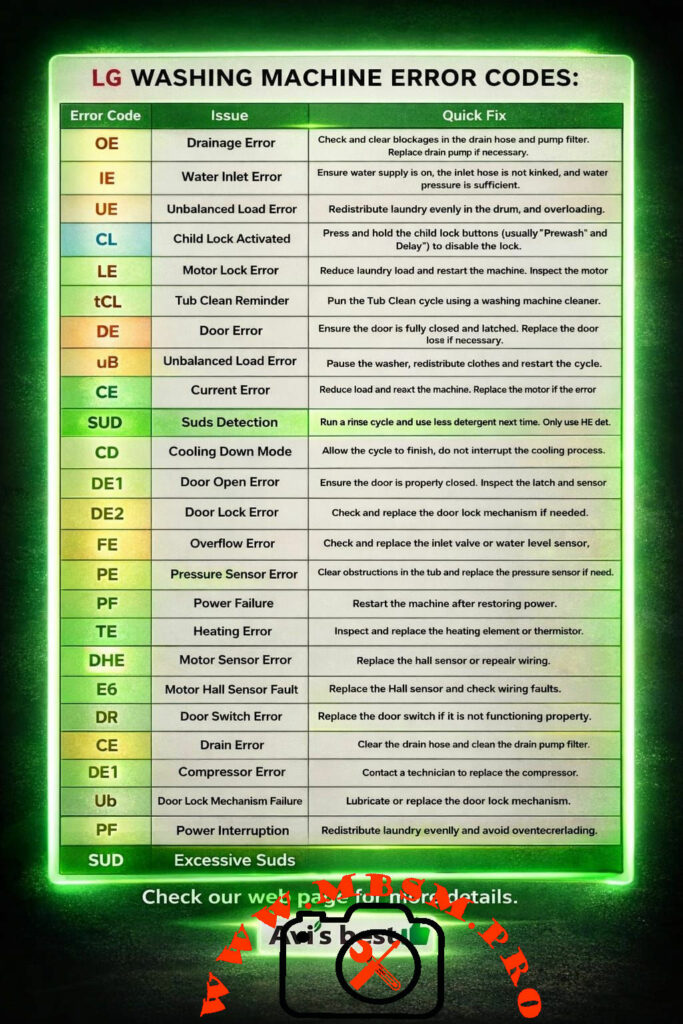
 LG washing machine error codes troubleshooting

 LG washing machine error codes troubleshooting mbsmpro


Focus Keyphrase:
 LG washing machine error codes troubleshooting guide for professional technicians and home maintenance Mbsmpro

SEO Title: Mbsmpro.com, LG Washing Machine, Error Codes, OE, IE, UE, LE, CL, Troubleshooting, Repair Solutions, Appliance Maintenance Guide

Meta Description: Master LG washing machine repairs with this expert guide. Learn to decode OE, IE, UE, and LE error codes with professional field-tested solutions from Mbsmpro.

Slug: lg-washing-machine-error-codes-troubleshooting-guide-mbsmpro

Tags: LG Washing Machine, Error Codes, Troubleshooting, OE Error, IE Error, UE Error, CL Child Lock, Motor Lock LE, Appliance Repair, Maintenance Tips, Mbsmgroup, Mbsm.pro, mbsmpro.com, mbsm

Excerpt: Decoding LG washing machine error codes is essential for any technician or homeowner looking to maintain peak performance. From the common OE drainage error to the complex LE motor lock fault, understanding these digital signals saves time and prevents further damage. This comprehensive Mbsmpro guide provides field-tested solutions to keep your laundry appliances running efficiently.


Mbsmpro.com, LG Washing Machine, Error Codes, OE, IE, UE, LE, Troubleshooting, Maintenance Guide

In the modern world of smart appliances, LG washing machines stand out for their efficiency and advanced self-diagnostic systems. However, when the digital display flashes an alphanumeric code instead of the remaining cycle time, it can be frustrating for the end-user. As an engineering-focused field expert, I have spent years analyzing these systems to provide a definitive guide for troubleshooting and repair.

Understanding these codes is not just about clearing a notification; it is about diagnosing the mechanical or electronic root cause to ensure the longevity of the appliance. Below is a comprehensive breakdown of the most frequent faults encountered in the field.

Comprehensive LG Error Code Reference Table

The following table serves as a primary diagnostic tool for identifying common issues and their immediate resolutions.

Error Code Issue Description Professional Diagnostic & Quick Fix
OE Drainage Error Inspect the drain hose for kinks. Clean the pump filter. Test the drain pump motor for continuity.
IE Water Inlet Error Verify water supply valves are open. Check inlet filters for sediment. Ensure house water pressure is adequate.
UE / uB Unbalanced Load Redistribute laundry evenly. Ensure the machine is perfectly level on the floor.
CL Child Lock Activated Not a fault. Press and hold the “Child Lock” button combination (often Prewash/Delay) for 3 seconds.
LE Motor Lock Error Possible heavy load. Reduce weight. Inspect the wiring harness between the PCB and the stator.
tCL Tub Clean Reminder Maintenance prompt. Execute the Tub Clean cycle using a high-quality citric-acid-based cleaner.
DE / DE1 / DE2 Door Error / Lock Fault Ensure the door is fully latched. Inspect the door switch and solenoid for electrical failure.
CE Current / Drain Error Can indicate a short circuit in the motor or a drainage obstruction. Inspect the main control board for scorch marks.
SUD Excessive Suds Detection High-efficiency (HE) detergent usage is mandatory. Run a rinse cycle to clear the drum.
FE Overflow Error Typically caused by a faulty water inlet valve that fails to close or a defective pressure sensor.
PE Pressure Sensor Error Check the air tube connecting the drum to the pressure switch. Verify the sensor’s frequency output.
PF Power Failure Indicates an interruption in electrical supply. Restart the cycle once power is stabilized.
TE Heating Error Inspect the heating element and the thermistor (NTC). Measure resistance values (typical 10k-15k ohms at room temp).
DHE Motor Sensor Error Focus on the Hall Effect sensor located on the back of the stator.
E6 Motor Hall Sensor Fault Often requires replacement of the Hall sensor or repairing the wiring harness.

Engineering Analysis: Sensors and Electronic Components

When a washing machine displays an error, it is reacting to data provided by specific electronic sensors. For the technician, understanding the electrical characteristics of these parts is vital.

Electrical Specification Comparison Table

Component Expected Value (Approx.) Fault Symptom
Inlet Valve Solenoid 1.1k – 1.5k Ohms IE Error, No water entry
Drain Pump Motor 150 – 200 Ohms OE Error, Standing water
Thermistor (NTC) 10k – 15k Ohms (at 25°C) TE Error, Water not heating
Stator Windings 8 – 12 Ohms (between pins) LE Error, Motor stuttering
Door Lock Solenoid 50 – 150 Ohms DE2 Error, Door won’t lock

Electronic Logic Schema (Simplified)

[Main PCB] <–> [Pressure Switch (PE)] <–> [Water Level Frequency]
[Main PCB] <–> [Hall Sensor (LE/E6)] <–> [Motor RPM Tracking]
[Main PCB] <–> [Thermistor (TE)] <–> [Temperature Feedback]


Comparative Study: LG vs. Industry Standards

In comparison to brands like Samsung or Whirlpool, LG utilizes a Direct Drive motor system in many models. This eliminates the belt, which reduces common mechanical “No Spin” errors found in older machines. However, it places more importance on the Hall Sensor (RPM sensor). While a Whirlpool might show a “Suds” error, LG’s SUD detection is often more sensitive to the specific viscosity of the water, requiring stricter adherence to HE detergent standards.

Professional Advice and Notices

  • Notice on Maintenance: Always perform a tCL (Tub Clean) cycle at least once a month. This prevents the buildup of biofilm which can interfere with the PE (Pressure Sensor) accuracy.
  • Benefit of Proper Leveling: A perfectly level machine significantly reduces the occurrence of UE (Unbalanced Load) errors and prevents premature wear on the shock absorbers.
  • Engineering Tip: If you encounter an LE error on a new machine, always check the wiring harness at the bottom of the tub. During high-vibration shipping, these connectors can sometimes wiggle loose.

Technical Troubleshooting Summary

  1. Safety First: Always disconnect the power supply before inspecting internal components.
  2. Visual Inspection: 60% of OE and IE errors are caused by external factors like clogged house filters or pinched hoses.
  3. Sensor Cleaning: Before replacing a PE sensor, blow air through the pressure tube to ensure there is no “water log” or debris blocking the signal.

Mbsmgroup remains committed to providing the highest quality technical insights for the appliance repair industry. Whether you are a master engineer or a dedicated DIYer, following these diagnostic steps will ensure your LG Washing Machine operates at peak performance for years to come.

 LG washing machine error codes troubleshooting mbsmpro
 LG washing machine error codes troubleshooting mbsmpro

https://www.lg.com/us/support/help-library


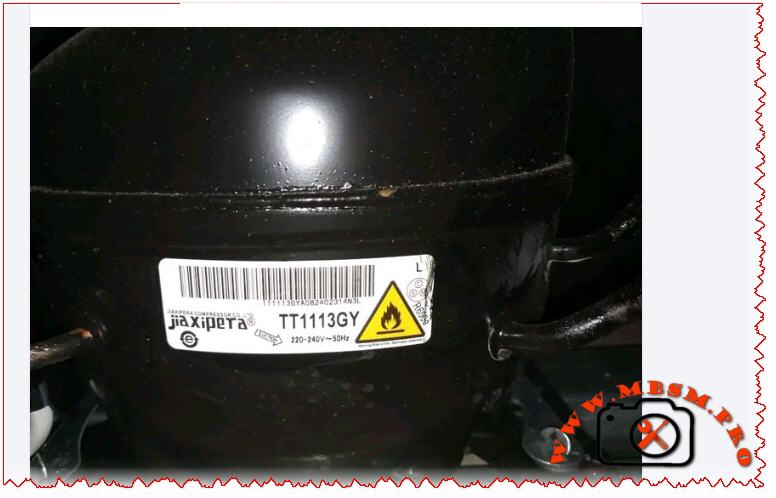
Compressor, Jiaxipera, TT1113GY, 1/5 hp

mbmpro-2026-01-13_225248-mbsmpro mbsmpro


Mbsmpro.com, Compressor, Jiaxipera, TT1113GY, 1/5 hp, Cooling, R600a, 183 W, 1Ph, 220-240V 50Hz, LBP, RSCR/RSIR, -35°C to -15°C, cooling or freezing

The Engineering Standard: Technical Analysis of the Jiaxipera TT1113GY Compressor

In the modern refrigeration landscape, precision engineering and environmental sustainability are no longer optional—they are foundational. The Jiaxipera TT1113GY stands at the forefront of this evolution, serving as a high-performance <u>Low Back Pressure (LBP)</u> compressor optimized for the eco-friendly R600a refrigerant. Designed for residential refrigerators and high-efficiency chest freezers, this unit exemplifies the shift toward high volumetric efficiency and low acoustic impact.

Technical Specifications and Thermodynamic Characteristics

The TT1113GY is built on a robust platform that balances power density with thermal stability. Below are the definitive parameters for technicians and refrigeration engineers:

Feature Detailed Specification
Manufacturer Jiaxipera Compressor Co., Ltd
Model TT1113GY
Horsepower (HP) 1/5 HP
Refrigerant Type R600a (Isobutane)
Cooling Capacity (-23.3°C ASHRAE) 183 Watts (624 BTU/h)
Displacement 11.3 cm³
Power Supply 220-240V ~ 50Hz (Single Phase)
Motor Type RSCR / RSIR (Dependent on Start Device)
Cooling Type Static Cooling (S)
Application Range LBP (-35°C to -15°C)
Oil Charge 180 ml (Mineral / Alkylbenzene)

Comparative Analysis: Displacement vs. Cooling Efficiency

When evaluating the <u>TT1113GY</u> against legacy R134a systems, the difference in displacement volume is striking. R600a compressors require larger cylinders to achieve the same cooling capacity due to the lower gas density of isobutane.

  • Jiaxipera TT1113GY (R600a): 11.3 cm³ displacement produces 183W.
  • Standard R134a Equivalent: A similar capacity often requires only 7.0 – 8.5 cm³.

This increase in displacement is countered by a significantly higher COP (Coefficient of Performance). While older R134a models might operate at a COP of 1.15 W/W, the Jiaxipera TT1113GY typically achieves values between 1.35 and 1.50 W/W, drastically reducing electricity consumption in domestic applications.

Electrical Schema and Connection Protocols

For professionals in the field, understanding the electrical architecture is vital for system safety. The unit employs a single-phase induction motor with a split-phase winding.

  • Main Winding (M): Low resistance, carries the running load.
  • Start Winding (S): Higher resistance, used during the initial acceleration.
  • Safety Tip: The use of a PTC (Positive Temperature Coefficient) starter is standard. When upgrading to RSCR (Resistance Start Capacitor Run) mode, a run capacitor (usually 4µf – 5µf) must be integrated across the ‘S’ and ‘R’ terminals to further improve electrical efficiency and lower the running amperage.

Comparison with Competitive LBP Models

Brand & Model Gas HP Displacement Output (Watts)
Jiaxipera TT1113GY R600a 1/5 11.3 cc 183 W
Secop NLE11KK.4 R600a 1/4 11.1 cc 191 W
Embraco EMX70CLC R600a 1/5+ 11.1 cc 182 W
Huayi HYB11.5 R600a 1/4 11.5 cc 188 W

Engineering Best Practices: Advice and Benefits

Operating with <u>R600a (Isobutane)</u> requires a heightened level of awareness due to its flammability (A3 safety classification).

  1. Vacuum Procedure: Always pull a vacuum down to 200 microns. Moisture in an R600a system with mineral oil can cause rapid mechanical acidification.
  2. Copper-Aluminum Joints: Ensure vibration dampeners are secure. The 11.3cc stroke creates significant torque oscillation; poorly brazed joints will leak over time.
  3. Filtration: Utilize a filter drier specifically labeled for XH-9 molecular sieves to maintain refrigerant purity.
  4. No Flame Braze: In field repair environments, ultrasonic welding or Lokring technology is preferred for sealing R600a process tubes to eliminate the risk of explosion.

Benefits of the Jiaxipera TT1113GY:

  • Ultra-Quiet Performance: Specially damped valve plates reduce “click” noises during startup.
  • Global Standard Compliance: Fully meets ROHS and CE regulations for environmental safety.
  • Energy Efficiency: Direct contribution to reaching A++ or A+++ energy ratings in residential refrigerators.

mbmpro-2026-01-13_225248-mbsmpro mbsmpro

Focus keyphrase: Jiaxipera TT1113GY compressor 1/5 hp R600a LBP refrigeration technical specifications and performance analysis for cooling efficiency

SEO title: Mbsm.pro, Compressor, Jiaxipera, TT1113GY, 1/4 hp, R600a, 183 W, LBP

Meta description: Professional technical guide for the Jiaxipera TT1113GY compressor. 1/4 HP, R600a, 183W capacity at 50Hz. Ideal for high-efficiency LBP cooling and freezing systems.

Slug: mbsmpro-compressor-jiaxipera-tt1113gy-1-4-hp-r600a-specifications

Tags: Mbsmgroup, Mbsm.pro, mbsmpro.com, mbsm, Jiaxipera, TT1113GY, R600a, 1/4 HP Compressor, Refrigeration Engineering, LBP Compressor, Isobutane Fridge, HVAC Repair

Excerpt: The Jiaxipera TT1113GY is a high-performance hermetic compressor engineered for Low Back Pressure applications using R600a (Isobutane). Featuring a 11.3 cm³ displacement and a cooling capacity of 183 Watts, it represents the gold standard for modern energy-efficient refrigeration, offering exceptional reliability and reduced acoustic emissions in the domestic market.


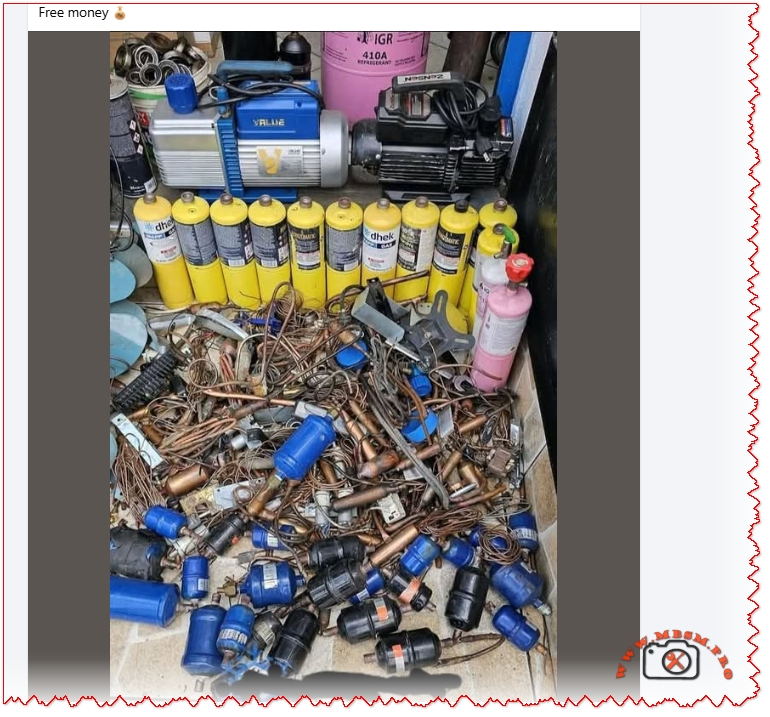
Free money Copper

Free money Copper mbsmpro


Focus Keyphrase for Google SEO:

HVAC Refrigeration Scrap Recovery Copper Filter Drier Recycling Vacuum Pump R410A Maintenance Brazing Tools

SEO Title:
Mbsmpro.com, HVAC Tools and Scrap, Filter Drier, Copper, Vacuum Pump 2 Stage, R410A Cylinder, Mapp Gas, Maintenance, Recycling, Technical Data

Meta Description:
Comprehensive guide to HVAC refrigeration component recovery. Analysis of copper filter driers, vacuum pump specifications, brazing with MAPP gas, and sustainable recycling practices for technicians.

Slug:
hvac-refrigeration-scrap-recovery-copper-filter-drier-tools

Add Tag:
Copper Recycling, Filter Drier, HVAC Tools, Vacuum Pump, R410A, Brazing, Scrap Metal, Compressor Replacement, Maintenance, Mbsmgroup, Mbsm.pro, mbsmpro.com, mbsm

Excerpt:
In the world of refrigeration maintenance, a pile of discarded components tells a story of hard work and technical precision. Every replaced filter drier represents a saved compressor, and every vacuum pump represents a system brought down to perfect microns. This guide explores the technical value behind HVAC scrap and the essential tools used in the trade.


Mbsmpro.com, HVAC Tools and Scrap, Filter Drier, Copper, Vacuum Pump 2 Stage, R410A Cylinder, Mapp Gas, Maintenance, Recycling, Technical Data

When a refrigeration technician looks at a workshop floor, they don’t just see clutter; they see the lifecycle of thermodynamic systems. The accumulation of copper filter driers, the hum of high-performance vacuum pumps, and the distinct yellow canisters of brazing gas are the hallmarks of a busy season. Whether it is replacing a burnt-out compressor or performing a system flush, managing these materials is not just about waste—it is about resource recovery and engineering integrity.

The Hidden Value in Filter Driers

The most abundant item in any refrigeration scrap pile is often the filter drier. These components are critical for the health of a cooling system, acting as the kidney of the refrigeration cycle. They trap moisture, acid, and solid debris.

When scrapping or replacing these, it is vital to understand what they are made of. Most residential and light commercial driers have a copper shell, while larger industrial ones are steel. The “free money” aspect comes from the high-grade copper used in the spun copper driers. However, for the engineer, the value is in understanding why they failed.

Technical Composition of a Filter Drier

Component Material Function Recycling Potential
Shell Spun Copper or Steel Pressure containment High (Copper is valuable)
Desiccant Molecular Sieve (Zeolite) Absorbs water/acid None (Hazardous waste)
Screen Stainless Steel / Brass Filters particulates Low
Connections Copper Brazing points High

Engineering Notice: Never reuse a filter drier. Once exposed to the atmosphere, the molecular sieve reaches saturation within minutes. A saturated drier releases moisture back into the system, creating hydrofluoric acid which destroys compressor windings.

The Heart of Evacuation: Vacuum Pumps

The presence of robust vacuum pumps, such as the dual-stage rotary vane pumps often seen in professional setups (like the blue “Value” series), indicates a commitment to deep vacuums.

A vacuum pump is not just an air mover; it is a dehydration tool. By lowering the pressure inside the refrigeration circuit below 500 microns, water boils off at room temperature and is exhausted as gas.

Comparison: Single Stage vs. Dual Stage Pumps

Feature Single Stage Pump Dual Stage Pump (Recommended)
Ultimate Vacuum ~75 Microns ~15 Microns
Efficiency Lower High (Faster evacuation)
Application Automotive / Small A/C Refrigeration / Deep Freeze / R410A
Oil Sensitivity Less sensitive Requires clean oil for max performance

Maintenance Tip: The oil in a vacuum pump is hygroscopic. If the oil looks milky or cloudy, it is saturated with moisture and cannot pull a deep vacuum. Change the oil immediately after every wet system evacuation.

Brazing and joining: Mapp Gas vs. Propane

For joining the copper lines of filter driers or compressors, standard propane is often insufficient due to its lower burn temperature. MAPP gas (Methyl Acetylene-Propadiene Propane) or “Map/Pro” replacements are the standard for field service.

Yellow cylinder gas burns significantly hotter than blue propane cylinders, allowing the technician to melt silver solder (15% to 45% silver content) rapidly without overheating the surrounding components.

  • Propane Temperature in air: ~1,980°C (3,596°F)
  • MAPP Gas Temperature in air: ~2,925°C (5,300°F)

Safety Protocol: When brazing near a Schrader valve or a service port, always remove the valve core or use a wet rag (heat sink) to prevent the rubber seals from melting.

R410A: Handling High-Pressure Refrigerants

The pink cylinders generally indicate R410A, a hydrofluorocarbon (HFC) refrigerant. Unlike the older R22, R410A operates at pressures approximately 60% higher. This dictates that all tools—manifold gauges, hoses, and recovery tanks—must be rated for these higher pressures.

Recovery and Recycling:
Venting refrigerant is illegal and unethical. Recovered R410A must be stored in DOT-approved recovery cylinders (usually gray with a yellow shoulder) and sent to reclamation facilities. The pink disposable tanks should strictly be used for charging, not recovery, as they lack overfill protection sensors.

Maximizing Copper Recovery (The “Free Money” Aspect)

For the technician looking to liquidate scrap, segregation is key. A mixed pile of steel and copper yields the lowest return.

  1. Cut the Ends: Use a tubing cutter to remove the copper capillary tubes or connection pipes from steel-bodied driers.
  2. Separate Brass: If there are expansion valves or service valves, separate the brass from the copper.
  3. Clean Copper: Tubing should be free of insulation (Armaflex) and heavy solder joints for the best grade classification (often called #1 Copper vs. #2 Copper).

Conclusion

The messy pile of copper, worn-out tools, and empty gas canisters is the byproduct of thermal comfort. For the expert, it represents a cycle of diagnosis, repair, and renewal. Whether you are recovering resources for recycling or evacuating a system to 200 microns, precision and material knowledge are your most valuable assets.


Exclusive Comparison: Filter Drier Types

This table assists in selecting the correct drier to replace the scrap units.

Type Application Desiccant Blend Direction
Liquid Line Drier Placed after condenser 100% Molecular Sieve (or blend) Uni-directional
Suction Line Drier Placed before compressor High Activated Alumina (Acid cleanup) Bi-directional (Heat Pump) or Uni
Spun Copper Domestic fridges/freezers Molecular Sieve beads Uni-directional
Free money Copper mbsmpro


855AWP-1A-C2 30A power relay

855AWP-1A-C2 30A power relay mbsmpro

Focus Keyphrase: Song Chuan 855AWP-1A-C2 12V DC 30A Power Relay Technical Specifications and HVAC Applications

SEO Title: Mbsm.pro, Song Chuan 855AWP-1A-C2, 12V DC, 30A, Power Relay, 240VAC, SPST-NO, High Current Control

Meta Description: Discover the technical depth of the Song Chuan 855AWP-1A-C2 30A power relay. This guide covers its 12V DC coil specifications, wiring schematics, and high-performance industrial applications.

Slug: song-chuan-855awp-1a-c2-12v-30a-power-relay-specs

Tags: Song Chuan, 855AWP-1A-C2, Power Relay, 12VDC Relay, 30A Relay, Mbsmgroup, Mbsm.pro, mbsmpro.com, mbsm, HVAC Controls, Electronic Components, Industrial Switching, PCB Relay

Excerpt: The Song Chuan 855AWP-1A-C2 is a high-performance 30A power relay designed for demanding electrical environments requiring robust 12V DC coil actuation. Primarily used in HVAC systems and heavy-duty industrial controls, this relay ensures reliable switching for loads up to 240VAC. This comprehensive guide provides essential technical insights, wiring configurations, and engineering advice for professionals.


Mbsmpro.com, Relay, Song Chuan, 855AWP-1A-C2, 12VDC, 30A, 240VAC, SPST-NO, Power Switching, HVAC, PCB Mount

In the realm of power electronics and industrial automation, the reliability of a switching component determines the longevity of the entire system. The Song Chuan 855AWP-1A-C2 stands as a benchmark for high-current PCB relays. Engineered for heavy-duty applications, this 30A power relay is a critical component for technicians and engineers dealing with heating, ventilation, air conditioning (HVAC), and automotive power management.

Technical Core and Engineering Excellence

The 855AWP series is specifically designed to handle high inrush currents. The “1A” designation indicates a Single Pole Single Throw – Normally Open (SPST-NO) contact arrangement. This means the circuit remains open until the 12V DC coil is energized, making it ideal for safety-critical “start-up” sequences in motors and compressors.

Key Technical Specifications

Feature Specification Details
Manufacturer Song Chuan (Xong Chuan)
Model Number 855AWP-1A-C2
Coil Voltage 12V DC
Contact Rating 30A @ 240V AC / 30A @ 30V DC
Contact Material Silver Tin Oxide (AgSnO)
Configuration 1 Form A (Normally Open)
Termination PCB Terminals with Quick Connect options
Operating Temperature -40°C to +85°C
Dielectric Strength 2,500V AC (between coil and contacts)

Internal Schematic and Wiring Logic

Understanding the internal architecture is vital for proper PCB layout and field replacement. The 855AWP-1A-C2 features a simple but robust internal mechanism.

  1. Coil Terminals (Control Side): These are the two pins that receive the 12V DC signal. When energized, the electromagnetic field pulls the armature to close the load circuit.
  2. Load Terminals (Switch Side): These high-gauge terminals handle the 30A current. In most industrial applications, these are reinforced to prevent pitting and arcing.

<u>Expert Engineering Tip: When switching inductive loads (like a fan motor or a compressor), always use a flyback diode (e.g., 1N4007) across the DC coil to prevent back-EMF voltage spikes that could damage your control circuit.


Comparative Analysis: 30A vs. Standard 10A Relays

Field workers often ask if a standard relay can be substituted. The answer is usually no. The 855AWP-1A-C2 offers significantly different thermal management.

Parameter Standard General Purpose Relay Song Chuan 855AWP-1A-C2
Max Current 10A – 15A 30A
Contact Resistance Moderate Ultra-Low (to prevent heat)
Expected Life (Mechanical) 1,000,000 cycles 10,000,000 cycles
Typical Use Light lighting/Signals Compressors / Industrial Heaters
Housing Standard Plastic High-Temp Flux Tight (C2 Rating)

<u>Industrial Applications and Best Practices</u>

This relay is a “workhorse” found in various sectors. Its ability to switch high AC voltages with a low DC control signal makes it indispensable.

  • HVAC Systems: Controlling the outdoor condenser fan or the auxiliary heating element.
  • Power Supplies: Serving as the main disconnect for high-wattage UPS systems.
  • Automotive Aftermarket: Managing high-power light bars, winches, or specialized cooling fans.
  • Industrial Automation: Acting as an interface between a low-power PLC output and a heavy motor starter.

Engineer’s Notice & Safety Advice

  • Avoid Overloading: While rated for 30A, running at the absolute limit for extended periods generates heat. For continuous loads (running 3+ hours), it is best practice to derate the relay to 24A (80% rule).
  • Check Soldering Integrity: Because this component carries high current, cold solder joints on a PCB can cause high resistance, leading to the relay melting the board itself. Use high-quality solder and ensure the traces are thick enough for 30A.
  • Environment: The “C2” rating indicates a flux-tight construction. However, in extremely dusty or humid environments, ensure the relay is housed in an appropriately rated NEMA enclosure.

Technical Resources and Data Links

For deep technical integration, we recommend reviewing the manufacturer’s original data sheets to verify timing diagrams and vibration resistance.

  • Official Catalog: Song Chuan Power Relay Series (855AWP PDF) (Note: External link, verify security upon clicking).
  • Cross-Reference Guide: Many technicians use Omron or TE Connectivity equivalents; however, the pinout of the 855AWP-1A-C2 is specific to its high-current capability.

Summary for Field Technicians: If you encounter a failure in a 12V control board managing a heavy compressor, the Song Chuan 855AWP-1A-C2 is your most reliable replacement choice. Its high dielectric strength and silver tin oxide contacts ensure that it will withstand the rigors of thousands of cycles without contact welding.

855AWP-1A-C2 30A power relay mbsmpro


78XX IC Family, Voltage Regulator

78XX IC Family, Voltage Regulator mbsmpro

Mbsmpro.com, 78XX IC Family, Voltage Regulator, 7805, 7806, 7808, 7810, 7812, 7815, 7818, 7824, 5V, 6V, 12V, 15V, 24V, Linear Regulator, 1.5A, Thermal Protection


78XX Voltage Regulator Family: Complete Technical Guide & Applications

The 78XX series is one of the most widely adopted family of linear voltage regulators in electronics. These three-terminal ICs have powered countless consumer devices, industrial systems, and hobbyist projects since their introduction decades ago. From a simple 5V supply for microcontrollers to a robust 24V rail for automation, the 78XX family delivers fixed regulated voltage with minimal external components.

Whether you are designing a power supply, troubleshooting an embedded system, or maintaining legacy equipment, understanding the 78XX lineup—including the 7805, 7812, 7815, 7824, and their companions—is essential knowledge.


What Is the 78XX Voltage Regulator?

voltage regulator is an electronic component that maintains a constant output voltage despite fluctuations in the input supply or changes in the load current. The 78XX family does this using a linear approach: it essentially acts as an intelligent resistor, dropping excess input voltage while supplying current at the regulated output level.

The “78XX” designation is a naming convention:

  • “78” indicates a positive voltage regulator (as opposed to 79XX for negative regulators).
  • “XX” is replaced by two digits representing the output voltage.

For example:

  • 7805 = 5 V output
  • 7812 = 12 V output
  • 7824 = 24 V output

Complete 78XX Series Specifications & Voltage Breakdown

Below is the definitive reference table for the standard 78XX family, showing all available output voltages, input requirements, and current capability.

IC Model Output Voltage (V) Min Input Voltage (V) Max Input Voltage (V) Typical Output Current (A) Package Typical Application
7805 5.0 7.0 25 1.5 TO-220, TO-3 Microcontroller, logic circuits, SPI devices
7806 6.0 8.5 25 1.5 TO-220 Audio preamplifier, sensor supply
7808 8.0 10.5 25 1.5 TO-220 Industrial sensor supply, panel meters
7810 10.0 12.5 28 1.5 TO-220 Analog circuits, operational amplifier supply
7812 12.0 14.5 30 1.5 TO-220, TO-3 Automotive applications, motor logic control
7815 15.0 17.5 30 1.5 TO-220, TO-3 Industrial automation, TTL logic systems
7818 18.0 20.0 35 1.5 TO-220 Audio amplifier supplies, high-voltage relay logic
7824 24.0 27.0 38 1.5 TO-220, TO-3 Solenoid driver supplies, PLCs, high-power circuits

Key observations:

  1. Output voltage range spans from 5 V to 24 V, covering nearly all common digital and analog supply voltages.
  2. Input voltage must exceed output by at least 2–3 V (called the dropout voltage). For example, the 7805 requires minimum 7 V input to reliably deliver 5 V.
  3. All variants provide up to 1.5 A continuous output current, making them suitable for moderate-power applications.
  4. Larger output voltages (7815, 7824) allow higher maximum input voltage, useful in industrial environments.

78XX Internal Architecture & Operating Principle

The 78XX IC is a monolithic linear regulator, meaning all components are integrated on a single silicon die. Here is how it works internally:

Functional Block Diagram (Conceptual)

text┌─────────────────────────────────────────────────────────┐
│                    78XX Voltage Regulator               │
│                                                         │
│  Input  ──┬─→ [Reference      ┌──→ [Error Amp]       │
│  (Vin)    │    Voltage Diode]  │    Comparator     Output
│           │    ~ 1.25V         │    & Driver    ┬──→ (Vout)
│           │                    │                │
│  Ground ──┴────────────────────┴────────────────┴─→ (GND)
│           │                                     │
│           └─ [Pass Transistor (Darlington)]────┘
│           │    Current Limiting & Thermal      │
│           │    Protection Circuit              │
│           └──────────────────────────────────────┘
│                                                         │
└─────────────────────────────────────────────────────────┘

How it regulates:

  1. Reference Voltage: An internal Zener diode generates a stable ~1.25 V reference.
  2. Error Amplifier: Continuously compares the output voltage (via a voltage divider) against the reference.
  3. Pass Transistor: A high-power Darlington transistor acts as a dynamic resistor, adjusting its resistance to maintain constant output voltage.
  4. Feedback Loop: If output voltage rises, the error amp reduces pass transistor conductance (increases resistance). If output falls, it increases conductance. This negative feedback keeps output voltage rock-steady.

Built-in protection circuits:

  • Current Limiting: If load current exceeds ~2.2 A (typical), internal circuitry reduces the pass transistor bias, preventing damage.
  • Thermal Shutdown: If junction temperature exceeds ~125 °C, the regulator shuts down until cooling.
  • Short-Circuit Protection: If output is shorted to ground, the current limiter engages immediately.

78XX Device Comparison: Series-by-Series Breakdown

Understanding the differences and similarities helps you choose the right device for your design.

78XX vs. 79XX (Negative Regulators)

Feature 78XX (Positive) 79XX (Negative)
Output polarity Positive voltage Negative voltage
Ground reference Ground is 0 V Ground is 0 V, output below ground
Typical use Most digital logic, microcontroller power Dual-supply op-amp circuits, symmetrical supplies
Pin configuration IN / GND / OUT (left to right) IN / GND / OUT (same order)
Examples 7805 (5V), 7812 (12V) 7905 (−5V), 7912 (−12V)

78XX vs. LM317 (Adjustable Regulator)

Aspect 78XX (Fixed) LM317 (Adjustable)
Output voltage Fixed (e.g., 5V, 12V) User-adjustable via resistor divider
External parts Minimal (2 capacitors) More components (2 resistors + 2 capacitors)
Design flexibility Low; choose IC for desired voltage High; one IC, many output voltages
Design complexity Beginner-friendly Intermediate
Quiescent current ~3–5 mA ~3–5 mA
Max output current 1.5 A (1 A for 78L variant) 1.5 A (higher for LM350/LM338)

Physical Packages: TO-220 vs. TO-3

The 78XX is available in different packages, each suited to specific thermal and space constraints.

TO-220 Package (Most Common)

  • Dimensions: Roughly 10 mm × 5 mm × 5 mm tall.
  • Pins: Three leads (IN, GND, OUT).
  • Mounting: Can be soldered to PCB directly or mounted on a small heatsink.
  • Thermal resistance (package only): ~50–65 °C/W (case to ambient without heatsink).
  • Best for: General-purpose designs, moderate power dissipation (<2 W).

TO-3 Package (High-Power)

  • Dimensions: Larger, roughly 25 mm × 10 mm.
  • Mounting tab: Large metal collector tab for heatsink mounting (provides excellent thermal path).
  • Thermal resistance (with heatsink): ~1–2 °C/W (when mounted on large finned heatsink).
  • Best for: Industrial applications, sustained high current (approaching 1.5 A), harsh environments.

Field note: A 7805 in TO-220 without a heatsink can dissipate only ~500 mW before overheating. The same IC in TO-3 with a proper heatsink can safely handle 10+ watts of continuous dissipation.


Step-by-Step: How to Design a Simple 78XX Power Supply

Example: 12V / 1.5A Regulated Supply Using 7812

Components needed:

Component Value Purpose
Transformer (T1) 18 VAC, 2 A Step down mains voltage
Bridge Rectifier (D1–D4) 1N4007 (or 1N4004) × 4, or bridge module Convert AC to pulsating DC
Filter Capacitor (C1) 2200 µF, 35 V (electrolytic) Smooth rectified voltage
Input Bypass (C2) 0.33 µF ceramic Reduce high-frequency noise at 7812 input
Output Bypass (C3) 0.1 µF ceramic Reduce output ripple
IC1 LM7812 (or 7812 variant) Voltage regulator
Heatsink Aluminum fin, ~1 K/W Thermal management for 7812
Output LED (optional) 5 mm red LED + 1 kΩ resistor Power indicator
Fuse (F1) 2 A slow-blow Protection

Circuit Operation:

  1. AC Input (18 VAC): From transformer secondary.
  2. Rectification: Bridge diode converts AC to ~25 VDC (peak), with ripple.
  3. Filtering: Large capacitor (2200 µF) smooths to ~20–22 VDC steady-state (ripple ~2–3 V).
  4. Regulation: LM7812 inputs 20–22 VDC, outputs stable 12.0 VDC.
  5. Output: Clean 12 V can power logic, relays, or motors.

Thermal calculation:

  • Input: 20 V, Output: 12 V → Voltage drop = 8 V
  • Load current: 1 A (worst case)
  • Power dissipation in IC: P = (20 − 12) × 1 = 8 watts
  • Using a 1 °C/W heatsink: Temperature rise = 8 W × 1 °C/W = 8 °C
  • If ambient = 25 °C → Junction ≈ 33 °C ✓ (well below 125 °C limit)

Essential Capacitor Selection for 78XX Designs

Capacitors at the input and output are not optional—they are essential for stable, noise-free operation.

Input Bypass Capacitor (C_in)

Specification Typical Value Notes
Value 0.33 µF ceramic or polyester Blocks high-frequency noise from upstream transformer/rectifier.
Voltage rating At least 50 V (to handle max input voltage) Safety margin is important.
Type Ceramic (X7R dielectric preferred) or film (Mylar) Avoid electrolytic here; ESR may be excessive.
Placement Within 1 cm of 7805 input pin Short leads reduce noise coupling.

Why: Without C_in, AC ripple from the rectifier can cause regulation errors and introduce noise into the output.

Output Bypass Capacitor (C_out)

Specification Typical Value Notes
Value 0.1–0.47 µF ceramic Stabilizes 7805 against transient load changes.
Voltage rating At least 25 V (output voltage + margin) 35 V ceramic is standard.
Type Low-ESR ceramic (X7R, 100 nF–470 nF) Electrolytic capacitors are NOT recommended; high ESR causes instability.
Placement Within 1 cm of 7805 output pin, and load Keeps parasitic inductance minimal.

Why: Output capacitor provides fast current during load transients (e.g., when a microcontroller suddenly draws peak current). Without it, output voltage sags momentarily, risking microcontroller brownout or data corruption.


Heat Dissipation & Thermal Design

The 78XX dissipates as much power as it must “drop” across its internal pass transistor. This heat must be conducted away, or the regulator will shut down.

Thermal Resistance Chain

textJunction Temperature (Tj)
        ↓
    ΔT_JC (junction to case)
        ↓
    ΔT_CS (case to sink)
        ↓
Heatsink Temperature (Th)
        ↓
    ΔT_SA (sink to ambient)
        ↓
Ambient Temperature (Ta)

Practical Example: 7812 Regulator in Hot Environment

Given:

  • Output voltage: 12 V
  • Input voltage: 24 V
  • Load current: 1 A
  • Ambient temperature: 45 °C (hot climate)
  • Maximum allowed junction temperature: 125 °C

Calculate:

  1. Power dissipation: P = (V_in − V_out) × I = (24 − 12) × 1 = 12 watts
  2. Thermal budget: ΔT_max = 125 − 45 = 80 °C
  3. Required total thermal resistance: R_θ_total = ΔT / P = 80 / 12 ≈ 6.7 °C/W
  4. Thermal path breakdown (TO-220 package):

    • Junction to case (R_θ_JC): ~5 °C/W (device dependent)
    • Case to sink (R_θ_CS): ~0.5 °C/W (with thermal grease on clean surface)
    • Remaining for sink: 6.7 − 5.5 = 1.2 °C/W

  5. Heatsink requirement: Must be ≤1.2 °C/W to ambient.

    • A typical aluminum fin heatsink in still air provides ~2–3 °C/W.
    • fan-cooled or liquid-cooled heatsink provides ~0.5–1 °C/W.

Conclusion: For 12 W dissipation in a 45 °C ambient, a small passive aluminum heatsink + forced-air fan is required to stay within safe temperature limits.


Comparison: 78XX vs. Modern Switching Regulators

The 78XX is old, but still relevant. Here is how it compares to modern alternatives:

Aspect 78XX Linear LM2596 / MP1584 Buck (Modern Switching)
Efficiency 40–50% (loses much energy as heat) 85–95% (minimal heat dissipation)
Heat management Heatsink often required for >1 W Tiny heatsink or none needed
Noise performance Very quiet (no switching noise) Some ~500 kHz ripple (acceptable for most)
Cost $0.30–$1.00 $2–$5
Component count 2–3 components 8–15 components (higher PCB complexity)
Design simplicity Extremely easy (beginner-friendly) Moderate (requires inductor selection, PCB layout care)
EMI emission Very low Moderate (requires filtering)
Line/load regulation ±2–3% typical ±0.5–1% typical (better)
Reliability Proven over 40+ years Proven in last 10–15 years

When to use 78XX: Simple designs, low current (<500 mA), noise-sensitive analog circuits, hobby projects, rapid prototyping.

When to use switching regulators: Battery-powered equipment, space-constrained designs, high-power supplies (>5 W), efficiency-critical systems.


Real-World Applications of 78XX Regulators

1. Microcontroller Power Supply

A hobby project using an Arduino or PIC microcontroller typically uses a 7805 to supply clean 5V to the logic circuits and sensors.

Typical schematic:

  • Unregulated supply (9–12 V from USB or battery) → 7805 → Arduino (5V rail)
  • Minimal external components; occupies <1 cm² of PCB.

2. Industrial Motor Control Panel

7812 or 7815 provides the supply for PLC logic, relay drivers, and sensor inputs in an automated manufacturing system.

Design considerations:

  • Input derived from 24 VDC industrial bus.
  • Large heatsink due to sustained load.
  • Extra filtering to reject switching noise from motor VFDs.

3. Audio Preamplifier or Op-Amp Circuit

Dual 7905 / 7805 (or 79X5 / 78X5 pair) create a ±5V symmetrical supply for high-quality audio amplification.

Benefit: The low-noise output of the 78XX makes it ideal for audio preamps, avoiding hum and distortion.

4. Legacy Equipment Service

Older industrial equipment (1990s–2000s) used 78XX extensively in their power supplies. Technicians repairing or rebuilding such equipment must understand the 78XX thoroughly.


Troubleshooting 78XX Problems

Symptom: No Output Voltage

Possible Cause Diagnosis Solution
Regulator not powered Check input voltage with multimeter Verify upstream supply and connections
Input capacitor shorted Measure voltage across C_in Replace with correct voltage-rated part
Regulator overheated (thermal shutdown) Feel the IC—is it very hot? Check load current, improve heatsinking, verify input voltage
IC itself failed (rare) Input OK, output open circuit Replace IC; test in known-good circuit

Symptom: Output Voltage Too Low

Possible Cause Diagnosis Solution
Excessive load current Measure current with clamp meter Load exceeds 1.5 A; use higher-rating supply
Input voltage too low Measure V_in; compare to minimum for that IC Increase input voltage (must be ≥ V_out + 2 V)
Output shorted or nearly shorted Measure output resistance Remove short; check for solder bridges, damaged components
Output capacitor failed (high ESR) Observe ripple on scope; may be excessive Replace output capacitor with low-ESR ceramic

Symptom: Output Voltage Too High

Possible Cause Diagnosis Solution
Wrong IC selected (e.g., 7815 instead of 7812) Check IC markings carefully Identify and replace with correct model
Open circuit in feedback path (unlikely in fixed-output) Very rare; would require internal IC failure Replace regulator

Professional Design Tips & Best Practices

  1. Always use bypass capacitors. Do not skip them, even in “test” circuits. Many circuit failures trace back to missing or wrong capacitors.
  2. Mount heatsink before power-on testing. Even a short 1–2 minute test without heatsinking can destroy a 78XX under load.
  3. Use thermal compound. A small dab of thermally conductive grease between IC and heatsink dramatically improves heat transfer.
  4. Check component datasheets. Manufacturers (ST Microelectronics, TI, ON Semiconductor) provide detailed thermal and electrical specs; not all 78XX variants are identical.
  5. Protect against reverse polarity. If input can be reversed, add a 1N4007 diode in series with the input (cathode toward 7805) to prevent reverse voltage damage.
  6. Use a dropout voltage margin. Design so that minimum input is at least 3 V above the rated output under worst-case conditions (supply sag, load surge).
  7. PCB layout matters. Keep input and output capacitor leads short; use ground planes to reduce noise coupling.

Focus Keyphrase (≤191 characters)

78XX voltage regulator family 7805 7812 7815 7824 linear IC, fixed positive output 1.5A, thermal protection, datasheet specifications, power supply circuit design


SEO Title

78XX Voltage Regulator Family: 7805, 7812, 7815, 7824 – Complete Specifications, Circuit Design & Applications | Mbsmpro.com


Meta Description

Complete guide to the 78XX voltage regulator family. Learn 7805, 7812, 7815, 7824 specifications, pinouts, thermal design, circuit applications, capacitor selection, and troubleshooting for fixed regulated power supplies.


Slug

78xx-voltage-regulator-family-7805-7812-7815-specifications-guide


Tags

78XX voltage regulator, 7805, 7812, 7815, 7824, linear voltage regulator, LM78XX family, positive voltage regulator, regulated power supply, TO-220 TO-3 package, thermal management, power supply design, microcontroller power, industrial supply, Mbsmgroup, Mbsm.pro, mbsmpro.com, mbsm, voltage regulation circuit


Excerpt (first 55 words)

The 78XX series is the industry-standard family of linear voltage regulators, providing fixed regulated output from 5V to 24V at up to 1.5A. This comprehensive guide covers the 7805, 7812, 7815, and 7824 variants, their specifications, internal architecture, thermal design, practical circuit applications, and professional troubleshooting tips for reliable power supply design.

78XX IC Family, Voltage Regulator mbsmpro


Kelvinator Inverter AC, Error

Kelvinator Inverter AC, Error mbsmpro

Mbsmpro.com, Kelvinator Inverter AC, Error Codes, E1, E2, E3, E4, E0, E6, F1, F2, F3, F4, F5, F6, F7, F8, F9, E8, Troubleshooting, Fault Diagnosis, Communication Error, Compressor Protection


Understanding Kelvinator Inverter AC Error Codes – Complete Diagnostic Guide

When your Kelvinator inverter split air conditioner displays an error code on the indoor unit, it is sending a critical diagnostic message. These codes—whether they appear as E‑series (E0, E1, E2, E3, E4, E6, E8) or F‑series (F1, F2, F3, F4, F5, F6, F7, F8, F9)—indicate specific faults in the refrigeration, electrical, or control systems.

Understanding what each code means empowers you to take quick action, communicate accurately with service technicians, and sometimes resolve issues without costly repairs. This guide breaks down every major error code found in Kelvinator inverter systems, the underlying causes, and professional troubleshooting steps.


Why Error Codes Matter in Inverter AC Design

Modern Kelvinator inverter air conditioners use sophisticated microprocessor controls and wireless communication between indoor and outdoor units. Unlike older fixed‑speed units, inverter models continuously adjust compressor speed to match cooling demand, saving energy but adding complexity.

When a sensor fails, a connection breaks, or the IPM module (Intelligent Power Module) overheats, the system detects the abnormality and triggers a protective shutdown with an error code display. This is not a failure of the system—it is the system protecting itself from damage.

Field technicians and homeowners who recognize these codes can:

  • Perform targeted checks (e.g., verify wire connections for E6 codes)
  • Know whether to clean filters, reset the unit, or call for service
  • Provide accurate fault information to repair professionals
  • Prevent cascading damage from overlooked issues

E‑Series Error Codes: Indoor and System‑Level Faults

The E codes generally cover sensor malfunctions, communication breakdowns, and refrigeration protection triggers. Below is the complete breakdown.

EE – EEPROM Loading Malfunction

Aspect Details
What it means The internal memory chip (EEPROM) that stores configuration data cannot be read or written properly.
Common causes Power surge damage, faulty main control PCB, corrupted memory data after abnormal shutdown.
What to do Power off for 15–30 minutes to reset memory. If it persists, contact authorized service; PCB replacement may be needed.
Field note This code suggests electrical stress has occurred; inspect the power supply and consider surge protection.

E1 – Indoor Fan Fault

Aspect Details
What it means The indoor unit blower fan is not running, running intermittently, or has seized.
Common causes Motor winding open circuit, capacitor failure, ice on coil blocking fan rotation, dust accumulation, loose wiring.
What to do 1. Check if the filter is clogged (clean if needed). 2. Listen for any grinding noise (seized bearing). 3. Visually inspect the fan blade for ice or debris. 4. If still blocked, turn off and call service.
Field note E1 is among the most frequent codes in tropical climates due to rapid ice formation during high humidity.

E2 – Indoor Fan Zero‑Crossing Detection Abnormal

Aspect Details
What it means The control board cannot properly detect the fan speed signal (electrical switching transitions).
Common causes Loose wire at the fan motor, faulty fan capacitor, wiring harness disconnection, moisture in the motor connector.
What to do 1. Power off the unit. 2. Check all wire connections at the indoor fan motor. 3. Dry any wet connectors and ensure firm seating. 4. Power on and observe. 5. If code returns, the fan motor or capacitor requires replacement.
Field note Often occurs after extended high‑humidity operation or recent water leak in the unit.

E3 – Indoor Coil Sensor Fault

Aspect Details
What it means The temperature sensor on the indoor heat exchanger (evaporator coil) has failed or become disconnected.
Common causes Sensor wire loose at connector, sensor element corroded by refrigerant or moisture, PCB connector pin bent or corroded.
What to do 1. Power off. 2. Locate the thin wire sensor in the indoor coil area (usually copper or stainless steel bulb). 3. Check the connector at the PCB. 4. Ensure the connector is fully seated and dry. 5. If clean and seated, the sensor itself has failed and must be replaced.
Field note Refrigerant residues or corrosion inside the unit can damage sensors over time; consider coil cleaning as preventive maintenance.

E4 – Indoor Ambient Temperature Sensor Fault

Aspect Details
What it means The room air temperature sensor (thermistor) is open circuit, short circuit, or out of range.
Common causes Sensor disconnected or cracked, thermistor element drifted or failed, wiring pinched behind the circuit board.
What to do 1. Power off. 2. Locate the sensor (usually a small black bulb near the air inlet). 3. Visually inspect for cracks or loose wires. 4. Gently wiggle the connector to check for poor contact. 5. If the sensor is physically damaged, replacement is required.
Field note In dusty environments, sensor connectors can corrode; applying a small amount of dielectric grease (e.g., for automotive use) can reduce future failures.

E0 – Outdoor Unit EE Fault

Aspect Details
What it means The outdoor unit’s EEPROM or memory is corrupted or inaccessible.
Common causes Power surge at outdoor unit, faulty outdoor PCB, loose connection to the outdoor unit.
What to do 1. Switch off the system for 20–30 minutes. 2. Check the outdoor unit power supply and connections. 3. Restart the system. 4. If code repeats, the outdoor control board likely has a fault. Contact authorized service.
Field note Ensure outdoor unit is protected from direct water spray (e.g., from a hose) and covered during monsoon season to avoid electrical damage.

E6 – Indoor and Outdoor Unit Communication Fault

Aspect Details
What it means The wireless or wired communication link between the indoor and outdoor units has been interrupted or lost.
Common causes Loose wire at connector, wrong wiring polarity (ground and signal reversed), interference from nearby devices, faulty communication PCB on either unit.
What to do 1. Power off completely. 2. Check the wiring harness between indoor and outdoor units at both ends. 3. Verify connections match the wiring diagram (usually in the manual). 4. If wires are correct and tight, turn on again. 5. If still E6, check for physical damage to the wiring (crushed by furniture, cut, or wet). 6. If wiring is intact, the communication module (PCB) has failed.
Field note E6 is more common in older Kelvinator units with wireless remote communication; ensure the remote has fresh batteries and is not obstructed.

E8 – Outdoor Unit Communication Fault

Aspect Details
What it means Communication error originates at the outdoor unit; the display board and main control panel cannot exchange data.
Common causes Loose harness inside the outdoor enclosure, water ingress into the control panel, damaged PCB, power supply issues to the outdoor control board.
What to do 1. Power off. 2. Inspect the outdoor unit for water damage or corrosion around connector pins. 3. Check cable connections inside the outdoor unit (may require opening the cover—use caution with live electrical components). 4. If water is present, dry the connectors and allow the unit to dry for 24–48 hours before restarting. 5. If dry and connections are tight, contact service for PCB replacement.
Field note Heavy rain, improper drainage near the outdoor unit, or air conditioning near the ocean (salt spray) can accelerate corrosion; inspect quarterly in harsh environments.

F‑Series Error Codes: Compressor, Sensor, and Electrical Protection

The F codes indicate failures in the outdoor unit, particularly sensor, compressor, and power electronics faults. These are more critical and often require professional intervention.

F1 – Compressor Starting Abnormal (Phase Failure, Reverse Phase)

Aspect Details
What it means The compressor will not start due to missing phase, reversed phase sequence, or low voltage at the compressor terminals.
Common causes Blown circuit breaker, loose wiring at the outdoor unit, reversed wiring polarity (especially in three‑phase systems), voltage too low (<200 V on 220 V system), defective IPM module.
What to do 1. Check the main circuit breaker for your air conditioner (in the electrical panel). If tripped, reset it and observe if it trips immediately (indicating a fault). 2. Measure the voltage at the outdoor unit terminals using a multimeter (should match the unit rating, e.g., 220–240 V for single‑phase). 3. If voltage is very low, there may be a cable break or loose connection. 4. If voltage is normal and the breaker holds, check wiring polarity at the outdoor connector. 5. If all electrical checks pass, the IPM module inside the outdoor unit has likely failed and requires professional replacement.
Field note F1 is often preceded by a visible electrical event (blown breaker, lights dimming). Always verify utility supply is stable before assuming the AC is faulty.

F2 – Compressor Out‑of‑Step Fault

Aspect Details
What it means The compressor is not synchronizing with the control signal; it is running at the wrong speed or not running smoothly.
Common causes Low refrigerant (gas leak), high suction pressure, mechanical jam in compressor, faulty inverter drive circuit, loose wire to compressor.
What to do 1. This code typically indicates either a refrigeration problem or a drive circuit issue. 2. Listen to the outdoor unit—does the compressor sound normal or does it stall/strain? 3. Feel (not touch directly) the outdoor copper lines for temperature difference; cold suction line and warm discharge line indicate gas is circulating. 4. If both lines are equally warm or cold, refrigerant may be depleted. 5. Do not attempt to add refrigerant without proper training. Contact a licensed technician. 6. If refrigerant lines feel normal, the inverter drive board or wiring is suspect.
Field note F2 combined with poor cooling suggests a refrigerant leak; sealing the leak and recharging is necessary. Schedule professional service immediately to avoid compressor burnout.

F3 – IPM Module Fault

Aspect Details
What it means The Intelligent Power Module (IPM)—the electronic component that controls and protects the inverter compressor—has detected an internal fault or is overtemperature.
Common causes IPM overheating due to high ambient or dirty condenser, internal IPM component failure (IGBT transistor or diode), loose thermal contact between IPM and heatsink, excessive current draw from compressor.
What to do 1. Ensure the outdoor unit condenser is not blocked by leaves, dust, or debris. Clean the condenser fins with a soft brush or compressed air. 2. Check that the outdoor fan is spinning freely when the unit runs. 3. Touch (carefully) the heatsink near the outdoor unit’s electrical panel—it should be warm but not too hot to touch for more than a few seconds (roughly <50 °C / 122 °F is acceptable during high load). 4. If the heatsink is extremely hot or the fan is not running, the IPM is likely overheating. 5. Turn off the unit and allow it to cool for 30 minutes, then restart. 6. If F3 recurs frequently during hot weather, the IPM or the cooling solution (fan, airflow) is failing. Professional service is needed.
Field note IPM failures are a leading cause of air conditioner breakdown in Kelvinator units operating in high ambient (>40 °C / 104 °F). Ensuring adequate ventilation around the outdoor unit and cleaning the condenser monthly extends IPM life.

F4 – Compressor Shell Roof Fault / Protection

Aspect Details
What it means The compressor discharge temperature (measured inside the compressor shell) has exceeded safe limits.
Common causes Low refrigerant causing the compressor to run hot, high outdoor ambient temperature, compressor motor load too high, faulty discharge temperature sensor.
What to do 1. Allow the unit to run in cooling mode with normal settings. 2. After 10 minutes of operation, touch the outdoor copper discharge line (the thin line coming from the compressor toward the condenser)—it should be hot (~60–70 °C / 140–158 °F) but not scalding. 3. Feel the suction line (larger line returning to the compressor)—it should be cool (~0–10 °C / 32–50 °F) and may have frost. 4. If suction is warm and discharge is only lukewarm, refrigerant is low. 5. If temperatures feel extreme, reduce the load (close extra rooms, reduce set temperature by just 1–2 °C) and recheck. 6. Persistent F4 with normal refrigerant suggests either a sensor fault or internal compressor damage. Contact service.
Field note In very hot climates, F4 may occur temporarily during peak heat; if it clears after an hour of cooling and does not repeat, no action is needed.

F5 – Discharge Temperature Sensor Fault

Aspect Details
What it means The sensor measuring compressor discharge temperature is not responding correctly.
Common causes Sensor wire disconnected or pinched, sensor element burnt out, PCB connector corroded or loose.
What to do 1. Power off the unit. 2. Locate the discharge temperature sensor on the outdoor unit (a small bulb or wire-wound sensor). 3. Visually inspect for loose or damaged wiring. 4. Check the connector at the outdoor PCB is fully seated. 5. If connections are sound, the sensor element itself has failed. Replacement is required.
Field note Discharge sensors are often damaged when the compressor runs with depleted refrigerant; always confirm refrigerant level is adequate before replacing the sensor.

F6 – Suction Temperature Sensor Fault

Aspect Details
What it means The sensor measuring refrigerant suction (inlet) temperature is faulty.
Common causes Similar to F5: disconnected wire, burnt-out sensor element, corroded PCB connector.
What to do 1. Power off. 2. Locate the suction temperature sensor (usually clipped to the large copper suction line entering the compressor). 3. Check for loose or torn wiring. 4. Verify the connector is dry and fully seated at the PCB. 5. If intact, the sensor requires replacement.
Field note Suction sensors are robust but can corrode if refrigerant moisture is present; proper evacuation and drying during any compressor service prevents this fault.

F7 – Outdoor Coil Temperature Sensor Fault

Aspect Details
What it means The condenser (outdoor heat exchanger) temperature sensor is open circuit, short, or out of range.
Common causes Wire disconnected or pinched under the condenser, sensor element failed, moisture in the connector causing corrosion.
What to do 1. Power off. 2. Inspect the outdoor condenser area for loose sensor wires or connections. 3. Check the routing of the sensor lead—ensure it is not pinched between the condenser fins or trapped under a mounting bracket. 4. Dry any wet connectors. 5. Retest. 6. If the wire is intact and dry, the sensor element has failed and must be replaced.
Field note High-pressure water spray during cleaning can push water into sensor connectors; use a soft brush instead of direct spray.

F8 – Outdoor Ambient Temperature Sensor Fault

Aspect Details
What it means The outdoor air temperature sensor is disconnected, damaged, or is reporting an out-of-range value.
Common causes Loose wire at the outdoor wall-mounted sensor, sensor bulb cracked, PCB connector pin bent or corroded, sensor element drifted due to age.
What to do 1. Power off. 2. Locate the outdoor ambient sensor (a small round or bulbous device mounted on the outdoor unit casing). 3. Check for cracks or loose wiring. 4. Ensure the connector is clean, dry, and fully seated. 5. If all connections are sound, the sensor element has failed and needs replacement.
Field note Outdoor sensors are exposed to sunlight and temperature swings; replacing every 5–7 years is a reasonable preventive measure.

F9 – Outdoor DC Fan Fault

Aspect Details
What it means The outdoor condenser fan is not running, running at wrong speed, or has stalled.
Common causes Fan motor capacitor failed, motor bearing seized, blade obstruction (leaves, debris, ice), loose wiring at the fan connector, voltage drop in supply.
What to do 1. Power off and unplug. 2. Spin the fan blade by hand—it should rotate freely and smoothly without grinding. 3. If it binds, the bearing is seized; the motor requires replacement. 4. If it spins freely, check for blocked airflow (dust, leaves, insects). Clean the condenser and surrounding area. 5. Inspect the fan motor capacitor (if accessible) for bulging or leakage; a capacitor with dried-out ends likely has failed. 6. Power back on and listen. If the fan still does not run, check the connector at the PCB. 7. If the connector is tight and dry but the fan does not run, the motor has failed.
Field note The fan capacitor is a common wear item in tropical climates; proactive replacement every 2–3 years prevents sudden failure.

E8 (Continued) – Outdoor Communication Fault

Covered above in E-series; also applies to outdoor control issues.


Comparison: Kelvinator Error Codes vs. Other Inverter AC Brands

To help technicians working across multiple brands, the table below compares how similar faults are coded.

Fault Description Kelvinator Midea / AUX Carrier Haier Orient
Outdoor unit fan fault F9 F0 F0 F0 F0
IPM module overtemp/fault F3, F7 F7 (IPM temp) F5 (IPM) F1 (IPM) F5 (IPM)
Compressor start abnormal F1 F6 (phase), F1 (IPM) EC, F1 F1 F1
Refrigerant leak (low pressure) E3 E3, E5 E3 E3 E3
Communication error E6, E8 E6 E1 E6 E6
Room temp sensor fault E4 E2 E2 E2 E2
Coil temp sensor fault E3 E1 E4 E1 E1
Discharge temp sensor fault F5 F2 F2 F2 F2
Fan motor fault E1 E0 E0 E0 E0

Key insight: Although brand coding differs, the underlying components and fault mechanisms are nearly identical. A technician familiar with one brand can quickly learn another by cross-referencing sensor and module names.


Practical Troubleshooting Flowchart for Kelvinator Error Codes

When an error code appears, use this systematic approach:

Step 1: Identify and Record the Code
Write down the exact code (e.g., F3, E6). Check the display in different light and from different angles to confirm the character.

Step 2: Safety First
Before troubleshooting, ensure power is safely isolated. If you are unsure, do not open electrical enclosures.

Step 3: Quick Reset
Turn off the unit at the wall switch or circuit breaker. Wait 15–30 minutes, then restart. Many codes clear if they were temporary electrical glitches.

Step 4: Visual Inspection

  • E1, E2, F9: Check filter and fan visually for blockage or damage.
  • E3, E4, F5, F6, F7, F8: Inspect all visible sensor wires for disconnection, pinching, or damage.
  • E6, E8: Check wiring between indoor and outdoor units.
  • F1, F3: Check outdoor unit for debris, ensure fan moves freely, verify power supply.

Step 5: Component Testing (if equipped with a multimeter)

  • For sensor faults, measure resistance of the sensor element. A typical thermistor should read a few thousand ohms; an open circuit (∞) or zero ohms indicates failure.
  • For wiring faults, check continuity along the suspected wire path.
  • For power faults, verify voltage at key points matches the unit specification.

Step 6: Document and Report
If the error recurs or you cannot identify the cause, note:

  • Time of day and outdoor ambient temperature.
  • How many minutes the unit ran before the error appeared.
  • Any recent weather events, power outages, or changes to the setup.
  • Any sounds or odors noticed.

Provide this information to the service technician to speed diagnosis.


Professional Advice: Maintenance to Prevent Errors

Many Kelvinator error codes can be prevented through regular maintenance:

  1. Filter Cleaning (Monthly)
    A clogged filter reduces airflow, lowers cooling efficiency, and triggers E1 (fan fault). Clean the filter or replace it every month during cooling season.
  2. Condenser Inspection (Quarterly)
    Outdoor dust, leaves, and debris block airflow, causing F3 (IPM overtemp) and F9 (fan fault). Gently clean the outdoor unit with a soft brush or compressed air.
  3. Wiring Inspection (Annually)
    Visual inspection of all connectors and wiring harnesses (between indoor and outdoor units) can catch loose connections before they trigger E6 or E8 codes.
  4. Sensor Bulb Checks (Annually)
    Visually inspect temperature sensor bulbs for physical damage, corrosion, or frost buildup. Replace any that appear damaged.
  5. Refrigerant Level (Every 2–3 years)
    Have a licensed technician verify refrigerant charge. Low gas causes F1, F2, and F4 codes and reduces cooling.
  6. IPM and Capacitor Condition (Every 3–5 years)
    In high-temperature climates or after many operating hours, have the outdoor electrical components inspected. Proactive capacitor replacement (a wear item) prevents sudden shutdowns.

Error Code Scenarios: Real-World Examples

Scenario 1: E1 Code During Night Operation in High Humidity

What happened: Unit ran fine during the day. At night, E1 appeared and the fan stopped.

Diagnosis: High nighttime humidity combined with cold evaporator coil caused ice to form on the indoor coil fins, blocking the fan.

Solution: Run the unit in dry mode or reduce the set temperature by 2 °C. Allow ice to melt for 30 minutes. If E1 repeats nightly, ensure the drain pan is not clogged (preventing condensate drainage).

Prevention: Clean the air filter monthly; clogging accelerates ice formation.


Scenario 2: F3 Error on the First Hot Day of Summer

What happened: Unit worked fine during spring. As outdoor temperature jumped to 38 °C (100 °F), F3 (IPM overtemp) appeared after 20 minutes of cooling.

Diagnosis: IPM module is overheating. The outdoor unit’s condenser fins were heavily dust-clogged from months of standby.

Solution: Power off, clean the outdoor condenser thoroughly, ensure outdoor fan runs without obstruction. Restart in the early morning (cooler ambient). F3 should not recur.

Prevention: Clean the outdoor condenser before each cooling season.


Scenario 3: E6 Code After Electrician Service

What happened: Technician serviced the circuit breaker panel. Shortly after, E6 (communication fault) appeared.

Diagnosis: During electrical panel work, a wire was shifted or the communication cable between indoor and outdoor units was bumped loose.

Solution: Inspect the wiring harness connections at both the indoor and outdoor unit terminals. One connector was half-seated; pushing it home resolved E6.

Prevention: Always verify that service technicians reconnect all wiring exactly as found.


When to Call a Professional

Contact an authorized Kelvinator service technician immediately if:

  • F1, F2, F3, F4 appear: These indicate compressor or drive system issues requiring specialized testing equipment.
  • F5, F6, F7, F8: Sensor faults usually require replacement; test equipment is needed to confirm.
  • E0, EE, E8 persist after a 30-minute reset: Indicates potential PCB failure.
  • E6 remains after checking all visible wiring and connectors: Suggests a deeper communication problem.
  • Any error code accompanied by sparks, burning smell, or water leaks: Turn off immediately and call emergency service.

Benefits of Understanding Error Codes

  • Faster Resolution: You can provide exact information to technicians, reducing diagnostic time.
  • Preventive Action: Recognizing early warning patterns helps avoid catastrophic failures.
  • Cost Savings: Simple fixes (cleaning, resetting) sometimes clear codes without service calls.
  • System Longevity: Regular maintenance triggered by code patterns extends the life of your inverter AC by years.

Focus Keyphrase (≤191 characters)

Kelvinator inverter AC error codes E1 E2 E3 E4 E6 F1 F2 F3 F4 F5 F6 F7 F8 F9 troubleshooting guide, compressor, IPM module, sensor fault diagnosis


SEO Title

Kelvinator Inverter AC Error Codes E1, E2, E3, E4, E6, F1–F9 – Complete Troubleshooting & Fault Diagnosis Guide | Mbsmpro.com


Meta Description

Comprehensive Kelvinator inverter air conditioner error code guide. Understand E‑series (E1, E2, E3, E4, E6, E8) and F‑series (F1–F9) faults, causes, and professional troubleshooting steps for compressor, sensor, and communication failures.


Slug

kelvinator-inverter-ac-error-codes-troubleshooting-guide


Tags

Kelvinator error codes, inverter AC troubleshooting, E1 E2 E3 E4 F1 F2 F3 fault code, air conditioner error diagnosis, compressor protection, IPM module fault, communication error E6, sensor failure, HVAC troubleshooting, Mbsmgroup, Mbsm.pro, mbsmpro.com, mbsm, AC maintenance, inverter compressor


Excerpt (first 55 words)

When your Kelvinator inverter split air conditioner displays an error code (E1, E2, E3, F1, F2, F3, etc.), it is signaling a specific system fault. This comprehensive guide explains every major error code—from sensor failures and communication breakdowns to compressor and power module protection triggers—and provides professional troubleshooting steps.

Kelvinator Inverter AC, Error mbsmpro


Transistor IGBT, G80N60UFD, 600 V, 80 A

Transistor IGBT, G80N60UFD, 600 V, 80 A mbsmpro

Mbsmpro.com, Transistor IGBT, G80N60UFD, 600 V, 80 A, Ultrafast, TO‑3P, Motor Drive, Inverter, Induction Heating, Welding, UPS, PFC

Overview of the G80N60UFD Ultrafast IGBT 600 V, 80 A

The G80N60UFD is an ultrafast insulated‑gate bipolar transistor (IGBT) designed for high‑efficiency power conversion around 600 V DC buses and up to 80 A collector current.
It uses Fairchild / ON Semiconductor UFD technology with a co‑pack fast recovery diode, optimized for high‑frequency switching, low conduction loss and robust avalanche capability.

For a field technician or design engineer, this component is a solid choice in demanding power stages where classic MOSFETs start to lose efficiency at high voltage and bipolar transistors switch too slowly.


Key Electrical Characteristics of G80N60UFD

The following table summarizes the main parameters typically found in the official datasheet (25 °C, unless noted). Always confirm against the latest datasheet of your specific manufacturer / batch.

Parameter Symbol Typical / Max Value Notes
Collector‑Emitter Voltage V<sub>CES</sub> 600 V Repetitive, IGBT off
Continuous Collector Current @ 25 °C I<sub>C</sub> 80 A With proper heatsink
Pulsed Collector Current I<sub>CP</sub> >160 A (typ.) Limited by T<sub>j</sub>
Gate‑Emitter Voltage (max) V<sub>GE</sub> ±20 V Never exceed in drive design
Collector‑Emitter Saturation Voltage V<sub>CE(sat)</sub> ~2.1–2.6 V @ 40–80 A Strong conduction capability
Junction Temperature Range T<sub>j</sub> −55 to +150 °C Industrial class
Typical Gate Charge Q<sub>g</sub> ~160–200 nC Important for driver sizing
Total Power Dissipation @ 25 °C Case P<sub>D</sub> ≈195 W With ideal heatsink
Package Type TO‑3P / TO‑247‑3 Through‑hole, isolated tab versions exist

Internal Structure and How the G80N60UFD Works

The IGBT combines:

  • MOSFET gate structure for very high input impedance and easy gate drive.
  • bipolar output section for low on‑state voltage at high current.

In the G80N60UFD, the ultrafast diode is co‑packaged with the IGBT die. This diode clamps inductive energy during free‑wheel phases and is optimized for:

  • Low reverse recovery time (t<sub>rr</sub> ≈ tens of ns)
  • Low reverse recovery charge (Q<sub>rr</sub>), reducing switching losses and EMI.

This makes the device suitable for switching frequencies typically between 15 kHz and 40 kHz, depending on cooling and losses.


Comparison: G80N60UFD vs. FGH80N60FD vs. Classic 600 V MOSFET

To position the G80N60UFD in a design, it is useful to compare it with a close relative (FGH80N60FD, another 600 V / 80 A field‑stop IGBT) and a generic 600 V MOSFET around 60–70 mΩ R<sub>DS(on)</sub>.

Feature / Device G80N60UFD (UFD series) FGH80N60FD (Field‑stop) Typical 600 V MOSFET 60–70 mΩ
Device Type Ultrafast IGBT + Diode Field‑stop IGBT Power MOSFET
V<sub>CES</sub> / V<sub>DSS</sub> 600 V 600 V 600–650 V
I<sub>C</sub> / I<sub>D</sub> (cont.) 80 A 80 A 40–50 A (depending on package)
Conduction Loss @ 40–50 A Low (V<sub>CE(sat)</sub> ≈ 2 V) Very low (≈1.8 V) Higher (I × R<sub>DS(on)</sub>)
Switching Speed Very fast (UFD) Very fast (field‑stop) Fast but high capacitance
Best Frequency Range 10–30 kHz 10–30 kHz Up to 60–80 kHz (lower current)
Gate Drive ±15 V typical ±15 V typical 10–12 V typical
Ideal Applications Motor drives, UPS, welding, induction heating PFC, ESS, telecom, induction heating SMPS, PFC, lower power drives

Engineering conclusion:
At 80 A level and 600 V bus, the G80N60UFD offers better efficiency and robustness than many single MOSFETs, especially in applications where conduction loss dominates. The FGH80N60FD is a newer field‑stop variant with slightly lower V<sub>CE(sat)</sub>, but in many real installations the difference is small compared with cooling and PCB layout quality.


Typical Applications for G80N60UFD 600 V, 80 A

Because of its fast switching and strong current capability, this device is widely used in:

  • AC and DC motor drives (industrial motors, pumps, fans, compressors).
  • Inverter stages of solar, UPS, and battery storage systems with 300–400 V DC buses.
  • Induction heating and welding machines where rapid current commutation is necessary.
  • High‑power SMPS and PFC stages up to several kilowatts.
  • Servo controls and robotics requiring efficient torque control.

Practical Gate Drive and Protection Considerations

Recommended Gate Drive Strategy

Parameter Typical Design Value Comment
Gate drive voltage +15 V ON, 0 V or −5 V OFF Negative off‑bias improves immunity
Gate resistor R<sub>G</sub> 5–15 Ω Balance of dV/dt, EMI, losses
Gate driver type Isolated driver with Miller clamp For safe high‑side / low‑side control
Desaturation / over‑current sense Recommended Rapid fault turn‑off
Gate‑emitter Zener clamps 18–20 V Protect gate from surges

Using too small a gate resistor may reduce switching losses but increases dV/dt and EMI, and can push the device into unsafe operating areas. Field experience shows that a compromise around 8–12 Ω works well for most industrial inverters.


Thermal Design and Heatsink Selection

IGBTs at this power level must be treated as thermal devices as much as electrical ones.

Approximate thermal path:

  • Junction‑to‑case R<sub>θJC</sub> ≈ 0.6–0.7 °C/W
  • Case‑to‑heatsink (with proper thermal grease and insulation) ≈ 0.2–0.3 °C/W
  • Heatsink‑to‑ambient R<sub>θSA</sub> chosen for required temperature rise

Example design thought:

If the G80N60UFD is expected to dissipate 60 W average, and the maximum ambient is 40 °C, you want junction temperature below 125 °C for reliability:

  • Allowed ΔT<sub>JA</sub> ≈ 125 – 40 = 85 °C
  • Required total R<sub>θJA</sub> = 85 / 60 ≈ 1.4 °C/W

Subtracting R<sub>θJC</sub> + R<sub>θCS</sub> (~1.0 °C/W) gives ≈0.4 °C/W for the heatsink. This means a large finned heatsink, often with forced air for continuous high‑load operation.


Example Application Schematic: Single‑Phase Inverter Leg Using G80N60UFD

Below is a simplified textual schema style you can graphically reproduce in your WordPress article:

  • DC Bus: 325–400 V from rectified mains or battery bank
  • Upper Switch (Q1): G80N60UFD
  • Lower Switch (Q2): G80N60UFD
  • Freewheel Diodes: co‑pack diodes in each IGBT, no extra ultrafast diode normally needed
  • Gate Driver: high‑side/low‑side driver IC with isolated supply (for example 15 V).
  • Snubber Network: RC or RCD across each IGBT (e.g., 100 nF / 1–2 kΩ / 600 V film capacitor)
  • Current Sense: shunt resistor or Hall sensor on the DC bus or emitter leg.
  • Control: Microcontroller or DSP generating complementary PWM with dead‑time (200–500 ns).

This half‑bridge cell can be duplicated to create:

  • Three‑phase motor drives.
  • Full‑bridge inverters for UPS or photovoltaic systems.
  • Push‑pull or full‑bridge induction heating converters.

Comparison of G80N60UFD With Lower‑Power IGBT Devices

For designers stepping up from smaller IGBTs, the following table shows why the G80N60UFD is in a different league.

Parameter 30 A / 600 V IGBT (generic) 50 A / 600 V IGBT (generic) G80N60UFD 80 A / 600 V
Continuous current 30 A 50 A 80 A
Peak current capability ~60 A ~100 A ≥160 A
Recommended max power stage <2 kW 2–3 kW 3–6 kW or more
V<sub>CE(sat)</sub> at nominal current ≈2.2–2.5 V ≈2.2–2.5 V Comparable or slightly lower
Package TO‑220 or TO‑247 TO‑247 TO‑3P / TO‑247‑3 large tab
Cooling requirement Medium Medium‑high High, usually forced air

When your application moves beyond about 3 kW at 230 V AC, investing in G80N60UFD‑class devices plus serious thermal management is normally more economical than paralleling several smaller IGBTs.


Installation Tips, Field Notes and Reliability Advice

From a practical maintenance and design point of view, these points can make the difference between a reliable inverter and a burner of semiconductors:

  1. Respect dV/dt limits
    Fast devices like the G80N60UFD generate steep voltage transitions. Keep loop area small (short bus bars, wide copper), and use proper snubber networks to limit overshoot.
  2. Gate drive layout
    Route gate and emitter (return) traces as a twisted pair or very close tracks. A shared emitter path with power current causes false turn‑on through Miller capacitance.
  3. Heatsink and mounting

    • Use a flat, clean surface, thin thermal compound, and correct screw torque.
    • Consider insulating pads if the collector tab must be isolated from chassis.
    • After mounting, always check for shorts between tab and heatsink with a megohmmeter.

  4. Current sharing if paralleled
    Parallel use is possible but requires careful design: equal gate resistors, matched wiring lengths, shared heatsink, and sometimes small emitter resistors to encourage current balancing.
  5. EMI compliance
    Use common‑mode chokes, proper shielding, and LC filters on the mains or DC input. A badly filtered high‑power IGBT bridge can exceed EMC limits easily.
  6. Protection coordination
    Combine fast electronic protection (desaturation, overcurrent, over‑temperature) with slower fuses or circuit breakers. A fuse alone is not fast enough to save an IGBT at 80 A.

Advantages and Practical Benefits of Using G80N60UFD

  • Higher efficiency in medium‑frequency power converters compared with slower IGBTs and many high‑voltage MOSFETs.
  • Integrated ultrafast diode reduces component count and PCB area.
  • Robust structure tolerates industrial environments and transient conditions when properly designed.
  • Good compromise between conduction loss and switching loss, ideal for inverters running around 16–20 kHz.

For HVAC compressors, industrial pumps and fans, welding machines, induction cookers or heaters, upgrading an older design to G80N60UFD‑class devices often results in:

  • Lower operating temperature of the power stage.
  • Better efficiency (sometimes several percentage points).
  • Increased reliability and longer service intervals.

Design Recommendations and Professional Advice

  1. Start from the datasheet safe operating area (SOA).
    Do not design only from RMS current. Check short‑circuit withstand time, repetitive peak current, and switching SOA.
  2. Simulate first, verify later.
    Use SPICE or vendor models for G80N60UFD (or SGH80N60UFD / FGH80N60FD equivalents) to simulate switching losses and junction temperature over a complete load cycle.
  3. Always measure in the real system.
    A good differential probe and current clamp are essential to verify waveforms, dV/dt, and peak currents. Adjust gate resistors and snubbers based on real measurements, not only theoretical calculations.
  4. Plan for serviceability.
    Place IGBTs on easily accessible heatsink areas, label them clearly, and keep some mechanical margin so modules can be replaced without damaging PCB traces.
  5. Document thermal and electrical limits in the maintenance manual.
    Technicians must know maximum current, duty cycle, and temperature targets. This reduces the risk of field modifications that push devices out of their safe area.

Focus Keyphrase (≤191 characters)

G80N60UFD IGBT 600 V 80 A ultrafast transistor, TO‑3P power switch for motor drive, inverter, induction heating, welding, UPS, PFC and high‑efficiency industrial converters


SEO Title

G80N60UFD IGBT 600 V, 80 A – Ultrafast Power Transistor for Motor Drives, Inverters, Induction Heating and Welding | Mbsmpro.com


Meta Description

A detailed engineering guide to the G80N60UFD 600 V, 80 A ultrafast IGBT. Characteristics, comparison with other 600 V devices, thermal design, gate drive, inverter schematics, and professional tips for reliable industrial power stages.


Slug

g80n60ufd-igbt-600v-80a-ultrafast-transistor-to-3p


Tags

G80N60UFD, 600V IGBT, 80A IGBT, ultrafast IGBT transistor, TO-3P power transistor, motor drive inverter, induction heating IGBT, welding inverter IGBT, UPS PFC switch, power electronics design, gate driver design, thermal management IGBT, industrial converter, Mbsmgroup, Mbsm.pro, mbsmpro.com, mbsm


Excerpt (first 55 words)

The G80N60UFD is an ultrafast 600 V, 80 A insulated‑gate bipolar transistor in a robust TO‑3P package, designed for high‑efficiency industrial inverters. Combining MOSFET‑like gate control with low saturation voltage and a co‑pack fast recovery diode, it is ideal for motor drives, induction heating, welding machines, UPS and PFC stages.

Transistor IGBT, G80N60UFD, 600 V, 80 A mbsmpro